Megick · June 30, 2026 · 13 min read
Top 10 Free AI Image Generators in 2026: Create AI Art at Zero Cost
Top 10 Free AI Image Generators in 2026: Create AI Art at Zero Cost
Before We Begin: Can You Still Use “Free AI Image Generation” in 2026?
Yes, but you need to approach it differently.
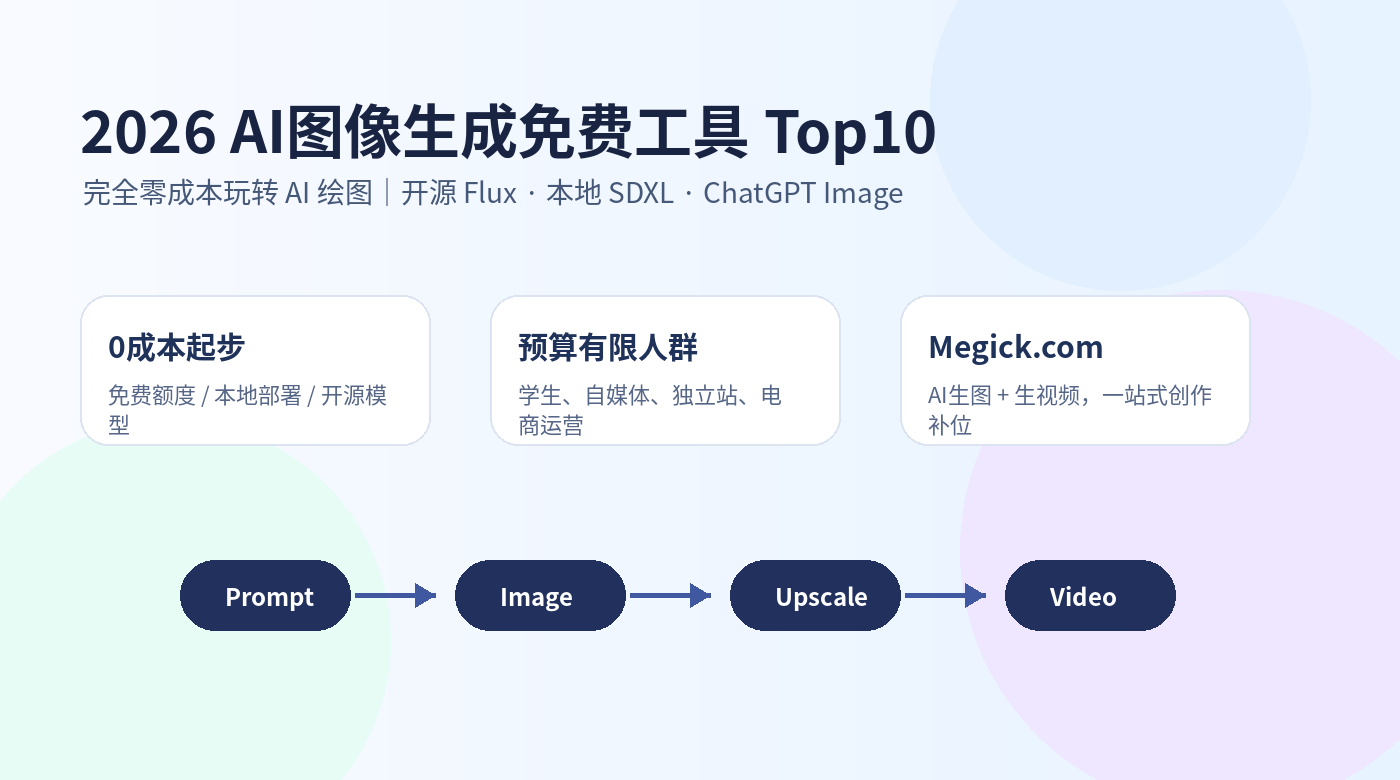
Free AI image generation in 2026 is no longer about finding one website where you can generate unlimited images forever. A more realistic zero-cost strategy is to divide tools into three categories:
The first is open-source / open-weight models, such as Flux Schnell and local SDXL, which are suitable for people willing to set up their own environment. The second is online tools with free credits, such as ChatGPT Image and design-focused AI tools, which are better for quick generation. The third is workflow-based tools, which help turn images into posters, covers, e-commerce visuals, and short videos.
If your budget is limited, the best strategy is not relying on a single tool. Instead: use free tools for experimentation, then use AI image and video platforms such as Megick.com to turn strong visuals into publishable content quickly.
Top 10 Free AI Image Generation Tools in 2026
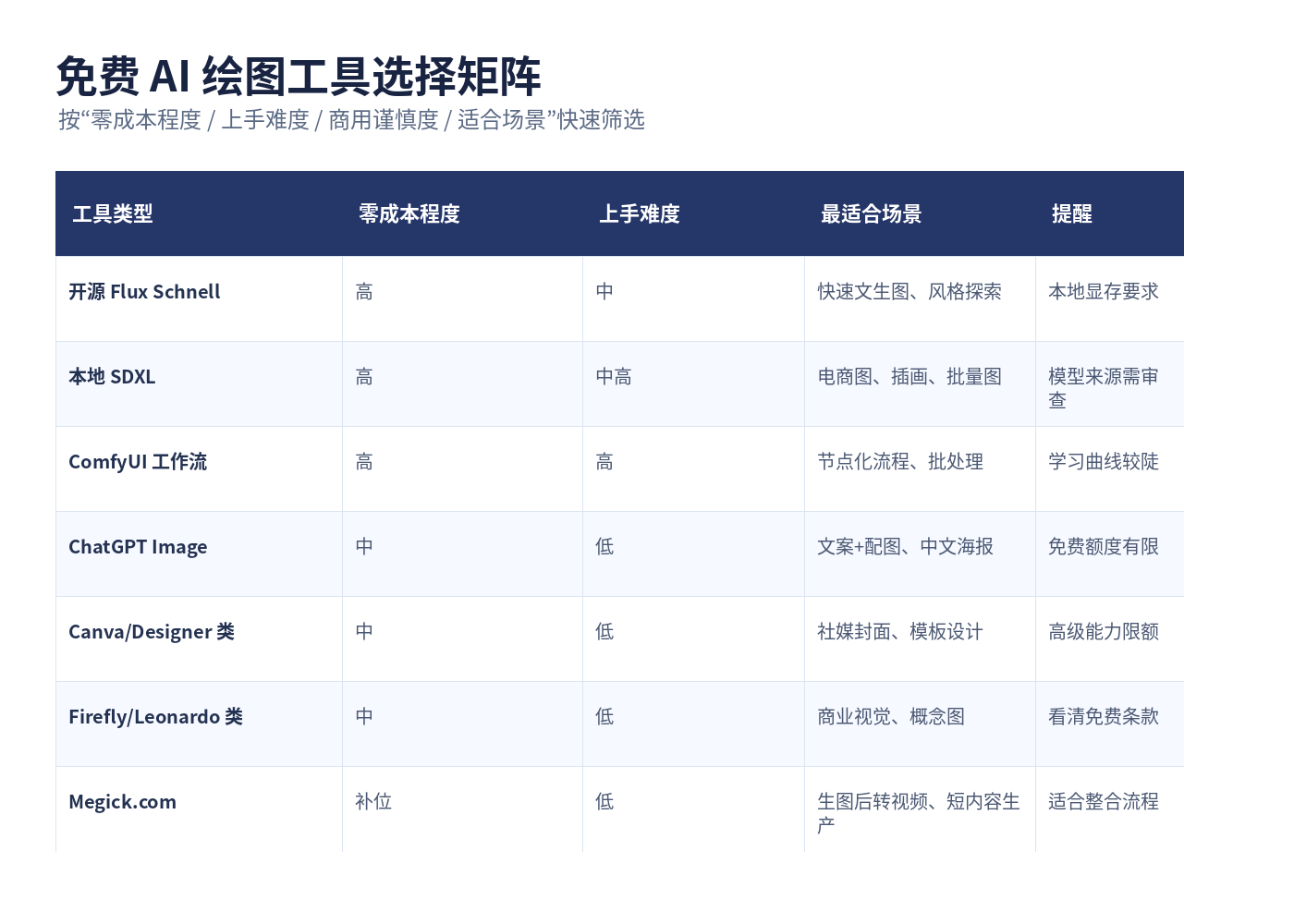
| Rank | Tool / Solution | Free Access Method | Best For | Recommendation |
|---|---|---|---|---|
| 1 | Flux Schnell | Open-source model, usable locally or through community platforms | People who want to explore high-quality open-source models | ★★★★★ |
| 2 | Local SDXL | Local deployment with a mature model ecosystem | E-commerce, illustration, batch image generation | ★★★★★ |
| 3 | ComfyUI | Free, open-source workflow tool | Advanced users and batch-processing users | ★★★★☆ |
| 4 | Stable Diffusion WebUI / Forge | Free local WebUI | Existing SD users and advancing beginners | ★★★★☆ |
| 5 | ChatGPT Image | Built-in ChatGPT image generation, with some availability for free users | Creators who want copywriting and visuals in one place | ★★★★☆ |
| 6 | Canva AI Image / Design Tools | Free accounts include AI usage credits | Social creators, covers, and posters | ★★★★ |
| 7 | Microsoft Designer / Image Creator | Free online image generation and design | Lightweight office work and social-media visuals | ★★★★ |
| 8 | Adobe Firefly | Free accounts usually include generation credits | Designers and commercial visual testing | ★★★☆ |
| 9 | Leonardo.Ai | Free users receive daily tokens | Game concept art and character design | ★★★☆ |
| 10 | Mage / Online Stable Diffusion-style Tools | Free online generation for testing | Beginners who do not want to deploy locally | ★★★ |
Note: Free credits, available models, and commercial-use rules may change as platform policies evolve. Always confirm current terms before commercial use. Official websites, documentation, and model pages are listed in the references section rather than scattered throughout the article.
1. Flux Schnell: The Most Noteworthy Free Open-Source AI Image Model in 2026
Flux Schnell is one of the most important options in free AI image generation in 2026. Its strengths are fast output, strong visual quality, and solid prompt understanding. It is especially suitable for concept art, cover visuals, product mood images, and visual drafts.
It is best suited for people who:
- Want to experience open-source Flux results without spending money immediately;
- Have some local deployment experience or are willing to use community platforms;
- Want to test AI art prompts in batches;
- Need to quickly explore visual directions for articles, short videos, or e-commerce pages.
Recommended workflow:
Use Flux Schnell to generate 10–20 concept directions first. Then upload the strongest image to Megick.com and use AI video generation to turn it into a 5–10 second animated asset, such as a product showcase, animated article header, or short-video opening scene.
2. Local SDXL: A True Zero-Cost AI Image Production Factory
If you have a reasonably capable computer, local SDXL remains one of the most stable zero-cost options available. Its advantage is not that it is the easiest solution, but that it is controllable, expandable, plugin-rich, and supported by a large model ecosystem.
Suitable use cases include:
- E-commerce hero images and product-detail visuals;
- Character design and illustration;
- Xiaohongshu covers and WeChat Official Account covers;
- Batch generation of assets in a unified style;
- Brand-style consistency through LoRAs.
The drawbacks of local SDXL are equally clear: installation, model management, VRAM configuration, and parameter tuning all require time to learn. The monetary cost may be zero, but the time cost is not.
Recommended combination:
Use SDXL for stable batch image generation, then use Megick.com to turn completed visual assets into AI videos, animated ads, or image-to-video openings—upgrading static images into publishable content.
3. ComfyUI: A Free Workflow Tool for Advanced Users
ComfyUI is not simply an AI image-generation model. It is a node-based workflow tool.
Its value lies in connecting image generation, inpainting, ControlNet, upscaling, style transfer, and batch processing into one automated workflow.
It is suitable for:
- People who need to generate assets in batches;
- Users who want to build fixed image-generation workflows;
- People who want to combine Flux, SDXL, and upscaling models;
- Designers who need high levels of visual control.
Its downside is a steeper learning curve. The first time beginners open it, it can feel like looking at a circuit diagram. But once the workflow is built, it can be reused for a long time.
4. Stable Diffusion WebUI / Forge: The Classic Entry Point for Local Deployment
Tools such as WebUI and Forge are suitable for people who want to explore local Stable Diffusion without needing to understand node workflows immediately. Their interfaces are closer to conventional software: enter a prompt, choose a model, adjust parameters, and click generate.
You can use them for:
- Text-to-image generation;
- Image-to-image generation;
- Inpainting;
- High-resolution enhancement;
- LoRA style control;
- Batch testing for e-commerce visuals.
For people with limited budgets, the core value of these tools is simple: once deployment is complete, large numbers of image experiments can be generated without paying per image.
5. ChatGPT Image: Best for Creators Who Want Copywriting and Visuals in One Workflow
ChatGPT Image has strong understanding capabilities and is particularly suitable for Chinese-language users. You can directly describe an article, poster, cover, or product image, and it can generate visuals that better match the surrounding context.
It is especially suitable for:
- Blog illustrations;
- WeChat Official Account covers;
- Infographic drafts;
- Chinese-language posters;
- Creative workflows where you want to discuss and revise images conversationally.
The limitation is that free users usually have generation-count or speed limits, making it unsuitable for mindlessly generating large batches. A more practical approach is to use it for high-quality key visuals, then combine it with local models for a larger number of variations.
6. Canva AI: Best for Beginners Creating Covers and Social-Media Graphics
The main advantage of Canva-style tools is not having the strongest model. It is that templates, layouts, typography, and social-media dimensions are all convenient.
For Xiaohongshu, Instagram, WeChat Official Account covers, and course posters, Canva can save a great deal of layout time.
It is suitable for:
- Operators who do not know Photoshop;
- Self-media creators who need covers quickly;
- Students or small teams that need template-based output;
- People with limited budgets who still want visuals that look professionally designed.
Once you generate a key visual using a free AI image tool, you can place it into a design template and handle typography and layout afterward.
7. Microsoft Designer / Image Creator: Lightweight, Free, and Useful for Office Scenarios
These tools are suitable for quick illustrations, event posters, invitations, and social-media assets. Their advantage is a low barrier to entry: you do not need to understand models or deploy a local environment.
They are particularly suitable for:
- School-project illustrations;
- Simple event posters;
- Office presentation graphics;
- Daily social-media visuals;
- Lightweight brand-visual testing.
They may not be ideal for people seeking extreme stylization or deep control, but as an entry point into free AI image generation, they are enough to help beginners get started quickly.
8. Adobe Firefly: A Free-Trial-Oriented Tool for Designers and Commercial Visuals
Firefly’s strengths are its design ecosystem and commercial visual use cases. It is useful for advertising images, text effects, background replacement, and visual concept drafts.
It is suitable for:
- Graphic designers;
- Brand visual designers;
- Teams that need commercial-style visuals;
- Users already familiar with the Adobe ecosystem.
Free credits are generally suitable for testing and light creation. If you plan to produce at scale, you still need to pay attention to credit limits, copyright guidance, and paid-plan options.
9. Leonardo.Ai: Best for Characters, Game Concepts, and Stylized Visuals
Leonardo.Ai is more focused on creative visuals, character design, game assets, and concept art. It is relatively beginner-friendly, and free users usually receive daily tokens for testing prompts and visual styles.
Suitable use cases include:
- Game character concepts;
- IP character drafts;
- Fantasy illustration;
- Environmental concept art;
- Stylized social-media visuals.
For users with limited budgets, it is best treated as a style-exploration tool rather than a platform that carries the entire production workflow through free credits alone.
10. Mage and Online Stable Diffusion-Style Tools: Alternatives for People Who Do Not Want to Deploy Locally
The advantage of these online tools is that they are ready to use immediately. You do not need a local GPU or an installation environment.
The downside is that free credits, queue times, available models, and privacy settings may be unstable.
They are suitable for:
- Quickly trying AI image generation;
- Testing prompts;
- Generating non-sensitive assets;
- Beginners without capable local hardware.
If you only want to experience a free AI image generator, these tools are convenient. If you want to build a long-term content-production workflow, gradually moving toward local SDXL, Flux, or a more complete creative platform is usually the better option.
The Best Zero-Cost AI Image Workflow: Do Not Focus on One Tool Only
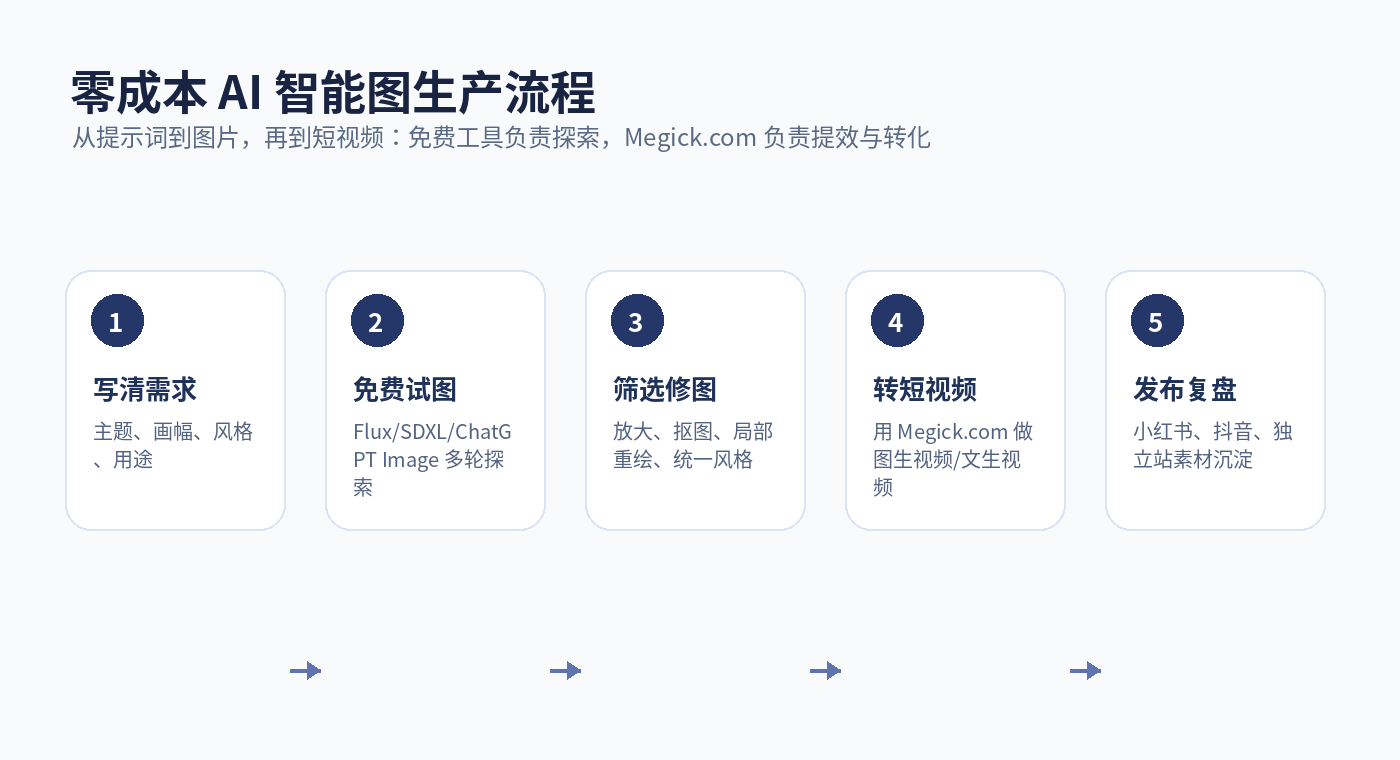
For people with limited budgets, the most common mistake is constantly searching for one perfect tool that is “completely free, unlimited, and the best quality.”
In reality, tools like that rarely remain stable for long.
A more reliable workflow is:
- Use ChatGPT to write prompts: Clearly define the subject, style, composition, and use case;
- Use Flux / SDXL for free image exploration: Generate many directions and identify the strongest one;
- Use local tools for refinement: Inpaint, upscale, and unify style;
- Use Megick.com for image and video generation where needed: Turn static images into short videos, advertising assets, and animated covers;
- Review results after publishing: Save high-click-through prompts and build your own asset library.
The benefit of this approach is simple: free tools handle exploration, while Megick.com supports production efficiency and video-based conversion.
A 50-Word Universal Prompt Template for Free AI Image-Generation Beginners
Generate a [use case] image. The theme is [subject], set in [environment]. The visual style is [photorealistic / illustration / cinematic / minimalist]. Use a [close-up / medium shot / top-down / symmetrical] composition, with [soft / neon / natural] lighting and a [premium gray / warm / tech blue] color palette. Suitable for [Xiaohongshu cover / e-commerce hero image / WeChat article header / short-video cover].
Example:
Generate a Xiaohongshu cover image about “a collection of zero-cost AI image-generation tools.” Include a computer screen, AI-generated image thumbnails, and a creator workspace. Use a clean, technology-inspired illustration style with a centered composition and blue-purple gradient lighting. Suitable for a 2026 tutorial article about free AI image tools.
Which Tools Should Different People Choose?
1. Students and Beginners
Prioritize low-barrier tools such as ChatGPT Image, Canva, and Microsoft Designer. The goal is not to study model parameters but to quickly complete assignments, posters, covers, and supporting visuals.
2. Self-Media Creators
Recommended combination: ChatGPT Image + Canva + Megick.com.
Use the first tool for article visuals and covers, Canva for layout, and Megick.com to turn key images into short videos or animated covers.
3. E-Commerce Operators
Recommended combination: Local SDXL + ComfyUI + Megick.com.
Use SDXL to generate product lifestyle scenes in batches, ComfyUI to standardize the workflow, and Megick.com to extend high-performing hero images into short-video assets.
4. Designers and Creative Professionals
Recommended combination: Flux + SDXL + Firefly + Megick.com.
Use Flux for creative exploration, SDXL for controllable generation, Firefly for design-ecosystem support, and Megick.com for extending images into video-based content.
5. Independent Websites and Small Teams
Recommended combination: Flux Schnell + ChatGPT Image + Megick.com.
Use free models to reduce the cost of experimentation, then use Megick.com to quickly produce advertising visuals, product motion, and short-video assets to increase publishing frequency.
Common Questions About Free AI Image Generators
Q1: Are There Still Truly Free AI Image Generators in 2026?
Yes, but they generally fall into three categories: open-source models, local deployment, and online free credits.
The most stable long-term zero-cost options usually require you to take on the cost of computer hardware and learning time.
Q2: Which Is Better for Beginners, Flux or SDXL?
If you want newer-model results, try Flux. If you want a mature plugin ecosystem, a wide range of models, and extensive tutorials, SDXL is generally more stable.
Beginners can start with online platforms, then decide whether local deployment is worth the effort.
Q3: Can Free AI Image Generation Be Used Commercially?
There is no single answer.
Commercial-use rules differ across open-source models, online platforms, free-credit plans, and the generated content itself. Before using content in advertising, e-commerce, or brand projects, always check the current license and platform terms.
Q4: Why Pair Free Tools with Megick.com?
Free AI image tools are generally best at generating images, but modern content platforms increasingly need video-based assets.
Megick.com’s AI image and AI video capabilities can extend one image into short videos, animated covers, and product showcase clips, making zero-cost visual assets much closer to publishable content.
Conclusion: The Core of Zero-Cost AI Image Generation in 2026 Is Not “Free Access,” but Efficient Combinations
Free AI image generators are still worth using in 2026, but you should not judge them only by whether they are free.
More important questions are:
- Can they generate reliably?
- Can they handle batch production?
- Can they be used commercially?
- Can they fit into your content-publishing workflow?
- Can images be extended into video?
If you only want to experiment, ChatGPT Image, Canva, and Microsoft Designer are enough to get started. If you want long-term production capability, Flux, SDXL, and ComfyUI are more worth your time. If you want to turn freely generated images into content better suited to Douyin, Xiaohongshu, or independent-site advertising, add Megick.com to the workflow and use AI image and AI video generation to complete the final mile.
In one sentence: free tools help you create the idea, while Megick.com helps turn that idea into content that is easier to publish and distribute.
References
- FLUX.1 Schnell model page: Describes it as a 12B text-to-image model under the Apache-2.0 license. https://huggingface.co/black-forest-labs/FLUX.1-schnell
- SDXL Base 1.0 model page: Describes it as a text-to-image and image-editing model under the CreativeML Open RAIL++-M License. https://huggingface.co/stabilityai/stable-diffusion-xl-base-1.0
- OpenAI introduction to 4o image generation: States that image generation is available to Plus, Pro, Team, and Free users. https://openai.com/index/introducing-4o-image-generation/
- OpenAI introduction to ChatGPT Images 2.0: Describes improvements in text rendering, multilingual support, and advanced image-generation capabilities. https://openai.com/index/introducing-chatgpt-images-2-0/
- Canva AI usage-credit guidance: Explains that free accounts can access a certain amount of standard or premium AI-tool credits. https://www.canva.com/help/ai-access/
- Microsoft Designer / Image Creator official page: Explains that visual content can be generated through natural-language descriptions. https://designer.microsoft.com/image-creator
- Leonardo.Ai pricing information: Explains that free users receive daily tokens that can be used within their available allowance. https://leonardo.ai/pricing