Megick · June 30, 2026 · 12 min read
Generate a Personalized AI Avatar + Portfolio: A Practical Guide to AI Image Style Transfer in 2026
Generate a Personalized AI Avatar + Portfolio: A Practical Guide to AI Image Style Transfer in 2026
In 2026, AI avatar generation is no longer just about making a selfie look better.
The more valuable use case is turning your profile image, social cover, personal portfolio, proposal cover, and short-video thumbnail into a visual system people can recognize over time.
You are not generating a single avatar. You are building a set of personal brand assets.
That is why AI image style transfer has become increasingly important. It is not simply about applying a filter. It means transferring the color palette, materials, camera language, lighting direction, and composition of one reference image to another set of images, while preserving the identity of the person, the main product, or the content of the work as much as possible.
Adobe Firefly’s Generative Match feature is moving in this direction as well: using a reference image to control the style of generated content instead of starting from scratch and relying on luck every time.
For creators, designers, freelancers, and small to medium-sized brands, the practical goal is not chasing a one-off viral image. It is building a reusable visual standard for avatars and portfolios.
Megick Studio’s Image AI Studio, Video AI Studio, Prompt Enhancement, and Brand Settings make it possible to break this into a clear workflow: create the main avatar visual first, then expand it into portfolio covers, case-study visuals, short-video assets, and brand promotional content.
1. Why 2026 Is the Right Time to Build an “AI Avatar + Portfolio” System
In the past, AI avatar creation often looked like this: the first image was great, but the second one looked like a completely different person.
The avatar might have a cyberpunk style, while the portfolio cover suddenly became minimalist. The homepage banner might look polished, but the case-study pages felt as though they were created by a different team. Each individual image could look fine, yet together they had no recognizable identity.
Three changes have made the combination of avatars and portfolios worth taking seriously.
First, AI image tools are placing more emphasis on character consistency and style consistency.
Creators are no longer satisfied with generating one attractive image at random. They want the same person, the same brand, and the same visual language to appear consistently across avatars, covers, case studies, and video assets.
Second, the boundaries of a portfolio have changed.
A portfolio is no longer just a PDF or a personal website. It now includes profile photos, homepage banners, project covers, short-video thumbnails, introduction videos, case-study posters, and social media grid posts.
AI avatar generation and AI portfolio creation have effectively become part of the same content production pipeline.
Third, audiences have become more sensitive to the “AI look.”
Overly smooth skin, excessive cyberpunk styling, and overly polished visuals are easy to recognize now. The visuals that feel more appealing in 2026 often carry a bit of texture, warmth, emotion, and human imperfection.
Creative Bloq’s observations on 2026 graphic design trends also point toward a shift away from overly polished, algorithmic-looking aesthetics and toward more material-driven, emotional, and authentic visual expression.
The value of style transfer lies in helping creators find a balance between efficiency and personal character.
2. First, Understand What AI Image Style Transfer Actually Transfers
Many style-transfer attempts fail because the prompt is too vague:
Turn it into a Ghibli-style image. Turn it into a magazine editorial photo. Turn it into a 3D style.
These descriptions are too broad.
A controllable style-transfer workflow involves at least six variables.
- Color: temperature, saturation, contrast, primary colors, and supporting colors.
- Lighting: natural light, studio light, backlight, soft light, or hard light.
- Camera Language: close-up, half-body portrait, wide-angle, telephoto, top-down, or eye-level framing.
- Materials: film grain, paper texture, metal, fabric, glass, or hand-drawn brushwork.
- Composition: centered layouts, negative space, symmetry, diagonal composition, or magazine-cover structures.
- Mood: restrained, professional, relaxed, futuristic, nostalgic, or experimental.
If you only enter “premium avatar,” the model will make too many decisions on its own.
But if you write:
Low-saturation warm gray palette, soft side lighting, 35mm half-body portrait, subtle film grain, negative-space composition, suitable for a designer portfolio homepage.
The output will usually be much more stable.
Style is not a single word. It is a set of visual rules that can be broken down, reused, and layered over time.
3. From Avatar to Portfolio: A Reliable Five-Step Workflow
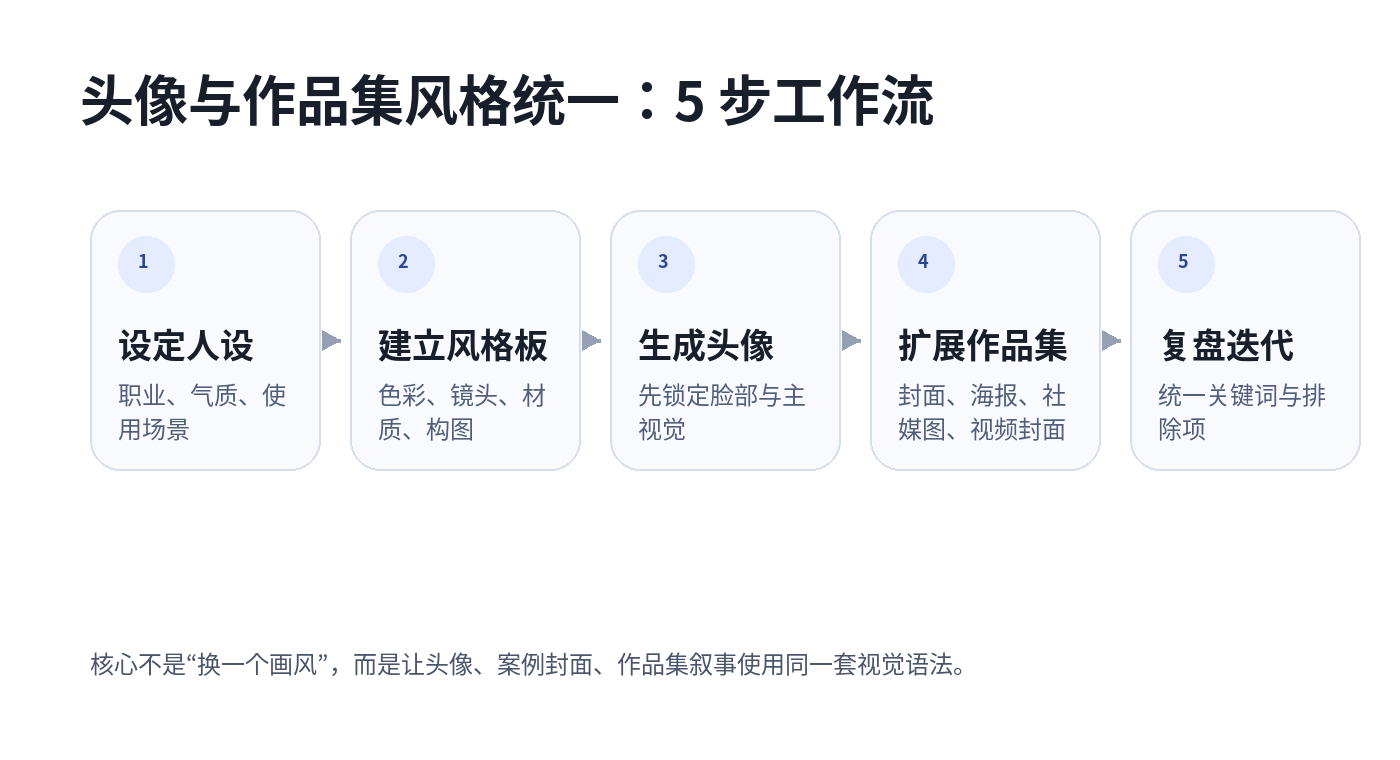
Step One: Define Your Persona Before Choosing a Visual Style
An avatar is not an isolated image.
It shapes the first impression people form about your profession, personality, and level of expertise.
Start by answering three questions:
- Who are you: a designer, photographer, product manager, illustrator, indie developer, or brand founder?
- How do you want people to perceive you: reliable, sharp, warm, experimental, professional, approachable, or visually discerning?
- Where will this avatar appear: LinkedIn, X, Xiaohongshu, Behance, a personal website, résumé, proposal cover, or video account?
For example:
A personal avatar for an independent UI designer. Professional but not distant. Suitable for a portfolio homepage and social media profile. The image should feel clean, with a subtle editorial portrait quality, a simple background, and a warm, restrained overall tone. Avoid an overly commercial photography look.
This kind of description is much more likely to produce stable results than simply saying, “Generate a good-looking avatar for me.”
Step Two: Build Your Own Style Board
Style transfer works best when you have references.
Prepare three categories of materials.
Portrait References
Use these to preserve facial structure, hairstyle, and overall personality. Choose clear images with natural lighting and consistent angles. Avoid mixing too many selfies, group photos, or images with drastically different styles.
Visual References
Use these to determine color, lighting, materials, and composition. They can include photography you like, posters, website hero sections, magazine covers, or packaging design.
Brand References
Use these to unify your portfolio, including typography mood, color range, cover layout, button styling, and graphic elements.
In Megick Studio, you can first use the Image AI Studio to generate three to five avatar directions, then use your preferred result as the visual anchor for portfolio covers, case-study headers, and video thumbnails.
Megick’s tutorial center also places Image AI Studio, Video AI Studio, Prompt Enhancement, and Brand Settings in one workflow, making it suitable for building gradually in the order of “image generation → prompt enhancement → brand reuse → video extension.”
Step Three: Lock in the Main Avatar Visual First
Your primary avatar visual does not need to be complicated from the beginning.
It is useful to generate four versions first.
| Type | Best Use Cases |
|---|---|
| Professional Version | Résumés, LinkedIn, About pages |
| Creator Version | Xiaohongshu, portfolio homepages, social platforms |
| Brand Version | Fixed background colors, brand symbols, signature compositions |
| Video Version | Leave head-and-shoulder space for AI video and talking-head thumbnails |
You can use the following prompt structure directly:
Generate a personal brand avatar: {professional identity}, {age and personality}, {clothing and styling}, {background environment}, {camera distance}, {lighting type}, {color style}, {materials and texture}, suitable for {platform or portfolio placement}. Keep the person natural and realistic. Avoid exaggerated skin retouching, an overly commercial photography look, and cluttered backgrounds.
Example:
Generate a personal brand avatar: independent visual designer, calm but approachable personality, simple black outfit, light gray studio background, half-body close-up, soft side lighting, low-saturation warm gray palette, subtle film grain, suitable for a portfolio homepage and social media avatar. Keep the person natural and realistic. Avoid exaggerated skin retouching, an overly commercial photography look, and cluttered backgrounds.
Step Four: Extend the Avatar Style into a Portfolio System
Once the avatar is finalized, do not switch to a completely different visual style for project imagery.
Continue applying the same visual language across the portfolio.
This can include:
- Portfolio homepage banners;
- Project case-study covers;
- Social media grid posts;
- Short-video thumbnails;
- Intro-video openings;
- Proposal cover pages;
- Service introduction pages;
- Project recap posters.
For example, if your avatar uses warm gray tones, soft side lighting, and subtle film grain, your portfolio covers should follow similar lighting logic, color ranges, and layout rhythm.
Megick.com’s advantage is that it can place AI image generation and AI video generation within the same creative workflow.
You can establish your personal visual identity through images first, then use video capabilities to create animated introductions, portfolio previews, or case-study explainers. For individual creators, this has much more long-term value than simply generating a few avatar images.
Step Five: Save a “Style Lock” Prompt
Once you generate a style you are happy with, turn it into a fixed prompt block.
Use it as a consistent constraint whenever you create avatars, project covers, case-study posters, or short-video thumbnails.
For example:
Unified style requirements: low-saturation warm gray palette, soft natural side lighting, subtle film grain, clean negative-space composition, modern editorial magazine feel, realistic and natural people, professional but not cold. Avoid high-saturation neon, exaggerated cyberpunk aesthetics, excessive skin retouching, plastic textures, cluttered backgrounds, and incorrect text.
After that, you only need to replace the specific subject.
For example:
- Project covers;
- Personal introduction visuals;
- Case-study breakdown graphics;
- Service introduction pages;
- Short-video thumbnails;
- Proposal opening visuals.
The value is not making every image look like the same template. It is creating a stable visual relationship between different images.
4. Three Generation Paths and Who They Work Best For
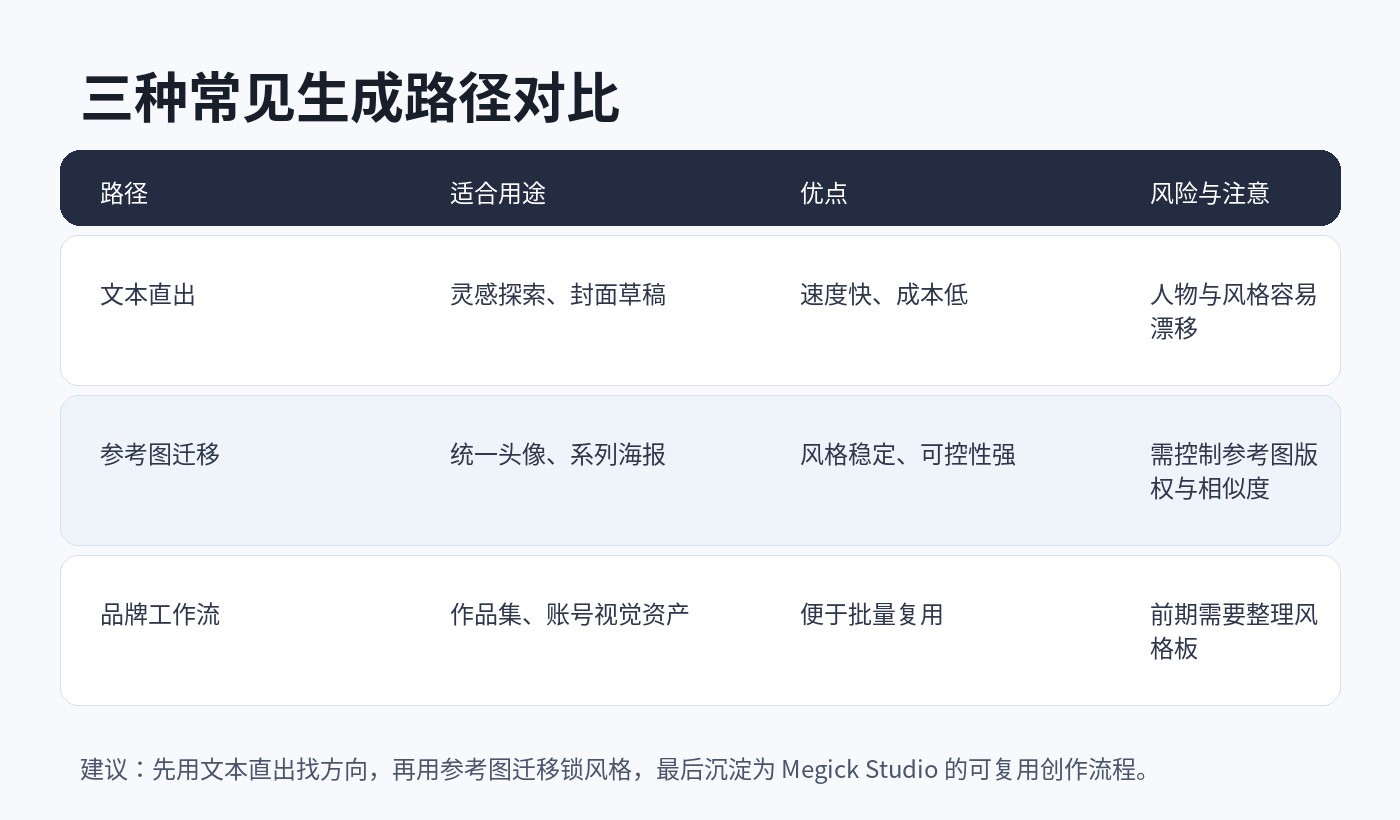
1. Text-Only Generation: Best for Exploring Directions
Text-only generation is useful when you are just starting to explore styles.
You can quickly test:
- Minimalist editorial style;
- Warm film style;
- Futuristic technology style;
- Hand-drawn illustration style;
- Low-saturation studio portraits;
- Retro editorial layout style.
The advantage is speed.
The limitation is equally obvious: people, compositions, and overall personality can drift. Generate the same prompt several times, and the subject may no longer look like the same person.
For that reason, text-only generation is better for finding inspiration than for serving as the long-term foundation of a complete portfolio.
2. Reference Image Transfer: Best for Locking in a Style
Once you already have an avatar, portrait reference, or visual sample you like, you can begin using reference-image transfer.
The core approach is simple:
Preserve the person or subject matter while transferring the reference image’s color, lighting, composition, and materials.
Suitable use cases include:
- Generating multiple professional portraits of the same person;
- Creating multiple portfolio project covers for the same designer;
- Producing social covers and campaign posters for the same brand;
- Creating profile images and video thumbnails for the same founder;
- Generating visual variations of the same product across different settings.
For reference images, use assets you photographed yourself, designed yourself, have explicit authorization for, or are cleared for commercial use.
Do not directly use copyrighted or unclear-reference materials for commercial projects. Do not copy the exact composition, person, brand marks, or recognizable elements into the final output.
3. Brand Workflow: Best for Long-Term Operations
If you plan to build a personal IP, design account, e-commerce brand, or creative studio over time, do not rewrite prompts from scratch every time.
A more stable method is to build a brand workflow.
At minimum, it should include:
- A fixed avatar style;
- Fixed cover ratios;
- Fixed background and supporting colors;
- A consistent title-layout system;
- Fixed negative prompt constraints;
- A consistent video-thumbnail structure;
- A fixed information hierarchy for project covers.
In Megick Studio, you can establish visual standards through image generation first, then extend them into video generation so your avatar, portfolio, case explainers, and social covers all remain consistent.
For an “AI portfolio,” this is much more valuable than simply recommending a few tools.
5. Ready-to-Use Prompt Templates
Template 1: AI Avatar Generation
Generate a personal brand avatar for a {profession/identity}. The person should feel {keyword 1}, {keyword 2}, and {keyword 3}, wearing {outfit}, with a {background environment}. Use {camera language}, {lighting}, and {color style}, with {materials/texture}. The avatar should be suitable for {platform/portfolio placement}. Keep it realistic, natural, and recognizable. Avoid excessive skin retouching, exaggerated expressions, cluttered backgrounds, incorrect text, and a strong artificial AI look.
Template 2: Portfolio Homepage Cover
Generate a portfolio homepage cover for a {professional direction/portfolio theme}. Continue the avatar’s visual style: {fixed style description}. Include {core elements}, use a clean composition, and leave a clear negative-space area for the title. Suitable for a website hero section or portfolio opening page. The overall feeling should be professional, visually refined, and not overly decorative.
Template 3: Project Case-Study Cover
Generate a portfolio project cover. The project theme is {project name/industry}, and the core visual elements include {element 1}, {element 2}, and {element 3}. Continue the unified style: {fixed style description}. The image should work well in a 16:9 format, with a clear title area and distinct visual hierarchy. Avoid excessive text and cluttered details.
Template 4: AI Video Thumbnail
Generate a short-video thumbnail. The theme is {video theme}, and the person or key visual should continue the personal avatar style: {fixed style description}. The image should be highly recognizable, with reserved space for a large title, suitable for a vertical 9:16 video cover. Keep it clean, professional, and clickable, but avoid exaggerated marketing aesthetics.
Template 5: Style Transfer Enhancement Prompt
Transfer the reference image’s color, lighting, composition, materials, and overall mood into the new image while preserving the identity of the main subject and the core content. Style keywords: {color}, {lighting}, {camera}, {material}, {mood}. Do not alter the person’s essential features, generate exaggerated facial features, create incorrect text, or damage the realism of the image.
6. Common Problems and How to Avoid Them
The Avatar Looks Great but Does Not Look Like Me
Reduce overly artistic descriptions.
Add constraints such as:
Preserve natural facial structure, keep realistic facial proportions, avoid exaggerated features, avoid excessive skin retouching, and do not change hairstyle or face shape.
When using reference images, choose clear front-facing photos whenever possible. Do not mix selfies, ID photos, group photos, and heavily filtered images at the same time.
The more inconsistent the reference materials are, the more unstable the result becomes.
Every Portfolio Cover Looks Inconsistent
Summarize the color, lighting, materials, and composition from the avatar you like into a fixed prompt.
Add that description to every project cover.
Do not create a cyberpunk cover today, a retro cover tomorrow, and a 3D illustration cover the next day—unless your goal is specifically to showcase a wide range of creative styles. Otherwise, too much visual jumping will weaken personal-brand recognition.
Is There Copyright Risk If Style Transfer Looks Too Similar to a Reference?
For commercial projects, use reference images you own, have licensed, or that have clear permission for use.
You can learn from a style, but you should not directly copy specific compositions, character designs, brand marks, or recognizable work elements.
A safer approach is to deconstruct the style:
- What are the colors?
- What is the lighting?
- What is the composition?
- What is the texture?
- What is the mood?
Then regenerate a new image using those abstract rules.
Can AI Avatars Be Used Directly for Commercial Branding?
They can be used as brand-visual drafts or personal-brand materials.
However, before formal commercial use, you should still review portrait rights, copyright, trademarks, platform rules, and asset licensing. Be especially cautious when using real people, celebrity-like faces, photography references, or brand elements.
7. A Recommended Practical Route
To build a complete AI avatar and portfolio system with Megick, you can follow this sequence.
First, generate twelve avatar directions in Megick Studio.
Do not rush to keep all of them. Narrow them down to one or two visual routes that are the most stable and aligned with your professional positioning.
Second, summarize the chosen avatar into a fixed style prompt.
Include color, background, camera, lighting, materials, layout, and negative constraints.
Third, use the same style to generate a portfolio homepage cover, project covers, and social media header images.
Do not try to make every image identical. The goal is to make them feel as though they belong to the same person, studio, or brand system.
Fourth, generate two versions for every project.
- 16:9: suitable for portfolio pages, website banners, and presentations;
- 9:16: suitable for short-video covers, social content, Reels, and Shorts.
Fifth, use Megick’s AI video-generation capabilities to extend your portfolio covers into animated openings, case-study explainers, or personal introduction videos.
The goal is not simply to generate more images.
It is to turn AI image style transfer into a reusable personal-brand asset system.
The avatar creates recognition. The portfolio proves your ability. Video expands your reach.
Once all three are unified, AI becomes a creative system rather than a tool that occasionally produces one good image.
Conclusion
The barrier to AI avatar generation is already very low.
But whether you can create a stable, professional, memorable personal visual system depends on whether you understand what style transfer is actually transferring.
Do not focus only on making one image look impressive.
Define your persona first, build a style board, then use Megick Studio to connect your avatar, portfolio covers, social visuals, and video thumbnails into a complete workflow.
In 2026, the people who stand out will not simply be those who know how to use AI.
They will be the ones who know how to use AI to build lasting visual assets.
Start with one avatar, then turn your personal portfolio into a visual system that can keep growing over time.