
Megick · June 30, 2026 · 16 min read
Batch-Producing AI Avatar Short Videos: A Content Pipeline Every Enterprise Must Build in 2026
Batch-Producing AI Avatar Short Videos: A Content Pipeline Every Enterprise Must Build in 2026
For businesses, the hardest part of short-form video has never been making one video. It has been producing content continuously, reliably, and repeatedly adapting it for different channels.
By the time one video is finished, the product features may have changed. The campaign mechanics may be different. The target audience may have shifted. Douyin, Xiaohongshu, Bilibili, and WeChat Channels may each require their own version. Rewriting scripts, scheduling on-camera talent, setting up lighting, filming, editing, and revising—many teams do not lack ideas. They simply cannot keep up with the pace at which content gets consumed.
By 2026, with digital avatars and AI video generation working together, enterprise marketing video is shifting from a one-off project into an operational content production pipeline.
This is not simply about placing a virtual presenter in front of the camera to read a script. More importantly, it is about breaking brand messaging, product benefits, user questions, channel rhythms, cover styles, and editing templates into reusable assets, then using AI to combine them into different video versions.
For businesses, the real value of AI avatar video is not whether it looks exactly like a real person. It is whether it makes testing faster.
The same product can be presented through a founder-explainer version, a customer-support Q&A version, an industry-expert version, an in-store sales-assistant version, or a livestream pre-launch version. The same selling point can also be adapted into a high-impact Douyin hook, a Xiaohongshu experience-sharing post, a deep Bilibili explainer, a private-community conversion asset, or an embedded video for a website landing page.
The more content variations a company can create, the faster the data feedback arrives—and the easier it becomes to make the next round of videos more accurate.
That is why terms such as “AI avatar video,” “batch AI short videos,” and “enterprise AI marketing video” have become impossible for content teams to ignore. The mature approach is not generating every video from scratch. It is building an AI video production system that belongs to the company.
1. Why Enterprises Need AI Avatar Short Videos
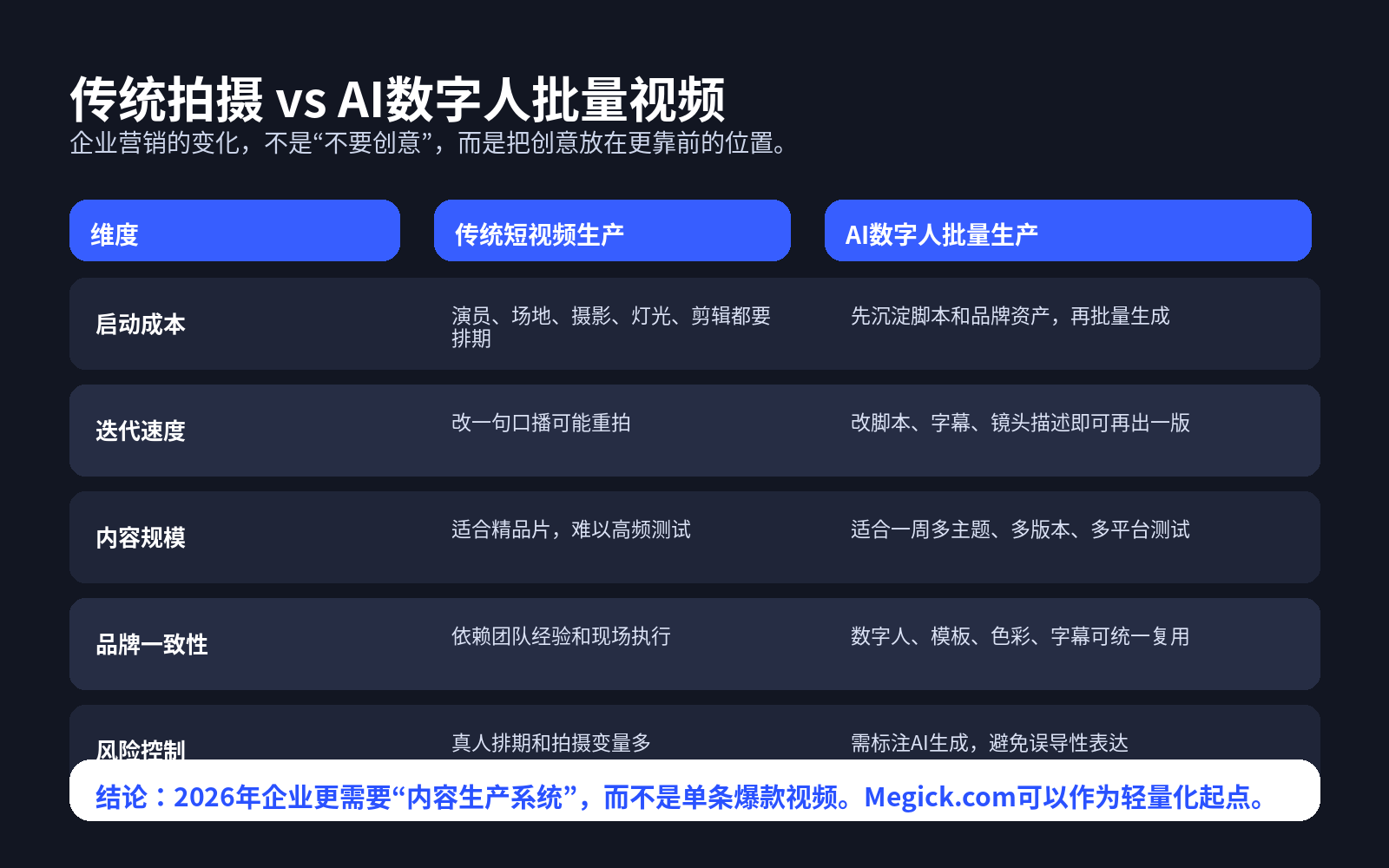
Traditional short-form video production faces a very practical contradiction.
If you want polished content, you need a production crew, locations, on-camera talent, lighting, and editing. If you want higher volume, you often end up sacrificing consistency, cost control, and content quality.
But enterprise marketing requires a large volume of content to reach different users, channels, and stages of the customer journey.
AI avatars solve the problem of maintaining a consistent on-camera presence.
They can handle high-frequency content such as product introductions, feature demonstrations, campaign announcements, educational explainers, customer Q&A, and employee training. Businesses no longer need to coordinate real presenters every time they update a script, and they do not need to schedule another filming session just because one sentence has changed.
More importantly, avatar videos are well suited for version testing.
For example, if a SaaS company wants to promote a new feature, it can create three video types around the same AI avatar:
- For business owners: emphasize cost reduction, efficiency, and team collaboration;
- For operations teams: focus on daily workflows and onboarding steps;
- For technical teams: highlight APIs, stability, and deployment methods.
The visual structure of the three videos can remain consistent, while the narration, subtitles, shot priorities, and examples can all be different.
That is where batch AI short video production becomes genuinely useful: not mechanically duplicating the same video, but using the same content assets to serve different audiences.
2. AI Video in 2026 Is More Than “Generating a Clip”
Many people still think of AI video as “typing one sentence and generating a few seconds of footage.”
But what businesses actually need is not a collection of isolated shots. They need an end-to-end workflow:
- Where do scripts come from?
- How do AI avatars stay consistent?
- How is brand visual identity maintained?
- How can videos be adapted in batches?
- How should content be adjusted for different platforms?
- Once data comes in, how should the next round be reviewed and improved?
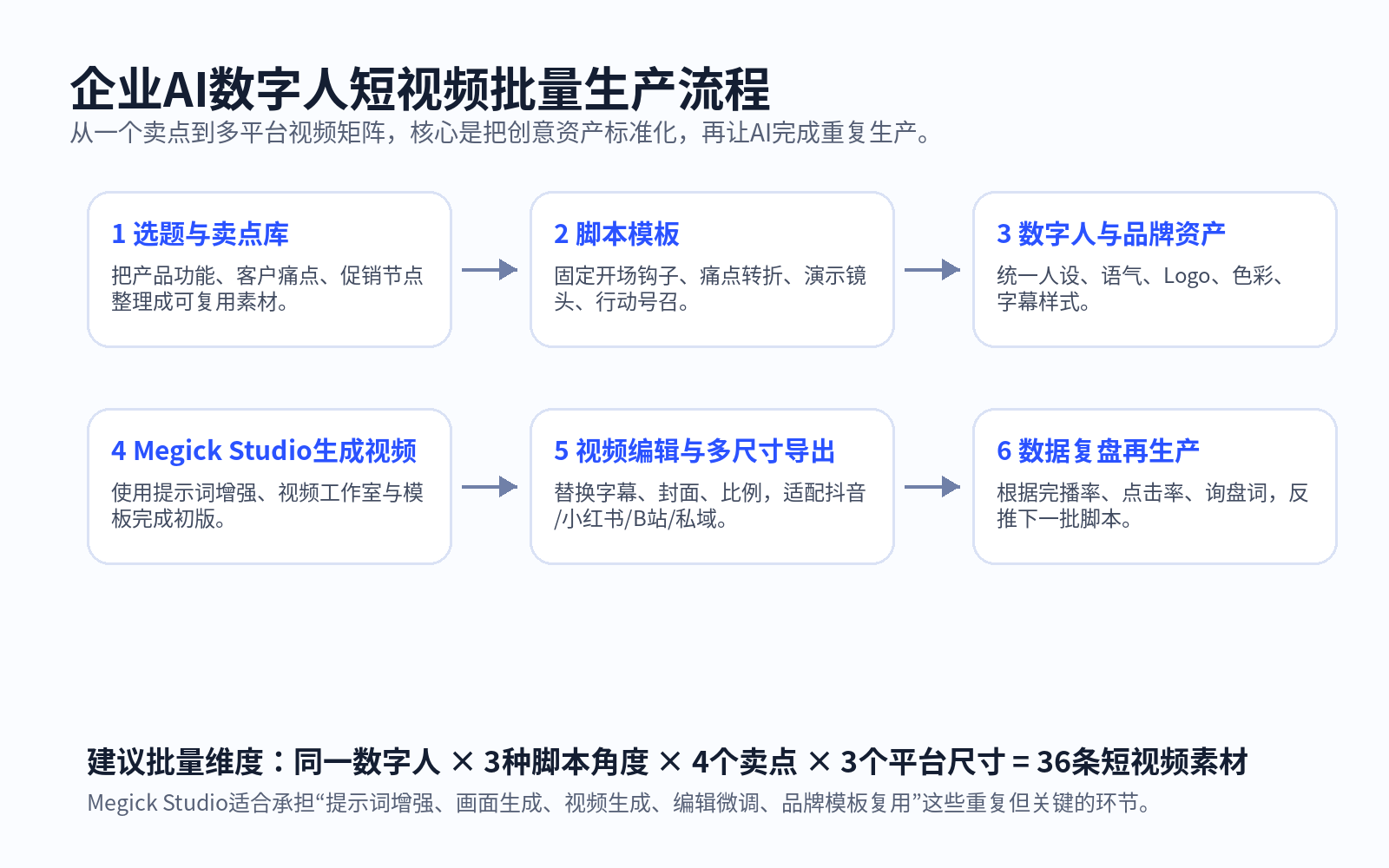
Using Megick Studio as an example, businesses can connect AI image generation, AI video generation, prompt enhancement, a video editor, brand settings, a template center, and a media center into one workflow.
Megick.com’s tutorial center has also organized capabilities such as the Image AI Studio, Video AI Studio, image and video prompt enhancement, video editing, and brand settings into relatively clear modules. For marketing teams, this means AI video is not a one-time generation task. It is a workspace that can be called upon repeatedly.
A workflow better suited to enterprise implementation can be built in the following order.
Step One: Build Brand Assets
Start by organizing the basics:
- Logo;
- Primary and secondary brand colors;
- Font and subtitle styles;
- Cover layouts;
- Product images and interface materials;
- Common brand messaging;
- The avatar’s persona, clothing, tone of voice, and background.
The clearer these assets are, the less likely your batch-generated videos will drift away from the brand.
Step Two: Build Script Assets
Do not start every campaign with a blank document.
Create a library of common video structures in advance, such as:
- Pain-point-driven videos;
- Educational explainers;
- Product walkthroughs;
- Comparison videos;
- Case-study videos;
- Campaign previews;
- FAQ videos;
- Post-sales tutorials.
The same product can serve different communication goals through different script structures. Build the template first, then replace the content. The efficiency gain is substantial.
Step Three: Build Visual Assets
Avatar videos should not consist of one person standing still and talking.
You also need product showcase shots, usage scenarios, screen recordings, icon elements, data visualizations, transition visuals, and end-card calls to action. This prevents the video from feeling like a flat, automated talking-head clip.
Step Four: Generate the First Batch of Video Drafts
In Megick Studio, you can use prompt enhancement to turn raw scripts into versions better suited to visual storytelling, then combine avatars, images, and video-generation capabilities to create initial drafts.
At this stage, do not chase the final polished video immediately.
First evaluate the script pacing, whether the avatar persona fits, whether the brand visuals are consistent, and whether the first three seconds contain a strong enough hook.
Step Five: Create Channel-Specific Versions
The same content should not be posted unchanged across every platform.
Douyin needs faster openings and shorter delivery. Xiaohongshu works better with authentic, specific experience-sharing. Bilibili can retain more explanation. WeChat Channels often require a more composed and trustworthy tone. Website landing pages place greater weight on credibility and completeness of information.
The video editor, subtitle templates, cover templates, and aspect-ratio adaptation should all be handled at this stage.
Step Six: Update Templates Based on Data
High-click-through, high-completion, high-inquiry, and high-conversion videos should not be treated as one-off viral hits.
They should be analyzed:
- Why did the hook work?
- Which line kept viewers watching?
- Which scenario made the product easier to understand?
- Which avatar delivery style felt more trustworthy?
- Which cover style attracted more clicks?
Turn these findings into templates for the next batch. That is how enterprise video production becomes increasingly precise.
Once this system is working, content no longer depends on a single moment of inspiration. It starts to depend on a repeatable process.
3. Which Businesses Are Best Suited to Start with Avatar Videos?
Not every type of content is suitable for an AI avatar.
But the following types of businesses are usually strong candidates for using AI avatar short videos as the starting point of their content production.
1. Businesses with Complex Products That Require Repeated Explanation
Examples include SaaS, cross-border e-commerce tools, AI tools, education and training, industrial equipment, fintech, and enterprise services.
The biggest challenge with complex products is not the lack of selling points. It is that first-time users often do not understand them.
Digital avatars can turn product documentation, customer-support questions, sales messaging, and case studies into short videos, continuously educating users at a lower cost.
2. Businesses with Large Volumes of Repetitive Customer Questions
If customer-support teams answer the same questions every day:
- How do I register?
- How do I top up?
- How do I export?
- Who is this for?
- How long does it take to get started?
- How is it different from traditional solutions?
Those questions should not remain trapped inside customer-support chat windows.
Once FAQs are turned into short videos, they can be published on social platforms, embedded on websites, added to help centers and sales materials, and shared in private communities. Once the content library is built, it can reduce the long-term cost of repeated explanation.
3. Businesses That Need Multi-Platform Distribution
The same topic should be expressed differently on different platforms.
Douyin needs speed. Xiaohongshu needs authenticity. Bilibili needs clear explanations. WeChat Channels need credibility. Websites need professional and stable presentation.
The advantage of batch AI video production is not “posting one video everywhere.” It is using the same set of content assets to quickly create multiple platform-ready versions.
4. Businesses with Small Teams but High Content Demand
Many startups do not have a complete video department, yet they still need to produce content continuously.
AI avatar videos can enable a lightweight content team made up of one operator, one designer, and one marketing lead. Once the templates, personas, and workflows are in place, short-form video production that once required a larger team can move forward at a much higher frequency.
4. The Key to Batch AI Short Videos Is Not “More,” but “Control”
Generating one hundred videos a day sounds attractive.
But if the personas are inconsistent, the brand colors are random, the narration sounds like generic ad copy, and the covers have no recognizable identity, volume only amplifies low-quality output.
To make batch production actually drive conversions, businesses need to control at least four things.
First: Control the Persona
An AI avatar should not be a randomly generated virtual character. It should be a spokesperson for the brand.
Its perceived age, professional identity, tone, clothing, background, and camera distance should all support the brand positioning.
A company can have one primary avatar responsible for long-term brand communication, then create supporting characters for customer support, industry education, in-store guidance, or product demonstrations.
But do not use a different face in every video. Users need to remember the brand, not a collection of random AI-generated people.
Second: Control the Script Structure
Short-form video is not simply reading a long piece of copy aloud.
A practical structure might look like this:
3-second hook → 10-second explanation → 5-second proof → 3-second action prompt
For example:
Why is your business video becoming more expensive every time you make one? The issue may not be filming. It may be that you have never turned your content into reusable templates.
State the problem first, then provide the explanation and solution. Viewers are more likely to keep watching.
Third: Control the Visual Templates
Covers, subtitles, brand corner marks, transitions, and end cards should all follow a consistent system.
By the time users see the third video, they should feel that it belongs to the same brand—not that it is part of a random collection of AI-generated clips.
Fourth: Control Platform-Specific Versions
Batch production is not copy and paste.
The same selling point can be adapted like this:
| Channel | Better-Suited Approach |
|---|---|
| Douyin | Strong hook, fast pacing, direct conclusion |
| Xiaohongshu | Experience-sharing, authenticity, specific scenarios |
| Bilibili | More complete explanations, cases, and process details |
| WeChat Channels | Composed delivery, trust, and business value |
| Website | Complete information, professional presentation, long-term embed value |
| Private communities | Clear guidance toward action and consultation |
Using the same content assets to create different channel versions is what batch AI video production should really be about.
5. Reusable Enterprise Avatar Video Script Templates
The following three script formats work for most enterprise marketing videos and can also serve as starting points for generating first-draft videos in Megick Studio.
Template One: Pain-Point Opening
Opening Hook:
For many businesses, the most expensive part of short-form video is not filming. It is starting from scratch every single time.
Problem Explanation:
Topics need to be reconsidered, scripts need to be rewritten, presenters need to be scheduled again, and editors still need to revise everything repeatedly. Then the video goes live, performs poorly, and the entire process has to start over.
Solution:
A more efficient approach is to standardize the avatar, script templates, and brand visual system first, then use AI to generate different versions in batches.
Product Integration:
In Megick Studio, teams can use prompt enhancement to organize scripts first, then combine AI video generation and video editing capabilities to quickly create enterprise marketing videos tailored to different platforms.
Action Prompt:
If your team is also creating AI avatar videos, start with one fixed script template.
Template Two: Product Explanation
Opening Hook:
When you want users to understand a complex product quickly, the most effective approach is not always a long article. It can be a 60-second explainer video.
Scenario Setup:
Enterprise software, AI tools, e-commerce platforms, and training courses often require repeated explanation of their value.
Core Message:
An AI avatar can take on the role of presenter, while the video incorporates product interfaces, usage scenarios, and subtitle highlights to help users understand what problem you solve within one minute.
Product Integration:
Megick.com can connect product images, scenario visuals, explainer scripts, and short-video generation to help teams complete first-draft assets faster.
Action Prompt:
Start by turning one product benefit into three videos, then see which message resonates most with users.
Template Three: FAQ Format
Opening Hook:
The questions customers ask most often are usually the questions most worth turning into short videos.
Question Setup:
How does pricing work? Who is it for? How long does it take to get started? How is it different from traditional solutions? If these questions are answered only through customer support, efficiency will keep declining.
Solution:
Organize FAQs into AI avatar short videos, with one video for each question. They can be published on social media, embedded on websites, added to help centers, and shared in private communities.
Product Integration:
With Megick Studio, teams can turn FAQ text into more natural narration scripts, then generate subtitle-enabled video versions.
Action Prompt:
Start with ten high-frequency questions, and you will quickly build an enterprise video Q&A library.
6. How Enterprises Can Start Implementing Megick Studio
When creating AI avatar short videos for the first time, do not begin by trying to make a complicated blockbuster-style video.
A more reliable approach is to run a small closed-loop test first.
Week One: Organize Assets Only
Define:
- Brand colors;
- Logo usage rules;
- AI avatar persona;
- Subtitle style;
- Common cover structures;
- Product images and interface screenshots;
- Common calls to action.
Do not rush to publish videos this week. Organize the foundation first, and you will save significant time later.
Week Two: Build Script Templates Only
Prepare twenty content topics.
For each topic, write at least three different openings, covering pain points, product explanations, FAQs, case studies, campaigns, and other formats. In many cases, weak video performance is not caused by poor visuals. It is caused by an opening that does not address what users actually care about.
Week Three: Generate the First Batch of Videos
Use Megick Studio to generate ten to thirty first-draft videos.
You do not need to publish all of them. Screen them internally first to evaluate avatar consistency, subtitle readability, shot pacing, and brand coherence.
Week Four: Review the Data
Focus on:
- Viewer retention in the first three seconds;
- Completion rate;
- Questions appearing in comments;
- Direct messages and inquiry volume;
- Which video types receive more saves;
- Which delivery styles generate stronger leads.
Do not look only at views. A video with high views but no inquiries may not be the content your business actually needs.
Week Five: Replicate What Works
Break down the best-performing hooks, scripts, visuals, and covers, then replicate those structures in the next batch of content.
After this stage, AI video begins to shift from a novelty into an actual enterprise content capability.
Megick’s value is not limited to generating one video. It helps teams bring image generation, video generation, prompt enhancement, brand templates, and editing into one unified content workflow.
7. Three Boundaries AI Avatar Video Must Respect
The more useful AI avatars become, the more important it is to maintain clear boundaries.
First: Do Not Present AI Characters as Real Customers
Businesses can use virtual avatars to explain products, but they should not package AI-generated people as real customer testimonials.
This is especially important for case studies, reviews, and user-experience stories. Keep the content truthful and transparent. Once user trust is damaged, future conversion costs become much higher.
Second: Do Not Let AI Replace Brand Judgment
AI can improve production efficiency, but it cannot replace brand strategy.
Which messages should be communicated, which promises should not be made, which industry claims require caution, and which selling points need legal or business review still require human oversight.
An AI avatar can appear on camera for you, but it cannot take responsibility for your brand.
Third: Do Not Judge Only by Generation Quality—Judge by Business Results
A good-looking video is not necessarily effective.
Businesses should focus on:
- Inquiry volume;
- Lead quality;
- Purchase conversion;
- User retention;
- Search visibility and brand awareness created by the content;
- Whether existing users understand the product more easily;
- Whether repeated customer-support questions decrease.
Do not sacrifice business objectives simply to make videos look cinematic.
8. Conclusion: Enterprises Do Not Need a Few AI Videos. They Need a System for Continuous Expression
The value of AI avatar short video is not that businesses can film fewer videos.
What it truly changes is that businesses gain the ability to communicate continuously.
When a product launches a new feature, a tutorial video can be produced quickly. When users raise a new question, a Q&A video can be produced quickly. When a campaign is about to begin, a pre-launch video can be produced quickly. When different channels need different messaging, multiple versions can be produced quickly.
These are the businesses that are genuinely turning AI video into marketing infrastructure.
In 2026, competition in enterprise marketing video will no longer be limited to creative ideas.
It will also be a competition in production efficiency, asset management, and data-driven iteration.
AI image and video tools such as Megick Studio and Megick.com are well suited to serve as the starting point for building an enterprise content pipeline: first turn one-off creative ideas into reusable templates, then expand those templates into batch AI short videos, and finally use data to make the content increasingly accurate.
For businesses, the most worthwhile place to begin is not creating one perfect video.
It is building the first AI avatar short-video production workflow today.
References
- Adobe, 2026 AI and Digital Trends Report: On the impact of generative AI and agentic AI on customer experience, marketing operations, and brand-content production.
- Axios reporting on Google Vids avatar video capabilities: Script-based avatar video and short-form generation are gradually becoming part of everyday enterprise collaboration workflows.
- The Verge reporting on major consumer brands investing in AI advertising: AI video is increasingly being adopted by enterprises for marketing cost control and scalable content production.