Megick · June 30, 2026 · 17 min read
AI image monetization in 2026 is no longer something you can approach with the mindset of “post a few images and wait for orders to explode
AI image monetization in 2026 is no longer something you can approach with the mindset of “post a few images and wait for orders to explode.”
The people who actually make it work are usually not just good at generating images. They treat AI image monetization like a small business: choose a focused niche, build a portfolio, design pricing and delivery workflows, then scale revenue through content accounts, recurring packages, and digital products.
This article is written for three types of people:
The first group is just getting started with AI image generation and wants to understand which AI image income paths are actually reliable.
The second group already knows how to generate images but does not know how to find clients, set prices, or package case studies.
The third group wants to use AI image and video tools such as Megick Studio and Megick.com to turn image creation into a content-production workflow.
Here is the main conclusion: going from zero to earning more than $10,000 per month does not come from one viral image. It comes from stable products, stable client acquisition, and stable delivery. If you treat AI image generation as a toy, it is unlikely to create reliable income. If you treat it as a combination of visual services, content products, and account assets, it has the potential to become a sustainable business.
1. What Is the Biggest Change in AI Image Monetization in 2026?
Many people used to think that making money with AI images meant “generate pictures, then sell the pictures.”
That path still exists, but it is no longer the easiest way to start.
The reason is simple: as the supply of images increases, generic attractive visuals become harder to sell. What people are actually willing to pay for is not “this image looks good,” but “this image solves my problem.”
For example:
- A seller needs e-commerce hero images and product-detail visuals;
- A content creator needs Xiaohongshu covers in a consistent style;
- A course provider needs a set of enrollment posters and short-video opening frames;
- A local store needs seasonal campaign posters;
- A company needs campaign KVs, storyboard frames, and promotional video assets.
The willingness to pay in these scenarios is much higher than for “buying one general-purpose illustration.”
So in 2026, the mindset for making money with AI-generated visuals needs to shift from “selling images” to “selling visual solutions.”
2. Five Main Paths to Monetizing AI Image Generation
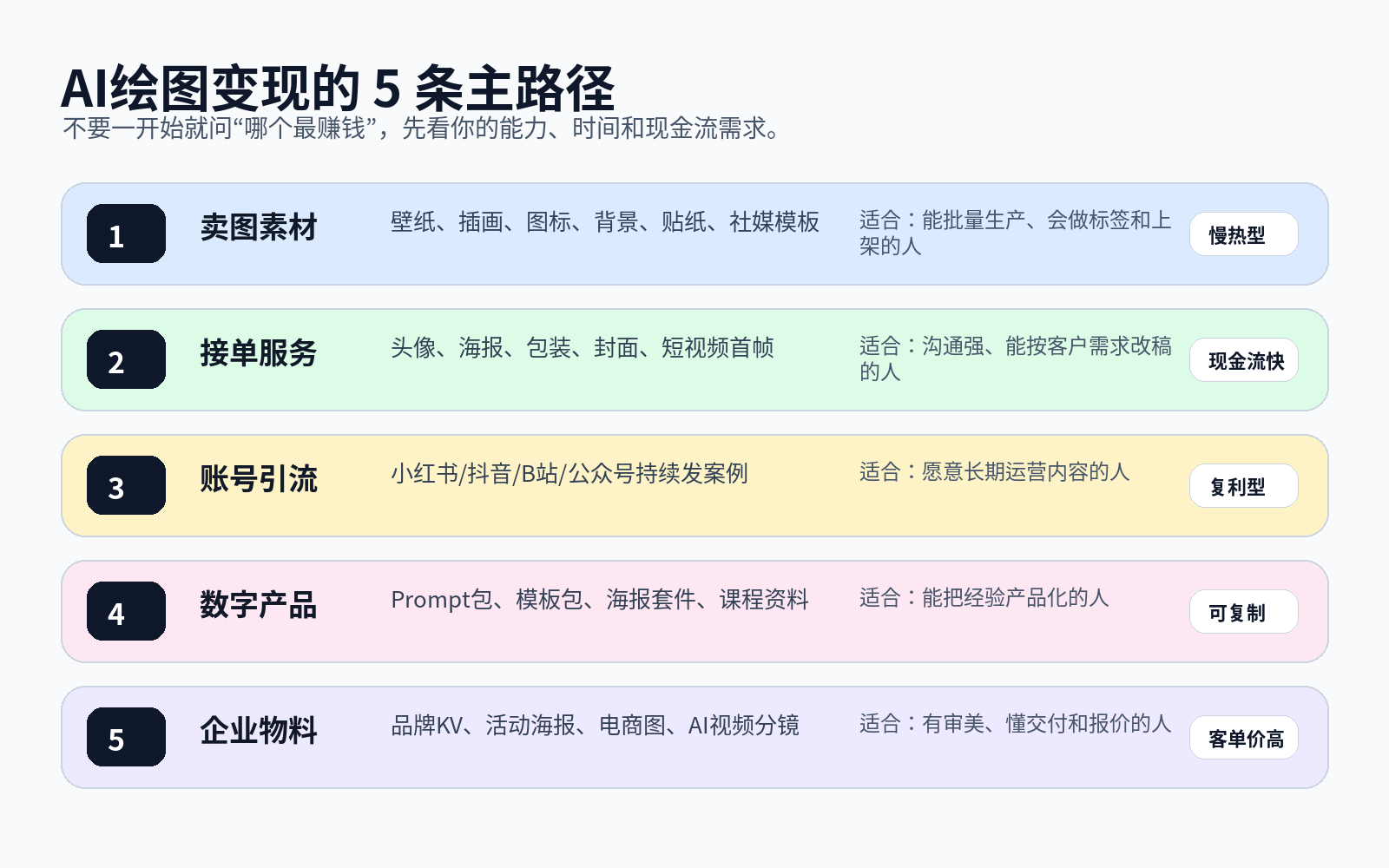
1. Sell Image Assets: Best for People Who Can Produce in Volume
Selling image assets includes wallpapers, icons, illustrations, backgrounds, stickers, social-media templates, holiday poster templates, and more.
The advantage is that you can build inventory over time, and one image may be sold repeatedly. The downside is that it takes time to gain traction and requires a good understanding of topic selection, keywords, listing rules, and platform policies.
If you want to pursue this path, do not create generic “pretty images that anyone could use.” It is better to create asset packs that are searchable, purchasable, and reusable, such as:
- 30 New Year promotional backgrounds;
- 50 Xiaohongshu cover backgrounds;
- 100 cartoon sticker elements;
- A pet-store poster template pack;
- A holiday menu visual pack for coffee shops.
The key to an asset business is not a single image. It is creating themed, packaged, reusable collections.
2. Offer Client Services: The Fastest Way for Beginners to Validate Cash Flow
If you want to see income quickly, client work is usually more direct than selling stock assets.
Common services include:
- AI avatars and AI headshots;
- Xiaohongshu cover-image packs;
- E-commerce hero images and product-detail visuals;
- Event posters and course posters;
- Short-video opening frames and storyboard images;
- Brand visual concepts and style exploration.
The key is not saying, “I know how to generate images.”
It is saying, “I can save you time, improve your click-through rate, and raise the quality of your visual materials.”
This is also where Megick Studio can be especially useful. You can use Megick Studio to generate multiple style concepts quickly, then select, refine, and extend the strongest directions around the client’s actual objective. The client is not buying one AI image. They are buying the full process of turning their visual needs into usable content.
3. Build a Content Account: Slower, but with the Strongest Compounding Effect
Many people offering AI image services do not lack technical skills. They lack trust.
A content account is how you build that trust.
You can consistently publish around one focused direction:
- AI-generated e-commerce hero image case studies;
- AI Xiaohongshu cover makeovers;
- AI avatar style collections;
- AI packaging-design inspiration;
- AI short-video storyboard cases;
- AI poster-prompt breakdowns.
The purpose of a content account is not to show off technical skills. It is to let potential clients see that you understand which visuals fit which business scenario—and that you know how to use those visuals in real operations.
4. Create Digital Products: Turn Experience into Repeatable Products
Once you complete a number of client projects, you will find that many requests are repetitive.
For example:
- The same cover-image structure;
- The same type of e-commerce selling-point visual;
- The same event-poster layout;
- The same prompt templates;
- The same short-video opening-frame composition.
These can all be turned into digital products: prompt packs, template packs, style preset packs, topic libraries, case-study lessons, and workshop materials.
They may not generate huge revenue at the beginning, but they are scalable. They help you move from “custom orders every time” toward a combination of “custom services + standardized products.”
5. Serve Businesses: Higher Order Value, Higher Requirements
Business clients care more about stable delivery.
They usually do not need just one image. They need a complete set of visual content:
- Brand campaign key visuals;
- E-commerce product-detail visuals;
- Promotional posters;
- Short-video opening frames;
- Video storyboards;
- Multi-size visual extensions.
In this context, Megick.com’s AI image and video capabilities are better suited to act as a creative-production hub: create visual directions first, then extend them into video assets so the same visual system can serve more content channels.
3. From Zero to $10,000+ Per Month: Build a 90-Day Foundation Before Expecting Explosive Orders
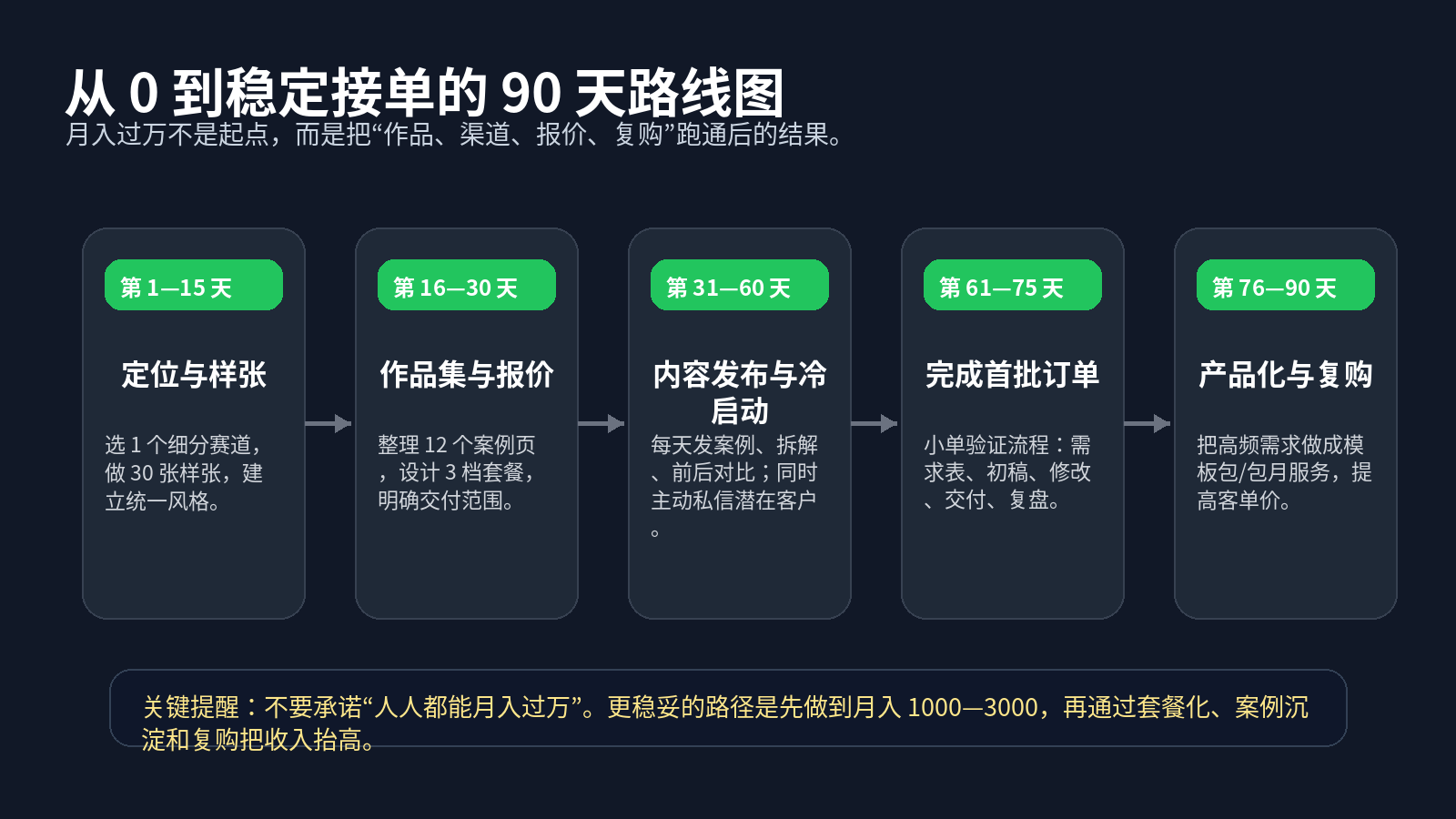
“Earning more than $10,000 per month” is an outcome, not a starting point.
A more realistic path is to first reach $1,000–$3,000 per month and prove that people are willing to pay for your visual capability. Then, increase revenue through service packages, repeat purchases, business clients, and digital products.
Days 1–15: Choose Only One Niche
The most common beginner mistake is trying to do everything.
They offer avatars, illustrations, e-commerce visuals, posters, and more. The result is a portfolio that looks like a miscellaneous store, and clients cannot tell what they are actually good at.
Start by choosing one direction:
- Xiaohongshu covers;
- E-commerce hero images;
- Pet avatars;
- Restaurant and local-store posters;
- Knowledge-product course posters;
- Short-video storyboard visuals.
Once you decide, create 30 sample pieces using Megick Studio.
Do not only chase aesthetic quality. Simulate real client requests: include titles, selling points, scenarios, dimensions, and intended use cases.
Days 16–30: Build a Portfolio and Pricing Sheet
Your portfolio does not need to be huge at the beginning, but it needs to be clear.
Prepare 12 cases. Each case should include:
- Client scenario;
- Original request;
- Generation approach;
- Final image;
- Deliverable sizes;
- Suitable channels.
Your pricing sheet should include three tiers:
- Entry tier: lower price, fewer images, fewer revisions;
- Standard tier: your primary package, including full delivery;
- Premium tier: multiple sizes, multiple scenarios, and a clear commercial-use explanation.
Do not only write “how much per image.”
You are selling a service. The service includes communication, concept development, generation, selection, refinement, layout, and delivery.
Days 31–60: Publish Content and Actively Reach Out at the Same Time
Do not wait for clients to find you during these 30 days.
You need to do two things at once:
First, publish case-study content every day so potential clients can see your capability. Second, actively approach people who may need visual materials.
Good content topics include:
- A poster transformation from ordinary to premium;
- Five AI hero-image styles for the same product;
- Xiaohongshu cover improvements for stronger clicks;
- Course-poster prompt breakdowns;
- How short-video opening frames improve completion rates;
- The process of generating multiple style concepts in Megick Studio.
When reaching out, do not mass-send messages such as “Do you need design?”
A better approach is to offer a specific observation:
I noticed you are promoting this product recently. The information on your current cover is a little scattered. I can help you create an AI cover sample that is more suitable for Xiaohongshu clicks, including a main title, key selling point, and consistent visual style.
This is much more likely to receive a response than a generic sales message.
Days 61–75: Complete Your First Orders—Focus on the Workflow, Not Just the Money
For the first few orders, do not focus only on profit. Focus on the process.
You need to validate:
- How client requirements should be collected;
- How many versions of the first draft you should provide;
- How revision scope should be written;
- How delivery files should be named;
- Whether commercial-use terms need to be explained;
- Whether clients are willing to provide feedback or referrals.
The most important thing at this stage is standardizing your service.
Days 76–90: Productize and Build Repeat Purchases
Once you complete a group of orders, start organizing high-frequency requests.
For example, if clients often need Xiaohongshu covers, turn it into a “10-cover monthly package.” If clients often need local-store campaign visuals, turn it into a “seasonal marketing visual package.” If clients regularly create short videos, create a bundled offer of “opening frame + storyboard images + video-generation prompts.”
This step determines whether you can move from scattered one-off orders toward stable income.
4. How to Price AI Image Services: Do Not Charge by Generation Count
The easiest pricing mistake for beginners is charging by image count.
For example, “$3 per image” or “$8 per image.” This reduces your value to the lowest possible level because clients may assume you simply clicked a few buttons.
A better method is charging based on delivery value.
Six Service Packages Suitable for Beginners
1. AI Avatar / Professional Headshot Package
Suitable for personal brands, creators, and professionals. Deliverables can include 10–20 final images, one refinement round, and several background styles.
The entry barrier is low, making it useful as a lead-generation service.
2. Xiaohongshu Cover Pack
Suitable for content creators, knowledge-product accounts, and brand operators. Deliver five to ten covers in a unified style, optionally with a reusable title-template system.
3. E-Commerce Hero Images / Product-Detail Visuals
Suitable for sellers and e-commerce operations teams. The goal is not to create flashy images. It is to highlight product benefits, fit the platform’s presentation requirements, and maintain consistency with the product-detail page.
4. Campaign Posters / Brand KVs
Suitable for local stores, communities, course providers, and business events. This package is more suitable for raising average order value because it usually requires multiple size variations.
5. AI Video Opening Frames / Storyboard Images
Suitable for short-video teams, performance-marketing teams, and content studios. You can combine AI image generation with video generation to provide early visual planning from the first frame to the storyboard.
6. Monthly Visual Service Package
Suitable for clients with ongoing content needs. For example: 20 images, four event posters, and eight short-video covers per month.
The value of monthly service packages lies in stability, not necessarily the highest per-image price.
5. Building a Monetization Workflow with Megick Studio: Deliver Results, Not Just Images
If you want to turn AI image generation into a stable service, your tool selection should support delivery efficiency.
Megick Studio is particularly useful in the following stages.
1. Generate Visual Directions Quickly
Clients often cannot clearly describe what they want. They may only say things like “make it more premium,” “make it younger,” or “make it feel more polished.”
Do not spend too long discussing abstract descriptions. Generate six to eight directions in Megick Studio and let the client choose.
Once the visual direction is confirmed, later revisions become much easier.
2. Generate Variations in Batches
The same poster can be generated with different backgrounds, compositions, and color palettes. You do not need to start from zero every time. Instead, you can expand quickly around one established theme.
3. Extend Images into Video
Content demand in 2026 increasingly favors linked image-and-video workflows. Many clients who finish a poster will also need short-video covers, intros, or storyboard visuals.
This is where Megick.com’s AI image and video capabilities can connect: create static visuals first, then extend key scenes into video assets. For clients, you are no longer delivering one image. You are delivering a complete content-asset package.
4. Build Your Own Style Library
After every project, organize the prompts, generated images, revision notes, and final deliverables.
Over time, you will build your own style library and case-study library.
That is your core long-term monetization asset.
6. How to Choose the Right Monetization Path
If You Have No Client Resources at All
Start with a content account and low-barrier client services.
Choose one niche and publish 30 consecutive pieces of content around it, such as “Xiaohongshu cover makeovers,” “e-commerce hero-image upgrades,” or “AI avatar style collections.”
The purpose of the content is not to show that you can use AI. It is to show that you can solve a specific problem.
If You Know Design but Not Operations
Prioritize your portfolio, freelance platforms, and private referrals.
Designers have an advantage in taste and layout. Do not reduce yourself to an “AI image operator.” Your service should emphasize visual strategy, style control, refinement, and reliable delivery.
If You Already Have Account Traffic
Prioritize template packs, prompt packs, courses, and custom services.
Traffic itself creates trust. You can turn your content into products, then use a smaller number of higher-priced custom services to handle stronger client needs.
If You Serve Business Clients
Prioritize complete “image + video” content packages.
Business clients do not lack one image. They lack an efficient, unified, reusable visual-production workflow. You can use Megick Studio for early creative visuals and Megick.com to extend them into short-video assets, creating a more complete service package.
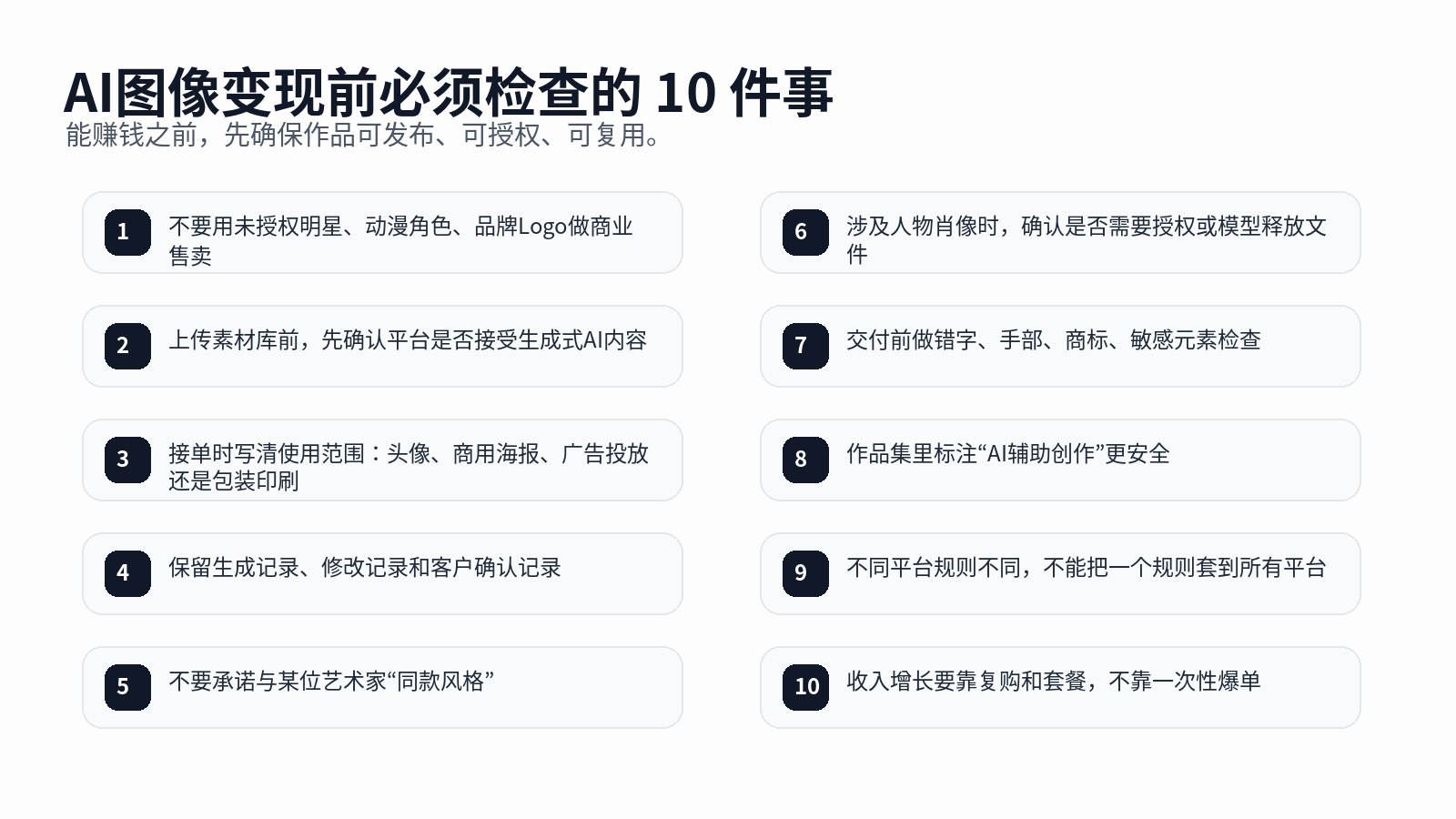
7. Risks to Avoid Before Monetizing AI Images
AI image generation can create income, but not every image can be sold.
Pay close attention to the following.
1. Do Not Sell Infringing Characters or Trademarked Images
Do not use unlicensed celebrities, anime characters, game characters, or brand logos for commercial sales. Even if a client asks for them, handle such requests carefully.
2. Platform Rules Differ—Do Not Apply One Rule Everywhere
Some platforms accept compliant generative-AI content, while others do not allow externally generated AI content to be submitted at all.
For example, Adobe Stock accepts generative-AI content that meets its submission standards, legal requirements, and technical requirements. Shutterstock’s contributor policy explicitly does not allow contributors to submit AI-generated content for licensing on the platform.
Always check platform rules before building a stock-asset business.
3. State Commercial-Use Rights Clearly
When taking client orders, clarify how the image will be used: profile images, social publishing, paid ads, packaging print, resale, and other uses all involve different license scopes.
4. Do Not Promise “Completely Original and Risk-Free”
A more professional statement is:
The work is generated with AI assistance and then manually selected, edited, and laid out. Obvious infringing elements will be avoided where possible before delivery, but clients should still confirm compliance based on their specific commercial use before launching campaigns.
5. Minors and Students Should Follow Platform Age Rules
Some commercial platforms, stock platforms, and payment tools may require users to meet a legal age threshold or work with a guardian.
Do not bypass platform rules in order to open a store, receive payments, or submit content.
8. Practical Example: How a Beginner Can Get Their First Order from Zero
Assume your chosen niche is a “Xiaohongshu cover-image package.”
Step One: Create 30 Sample Covers
Do not create them randomly. Build them around real industries:
- 10 beauty and skincare covers;
- 10 career-growth covers;
- 10 educational course covers.
Every image should include a title, topic, visual style, and target-account type.
Step Two: Publish Case-Study Breakdowns
Do not only post the final image. Explain:
- What the original problem was;
- How you adjusted the title;
- How you handled visual hierarchy;
- Why the new cover is more likely to earn clicks.
This helps clients see you as a problem solver rather than someone who simply generates images.
Step Three: Design a Low-Barrier Package
For example:
- $15: Basic package with three covers;
- $45: Ten-cover unified-style package;
- $100: Monthly cover package with topic-based visual suggestions.
These prices are only examples. Adjust them based on your skill level, market, and client type.
The key is giving clients options instead of forcing them to ask, “How much is one image?”
Step Four: Create Repeat Purchases After Delivery
Delivery is not the end. Ask clients:
- Do you need covers in the same style next month?
- Do you need short-video opening frames?
- Do you need course posters?
- Do you need to turn the cover style into a reusable account template?
For many people, the income gap is not in the first order. It is in repeat purchases.
9. Thirty High-Converting AI Image Monetization Prompt Templates
The following prompts are not meant for showing off. They are designed to help you create portfolios and client-service samples quickly.
1. Xiaohongshu Cover
Create a vertical cover image for a Xiaohongshu account. The topic is “{topic}” and the target audience is {audience}. Use a {style} visual direction. The main title should say “{title}” and the subtitle should say “{subtitle}.” Keep the layout clear, leave enough whitespace, make the text prominent, and optimize the design for stronger click-through rates.
2. E-Commerce Hero Image
Create an e-commerce product hero image. The subject is {product name}, highlighting the key benefit {selling point}. Set the background in {scene}. Keep the image clean, premium, and commercial. The product should be centered with natural lighting and shadows, suitable for e-commerce platform display.
3. Course Poster
Create an enrollment poster for a knowledge-product course. The course topic is {course name}. The main title should say “{title},” the subtitle should say “{learning benefit},” and the bottom section should include “{course start date}.” Use a professional and trustworthy style suitable for social-media promotion.
4. Local Store Campaign Poster
Create a promotional poster for a local store. The main subject is {store/product}. The main title should say “{campaign title},” the subtitle should say “{offer details},” and the bottom section should include “{time and address}.” Use clear typography suitable for offline display and social-media sharing.
5. AI Avatar Portfolio
Create a set of personal-brand avatar samples. The subject should have a {personality} presence and a {style} visual direction. Use a clean background suitable for social-media avatars, personal-brand presentation, and portfolio display.
6. Pet Avatar
Create a custom pet avatar. The subject is a {pet type}. Use a {illustration / photorealistic / trendy} style. Give the pet an adorable expression with a clean background suitable for custom avatar and gift use cases.
7. Short-Video Opening Frame
Create a short-video opening-frame image. The topic is {video topic}. The visual should have strong click appeal. The main title should say “{title}.” Make the person or primary subject prominent, use a compact composition, and optimize it for vertical short-video cover use.
8. Brand Campaign KV
Create a brand campaign key visual. The theme is {campaign theme}, and the brand personality is {brand personality}. The image should feel premium, unified, and shareable, suitable for extension into posters, horizontal banners, and short-video opening frames.
9. Holiday Marketing Image
Create a holiday marketing poster. The theme is {holiday}, and the subject is {product/service}. The main title should say “{holiday copy}.” Build a festive atmosphere without making the image cluttered, suitable for merchant promotion.
10. Digital Product Cover
Create a digital product cover. The product name is “{product name}.” Use a {style} visual direction. Make the main title prominent, add a subtitle that explains the value, and optimize the design for use on an e-book, prompt pack, or template-pack sales page.
11–30. Batch-Replaceable Templates
Create a {use case} image for {client type}. The main subject is {subject}, and the core selling point is {selling point}. Use a {style} visual direction with a {composition style} composition. The main title should say “{title}” and the subtitle should say “{subtitle}.” Overall requirements: clear, commercial, deliverable, and suitable for {publishing platform}.
You can replace the use case in this master template with: e-commerce product-detail visuals, WeChat Official Account covers, video storyboards, local-store posters, course-enrollment graphics, community recruitment visuals, livestream warm-up images, holiday promotion visuals, brand posters, packaging concepts, character posters, poster templates, wallpaper packs, sticker packs, IP character visuals, emoji packs, menu visuals, recruitment posters, event invitations, and short-video intro frames.
10. What Income Structure Is Needed to Reach $10,000+ Per Month?
Finally, make the numbers clear.
Earning more than $10,000 per month usually does not come from one product. It comes from a mix of revenue sources, such as:
- Three small-to-medium custom projects per month;
- Two monthly-retainer clients;
- Ongoing sales of a small number of template packs or prompt packs;
- Consulting leads and referrals from a content account.
A healthier revenue structure looks like this:
Client-service cash flow + productized revenue + content-account acquisition + long-term client repeat purchases.
If you rely only on selling individual images, income will fluctuate heavily. If you package AI image generation into a deliverable visual service, earning more than $10,000 per month becomes much more realistic.
Conclusion: The Core of AI Image Monetization in 2026 Is Not “Knowing How to Generate,” but “Knowing How to Deliver”
AI image generation has lowered the barrier to creation, but it has not lowered the barrier to business.
The people who can monetize successfully usually have four capabilities:
- They understand client scenarios;
- They can make strong visual judgments;
- They can deliver consistently;
- They can productize their experience.
Tools will continue to improve, but they will not automatically help you identify clients, design pricing, communicate requirements, or build a case-study library.
Your job is to place AI image and video capabilities from Megick Studio and Megick.com into a clear business process.
When you stop asking, “Can AI help me make money?” and begin asking, “What service can I provide with AI?”, AI image monetization truly begins.
Reference Materials
- Adobe Stock generative-AI submission guidelines: Adobe Stock accepts generative-AI content that meets its submission, legal, and technical requirements.
- Shutterstock contributor AI-content policy: Shutterstock does not allow contributors to submit AI-generated content for licensing sales on the platform.
- Etsy creativity standards and AI-creation guidance: Etsy allows sellers to create and sell work using original prompts with AI tools, provided they follow its creativity and platform rules.
- Fiverr AI services and AI Artist pricing materials: AI image, prompt, design, and media services have become sellable freelance service categories, with pricing varying by complexity and delivery scope.