
Megick · June 30, 2026 · 12 min read
2026 AI Video Cost Comparison: From Free Trials to Commercial Use, How Do You Choose the Most Cost-Effective Option?
2026 AI Video Cost Comparison: From Free Trials to Commercial Use, How Do You Choose the Most Cost-Effective Option?
The easiest mistake to make with AI video in 2026 is not writing weak prompts. It is opening a pricing page, seeing a plan that looks affordable, and topping up immediately.
Generating the same 10-second video can be priced very differently across platforms. Some charge by the second, others by generation. Some offer enough free credits to help you test creative directions, but the moment you need watermark-free exports, HD output, faster queues, or clear commercial rights, the cost structure changes completely.
For short-form video creators, e-commerce sellers, performance marketers, and small teams, the most cost-effective option is rarely the platform with the lowest monthly fee.
It is the one that lets you produce publishable, reusable, and ad-ready videos with the lowest possible cost of experimentation.
This article breaks the decision down into four stages: free experimentation, low-frequency publishing, commercial delivery, and team-scale production. The goal is not to rank platforms. It is to help you understand where your money is actually going: generation, or endless rework.
Megick Studio and Megick.com are better used at the front of the workflow: test models, shots, and ad scripts at a lower cost first. Once the direction is validated, concentrate your budget on the assets that are genuinely worth turning into finished videos.
1. The Main Conclusion: AI Video Costs Cannot Be Judged by Monthly Fees Alone

If you are only trying AI video for the first time, free credits are usually enough to get started.
But once you begin producing regular content, product videos, or ad creatives, “how much does it cost per month?” is no longer the only question. You also need to look at three things.
1. How Many Credits Does One Video Actually Consume?
Some platforms have low monthly fees, but credit consumption rises noticeably when you generate 1080p output, 10-second videos, complex camera movement, or use priority queues.
The price shown on the homepage is only the entry point. What really determines your cost is how many usable assets you can reliably produce each month.
2. How Expensive Is Regeneration?
AI video rarely works perfectly on the first attempt.
Facial expressions, hand movements, shot transitions, product details, text areas, and overall pacing can all require another generation. In commercial projects, assuming that it takes two to five generations to select one usable shot is usually much closer to reality.
A cheap single generation does not necessarily mean a cheap final delivery.
3. Are Commercial Rights Clearly Defined?
Watermarks, copyright terms, HD export options, queue speed, asset storage duration, and whether the video can be used in advertising all directly affect whether you can actually use the output.
Free plans are better for testing directions.
For e-commerce, advertising, and brand content, you still need to confirm practical conditions such as watermark-free exports, HD output, and commercial licensing before delivery. Pricing and policies change quickly, so always check the real-time checkout page and terms of service before purchasing.
2. Free Plans: Great for Testing Directions, Not for Building a Production Line
The purpose of free credits is not unlimited generation.
They are best used to confirm three things:
- Whether the style you want can actually be achieved;
- Whether products, people, or environments are likely to distort;
- Whether the model’s visual language fits the kind of content you need.
For example, some platforms are better for testing basic generation quality, while others are more suitable for lightweight effects, image-to-video, or conceptual short films. Free outputs are often limited by watermarks, queue times, duration, resolution, or commercial-use restrictions, so they are closer to a preview room than a long-term production workflow.
Megick.com fits well at this stage.
Use Megick Studio to run through your script, visuals, storyboard, and shot rhythm first. Generate two or three sample directions, then decide whether it is worth allocating budget to higher-cost production tools.
That is much safer than purchasing an annual plan before you know what works.
At the free stage, do not chase the final version. First determine whether the creative direction is viable.
If a low-cost test already reveals unstable characters, distorted products, or broken camera logic, increasing the resolution later will rarely solve the core problem.
3. Low-Frequency Publishing: For Fewer Than a Few Dozen Videos Per Month, Prioritize Stability and Accessibility
If you plan to publish three to ten short videos per week, the priority is usually not cinematic-level quality. It is whether you can produce content consistently.
At this stage, a better setup is:
One primary platform + one backup platform + Megick Studio for early-stage experimentation
Your primary platform should handle the type of content you create most often, such as product showcases, image-to-video clips, talking-head videos, or mood-driven short scenes.
Your backup platform should cover the areas where the primary tool is less stable, or prevent your workflow from being completely blocked by queue delays, credit limits, or review cycles during campaign peaks.
Megick Studio can handle the front-end work: cover images, key visuals, storyboard frames, script enhancement, and early video-direction screening.
Different tools usually have different strengths:
- Some have lower barriers to entry and work well for social effects, lightweight short videos, and image-to-video;
- Some offer more complete toolchains for users who need stronger editing capabilities and structured workflows;
- Some are better suited to cinematic shots, concept videos, and product mood visuals;
- Some receive more attention for realistic movement, character action, and Chinese-language use cases.
Pricing can vary by region, promotions, billing cycles, and credit rules. Do not rely only on screenshots of someone else’s plan. Check the real-time checkout page for your own account.
For low-frequency publishing, use the following framework.
| Use Case | Better Strategy | What to Focus On |
|---|---|---|
| Personal experimentation | Free credits + Megick Studio for testing | No need to subscribe immediately |
| Short-form content accounts | Monthly plan or low-entry subscription | Run it for one month and check the usable output rate |
| E-commerce assets | Testing platform + HD production platform | Include regeneration costs in the calculation |
| Paid advertising | Watermark-free, commercial-use plan | Do not rely on free tiers |
4. Commercial Video: The Most Expensive Problem Is Not Generation, but “It Cannot Be Used in the End”
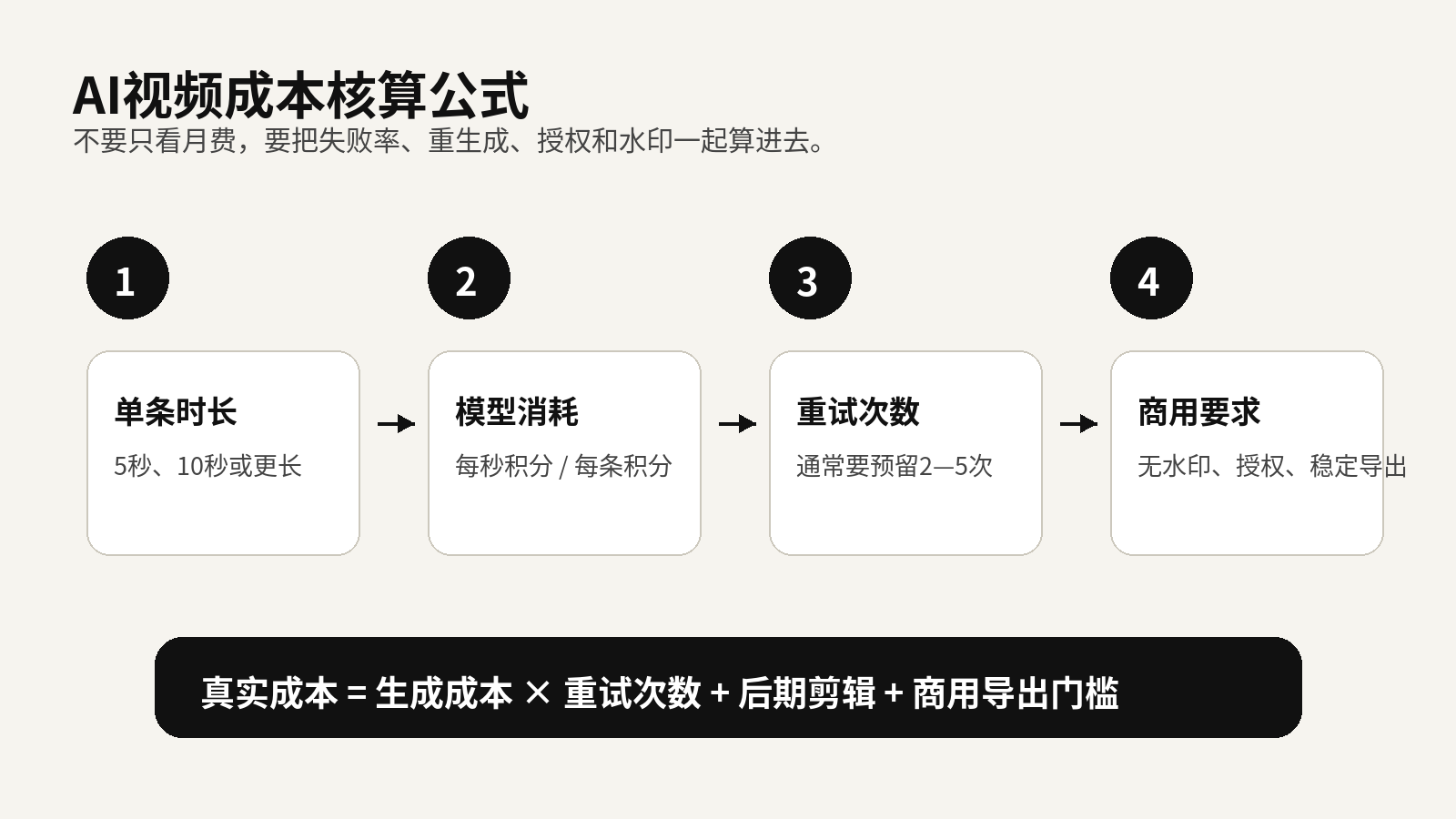
For commercial content, the price of generating a single video is only the visible cost.
The real expense comes when you generate many clips that all look decent, yet none can be used directly in a campaign.
Common issues include:
- The visuals look polished, but product details are incorrect;
- Character movement feels natural, but brand information is unclear;
- The shots look impressive, but there is no conversion logic;
- The export contains a watermark and cannot be used for ads;
- Lower-tier plans do not provide clear commercial-use rights;
- The video is watchable, but the aspect ratio, subtitle area, or cover frame does not fit the platform.
For commercial AI video, it is better to divide the workflow into three stages.
Stage One: Test Scripts and Storyboards
Start by testing multiple visual directions in Megick Studio.
The point is not to create a fully polished final video. It is to confirm:
- Whether the product value proposition is clear;
- Whether the character setup feels believable;
- Whether the camera movement makes sense;
- Whether the cover image creates enough desire to click;
- Whether the concept is worth developing further.
Filter out weak directions before entering the expensive stage.
Stage Two: Concentrate Budget on Core Shots
Do not spread your budget evenly across every idea.
Select the three to five shots with the strongest conversion potential from the testing stage, then generate them with higher-quality models. For advertising creatives, the shots truly worth spending on are often limited to a few key moments:
- The hook in the first three seconds;
- Product detail close-ups;
- The usage result;
- The emotional memory point;
- The closing brand shot.
AI video is not a one-click final-video tool. It is closer to an asset production tool.
Once you have one strong hero shot, turning it into multiple versions and testing different titles, subtitles, openings, and calls to action is usually far more cost-effective than creating ten completely different videos from scratch.
Stage Three: Edit Multiple Ad Versions
The same asset set can usually be cut into at least three directions:
- A benefit-driven version;
- An emotional atmosphere version;
- A product-detail version.
5. For Teams Producing AI Video, Do Not Mix Web Subscription Costs with API Costs
Many teams compare web subscriptions and API costs as though they are the same thing. They are not.
Web subscriptions are better suited to manual creation, shot testing, and smaller content volumes.
APIs are better suited to batch production, automated generation, system integration, and content matrices.
When a team evaluates API costs, it should consider at least four variables.
1. Model Pricing or Credit Consumption
Do not only look at the monthly package.
Convert the cost into:
- Cost per video;
- Cost per second of video;
- Cost per usable shot;
- Cost per publishable final video.
2. Duration and Resolution
Five-second, ten-second, and fifteen-second videos, as well as 720p, 1080p, and higher resolutions, are usually not priced linearly.
Some models are cheap during low-resolution testing, but credit consumption rises significantly when you move to high-spec delivery.
3. Concurrency, Failed Retries, and Queue Times
When teams create content in batches, the real efficiency question is not how long one video takes to generate. It is what happens when fifty videos are launched at once: success rate, queue time, and retry behavior.
If failed retries are not recorded, it becomes difficult to know what a project actually cost.
4. Whether the Entire Workflow Needs Automation
Teams rarely need video generation alone.
They usually also need:
- Product image generation;
- First frames and storyboards;
- Subtitles;
- Voiceovers;
- Cover images;
- Format adaptation;
- Video editing;
- Asset archiving.
If you focus only on the price of one video model, it is easy to underestimate the true cost of content production.
A more practical approach is:
- Use lower-cost models to test directions at scale;
- Use higher-quality models for key shots;
- Edit, subtitle, and design covers in a unified workflow;
- Track generation count, usable-output rate, and cost per final video by project.
Megick is more valuable as a front-end creative entry point: it helps users test directions, screen shots, and evaluate results before locking budget into a single expensive model or subscription.
6. The Most Cost-Effective Way to Choose in 2026: Select by Need, Not by Hype
1. You Only Want to Try AI Video
Starting with free credits is enough.
Test prompt behavior, visual stability, character consistency, and export quality first. Do not buy an annual plan simply because someone else made a cool-looking video.
Megick.com can serve as the early-stage entry point for testing image-to-video, text-to-video, and advertising short-video concepts.
The priority is not “making one complete video.” It is figuring out what type of content you are actually suited to create.
2. You Create Xiaohongshu, Douyin, or TikTok Short Videos
A lower-entry paid plan is usually more appropriate.
This kind of content needs consistent publishing, not cinematic quality in every post. Focus on how many videos you can produce reliably each month, not how cheap a single generation appears to be.
You can use Megick Studio for cover images, storyboard frames, and early video drafts, then send the better-performing directions into higher-quality production.
3. You Create E-Commerce Product Videos
Do not chase visual spectacle alone.
The product cannot distort, the value proposition must be clear, and every shot needs to support conversion.
A more reliable combination is:
Product image generation for storyboards + AI video generation + manual editing
Do not calculate your budget based on “how many generations were made.” Calculate it based on “how many final videos are actually ready to publish.”
4. You Create Paid Advertising Assets
Prioritize watermark-free exports, commercial rights, and stable delivery.
One ad creative often requires multiple rounds of regeneration, multiple edit versions, and different opening tests. The actual cost will likely be higher than the headline price shown on the homepage.
A better approach is to test creative directions inside Megick Studio first, then focus your budget on the scripts and shots with the most potential.
5. You Are a Team or Agency Producing at Scale
Do not rely on only one tool.
A more reasonable structure is:
Low-cost experimentation layer + high-quality production layer + API automation layer
For every project, track:
- Generation count;
- Success rate;
- Usable-output rate;
- Reasons for rework;
- Cost per final video;
- Final campaign performance.
After a few projects, most teams discover that the real savings do not come from the cheapest plan. They come from reducing wasted generations.
7. Before You Subscribe or Add Credits, Confirm These Eight Things
Before subscribing or topping up, check each item carefully.
| Checkpoint | Why It Matters |
|---|---|
| Whether free credits are available | Used to test style and usable-output rate |
| Whether commercial use is allowed | Essential for ads, e-commerce, and brand content |
| Whether there is a watermark | Directly affects publishing and advertising |
| How many credits a 10-second video consumes | Determines the true cost per video |
| Whether 1080p costs extra | HD exports are usually more expensive |
| Whether failed generations consume credits | Affects your maximum budget |
| Whether credits expire | Prevents unused credits from being wasted |
| Whether extra credits can be purchased separately | Prevents projects from being blocked by plan limits |
There is another commonly overlooked issue:
Can generated videos be downloaded reliably, stored long-term, and edited again later?
If asset retention is too short, or export formats do not fit downstream editing, the workflow will create additional costs later.
8. Final Recommendation: Test First, Pay Small, Then Scale
AI video generation in 2026 has clearly entered a tiered pricing stage.
Free tools are suitable for testing directions.
Lower-cost plans work well for regular content updates.
Higher-cost plans are better for reliable commercial delivery.
APIs are more suitable for scalable production.
For most creators and businesses, the more cost-effective path is not going all in from day one. It is:
First, use Megick.com or Megick Studio to test shots, scripts, and visual directions at a lower cost; Then use the right tools to produce HD final videos; Finally, decide whether to upgrade plans or integrate APIs based on usable-output rate and business results.
The key to controlling AI video costs is not saving a few dollars on a monthly subscription.
It is reducing wasted generations, increasing the hit rate of usable final videos, and spending budget on assets that can truly be published, used in campaigns, converted into results, and reused again.