Megick · June 30, 2026 · 11 min read
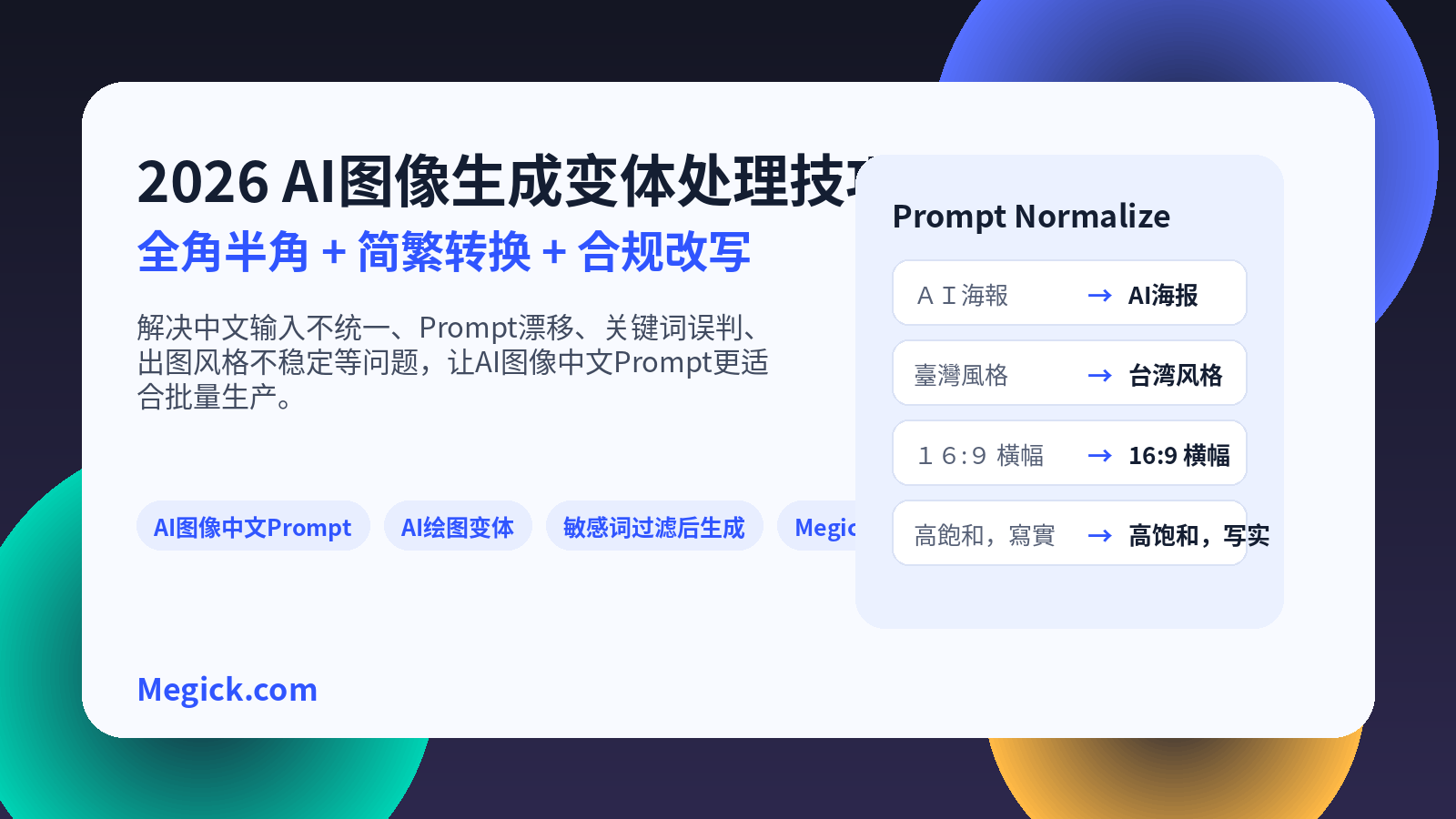
2026 AI Image Generation Variant Handling: Full-Width and Half-Width Characters, Simplified/Traditional Chinese Conversion, and Chinese Prompt Cleanup
2026 AI Image Generation Variant Handling: Full-Width and Half-Width Characters, Simplified/Traditional Chinese Conversion, and Chinese Prompt Cleanup
For Chinese-language users creating AI-generated images, the real challenge is often not knowing how to write a prompt.
It is that the same idea ends up being entered in many different forms.
“16:9海報” and “16:9 海报” look almost identical; “臺灣街景” and “台湾街景” differ only in Traditional versus Simplified Chinese. But once they enter an AI image-generation system, they may affect model interpretation, template matching, keyword moderation, cache hits, and even visual consistency in batch generation.
This matters even more when businesses are creating posters, e-commerce visuals, short-video covers, and branded assets. A small character-level difference in a prompt can carry through to aspect-ratio control, text rendering, moderation outcomes, and the final image.
So in 2026, writing Chinese AI prompts should not be about making sentences longer or more elaborate.
A more practical order is:
Clean the input first, clarify the intent second, then let the model generate.
Full-width and half-width conversion, Simplified and Traditional Chinese conversion, punctuation normalization, synonym consolidation, and compliant rewriting of ambiguous or high-risk phrasing may sound basic. In reality, they are one of the most overlooked layers in batch AI image production.
When experimenting with image and video models on Megick.com, this workflow can become a standard preprocessing step. It is useful not only for AI image generation, but also for extending image prompts into AI video prompts before moving into Megick Studio for image generation, video generation, and downstream asset production.
1. Why Chinese Prompts Need More Variant Handling
English prompts often rely on words, commas, parameters, camera terms, and style keywords.
Chinese prompts are more likely to include conversational phrasing, mixed Simplified and Traditional Chinese, full-width and half-width characters, repeated punctuation, implied meaning, and platform-specific slang.
The following inputs may mean roughly the same thing to a person, but they are received as different strings by a system:
- “AI 海報,16:9,霓虹燈,未來感”
- “AI 海报,16:9,霓虹灯,未来感”
- “AI poster, 16:9, neon light, futuristic”
- “做一张科技感爆款封面,别太 AI”
The first sentence includes full-width English letters, full-width numbers, and Traditional Chinese wording. The second is relatively standard Simplified Chinese. The third switches to English. The fourth is a casual, conversational request.
They may all point to the same visual category, but a model, prompt-enhancement tool, moderation layer, or template system sees four different inputs.
When you only generate an occasional image, the difference may not be obvious.
But when a business needs dozens of covers, hundreds of product images, or thousands of ad creatives, prompts cannot rely on “the model will probably understand.” The less stable the input is, the harder it becomes to reuse the results later.
2. Full-Width and Half-Width Characters: The Most Easily Overlooked Image-Generation Variable
Full-width characters are common in Chinese input-method environments.
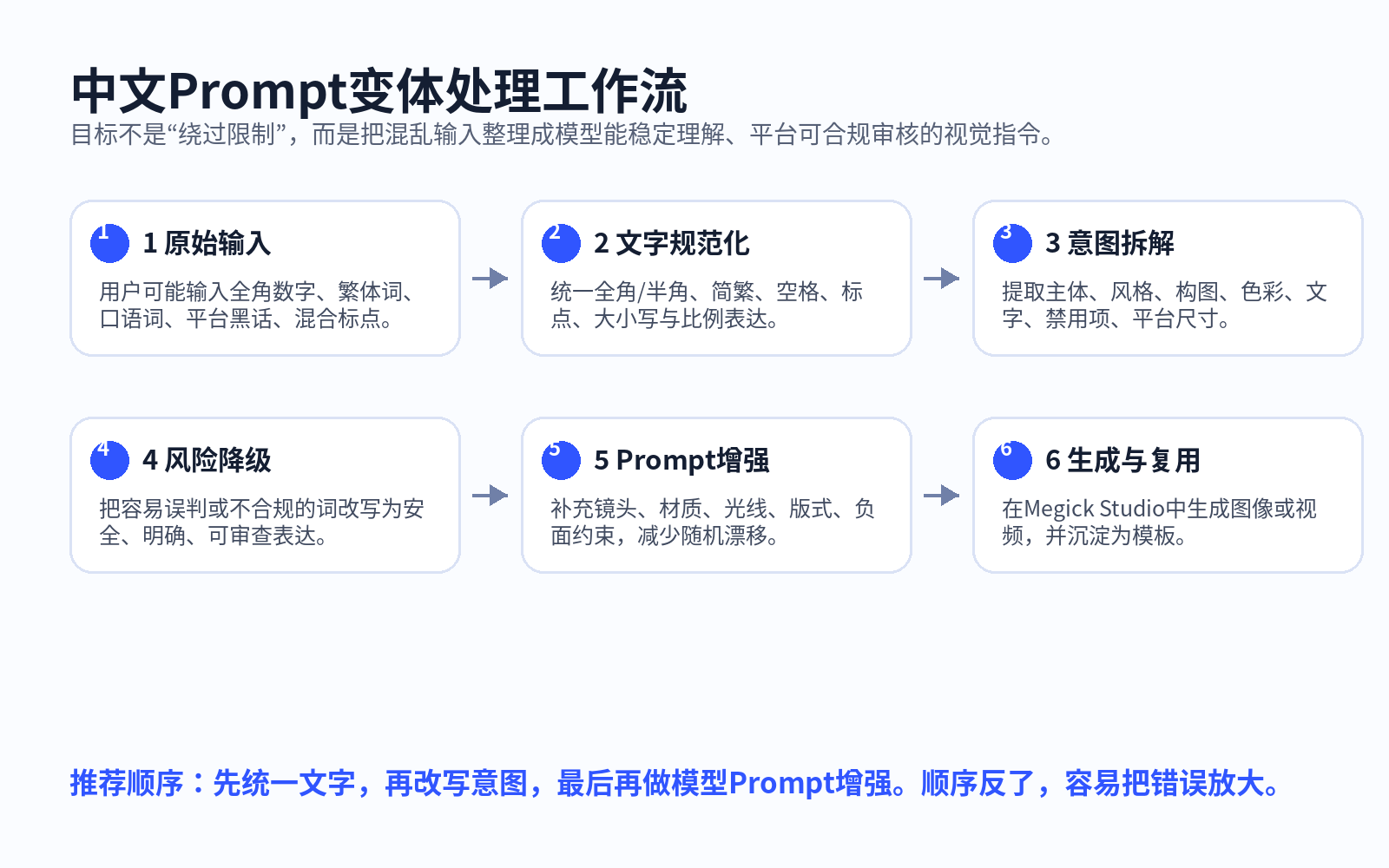
For example, “AI,” “16:9,” and “POSTER” look very similar to their half-width equivalents, but they are not the same characters to a program.
Half-width forms are more stable for English, numbers, and common parameters, such as “AI,” “16:9,” and “poster.”
In AI image-generation workflows, English words, numbers, aspect ratios, model names, brand terms, and file formats should generally be normalized to half-width characters.
For example:
- Normalize “16:9” to “16:9”
- Normalize “AI海报” to “AI 海报”
- Normalize “4K质感” to “4K 质感”
- Normalize “iPhone 17” to “iPhone 17”
- Normalize “PNG透明背景” to “PNG 透明背景”
This is not a matter of typography perfectionism.
Its purpose is to help the system recognize parameters more consistently. Aspect ratios, dimensions, model names, camera parameters, and English style terms can all affect template parsing, variable replacement, or model interpretation when full-width characters are mixed in.
A safer habit is:
- Keep Chinese descriptions in Chinese;
- Use half-width characters for numbers and English words;
- Write aspect ratios, dimensions, camera parameters, and model names in standard formats whenever possible;
- Avoid mixing full-width colons, full-width brackets, and English parameters.
Recommended format:
Subject: An AI tool launch-event poster
Style: Blue-to-purple gradient, technology-focused, clean layout
Composition: 16:9 horizontal banner, negative space on the right for the headline
Text: Title: “AI Image Workflow”
Constraints: No cluttered background, no fabricated brand logos
Not recommended:
做个AI海報,16:9,科技感強一點,不要太亂,像爆款那種
The first version can go directly into Megick Studio for prompt enhancement. The second is better cleaned and structured first.
3. Simplified and Traditional Chinese Conversion: More Than Replacing Characters
Simplified and Traditional Chinese conversion may look like a simple character-form change, but in AI image generation it affects at least two things.
The first is keyword categorization.
“復古海報” and “复古海报,” “霓虹燈” and “霓虹灯,” “臺北” and “台北” can easily be treated as different keywords in batch analysis, template management, and performance review if they are not normalized.
The second is regional expression.
Traditional Chinese is not merely a different visual form of Simplified Chinese. Many words also reflect regional usage habits.
For example:
| Common in Mainland China | Common in Hong Kong, Macau, and Taiwan |
|---|---|
| 视频 | 影片 |
| 信息 | 資訊 |
| 鼠标 | 滑鼠 |
| 软件 | 軟體 |
| 账号 | 帳號 |
| 文件夹 | 資料夾 |
If the target audience is Mainland China, you can standardize on Simplified Chinese and Mainland terminology.
If your content is aimed at Hong Kong, Macau, Taiwan, or overseas Chinese-language audiences, you can retain Traditional Chinese wording and explicitly specify “use Traditional Chinese” in the text-rendering requirement.
A more practical approach is to handle Simplified and Traditional Chinese in two layers.
The first layer handles the characters themselves.
For example, normalize “復古” to “复古.”
The second layer handles regional language context.
Whether “影片” should become “视频,” or whether “資訊图表” should become “信息图表,” depends on the intended publication channel.
If the goal is only to make model interpretation more stable, it is usually practical to standardize first on “Simplified Chinese + half-width parameters.”
If you need a final asset for Traditional Chinese markets, switch the text layer to Traditional Chinese at the final stage and state it explicitly:
Text: Use Traditional Chinese. Title: “AI 繪圖 Prompt 變體處理”
4. AI Image Variant Handling Is Not Character Replacement. It Is Requirement Restructuring.
Effective variant handling is not finished once you replace “臺” with “台” or “16” with “16.”
The more important task is turning a messy request into a structure the model can execute consistently.
A useful format is the “five-part prompt”:
Subject: What should appear in the image
Scene: Where it happens, when it happens, and the atmosphere
Style: Photorealistic, illustration, 3D, e-commerce, minimalist, cyberpunk, Chinese-inspired, and so on
Composition: Aspect ratio, camera, subject placement, negative space, depth of field
Constraints: What to avoid, how to handle text, and how brand elements should appear
For example, a user’s original request may be:
搞个小红书封面,AI 绘图教程,别太 AI,简洁,高级一点,繁体也可以
After cleanup, it can become:
Subject: A Xiaohongshu cover for an AI image-generation tutorial
Scene: A tablet on a desk displaying an image-generation interface, with a stylus and color swatches nearby
Style: Clean and technology-focused, with subtle paper texture and soft lighting; avoid overly sharp plastic-like surfaces
Composition: 3:4 vertical format, headline area in the upper third, main subject in the lower-middle area
Text: Use Simplified Chinese. Title: “AI 绘图 Prompt 变体处理”
Constraints: No cluttered background, no exaggerated neon, no unreadable text
To make a Traditional Chinese version, only replace the text layer:
Text: Use Traditional Chinese. Title: “AI 繪圖 Prompt 變體處理”
This makes it easier to generate the same visual theme consistently in multiple formats:
- Simplified Chinese version;
- Traditional Chinese version;
- Horizontal website banner;
- Vertical short-video cover;
- E-commerce main image;
- Video opening frame;
- Social-feed creative.
5. How to Continue Generating After Sensitive-Term Filtering
Many teams encounter this situation.
The user’s input may not necessarily violate a policy, but the phrasing may be vague, overly intense, full of platform slang, or include terms with multiple meanings that trigger sensitive-term filtering.
The correct response is not to bypass moderation.
It is to rewrite the original creative intent into visual language that is clearer, safer, and easier to review.
A key principle is:
The right approach after sensitive-term filtering is compliant rewriting, not attempts to evade safety review.
For example, if a user wants a visually impactful poster, there is no need to rely on aggressive wording that could be misunderstood. It can be rewritten as:
High-contrast visuals, strong motion, radial composition, prominent headline area
If a user wants a sense of pressure or tension, it can be rewritten as:
Suspenseful atmosphere, low-key lighting, cool tones, subjects maintaining a safe distance, no harmful imagery
If a user wants an exaggerated promotional visual, it can be rewritten as:
Large price information, red promotional labels, clear offer hierarchy, seasonal marketing atmosphere
Businesses using AI image generation can create an internal “risk term → visual expression” glossary.
The goal is not to work around the platform. It is to turn vague requests into executable creative language. That reduces unnecessary false positives and helps results better match the real marketing objective.
6. A Chinese Prompt Cleanup Workflow for Megick Studio
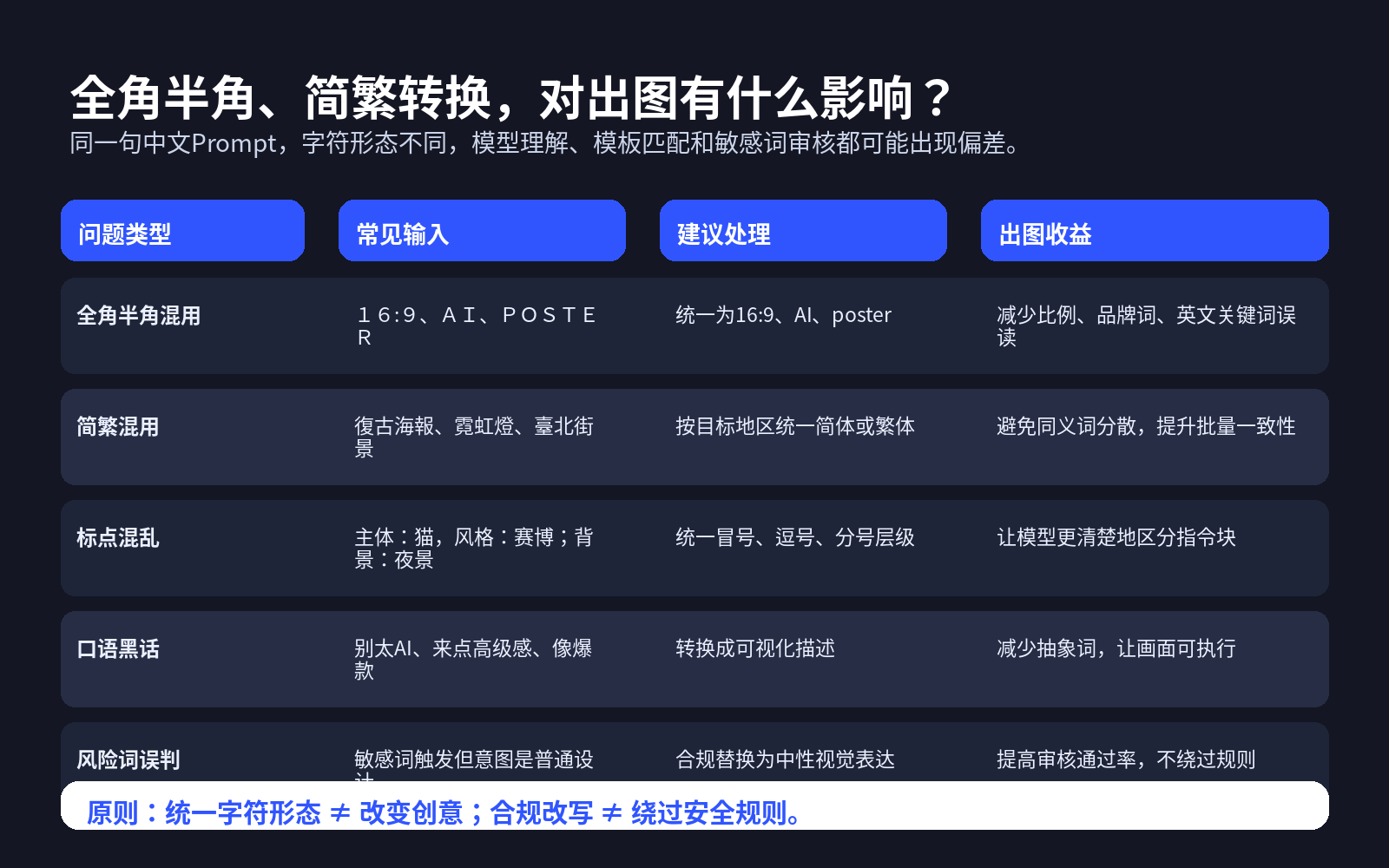
When experimenting with image or video models on Megick.com, prompt processing can be divided into four steps.
1. Clean the Character Layer First
Normalize full-width English letters, full-width numbers, and full-width symbols into half-width forms.
Remove unnecessary spaces, repeated punctuation, and garbled symbols. Convert “16:9,” “1:1,” and “3:4” into “16:9,” “1:1,” and “3:4.”
The goal at this stage is simple: keep parameter formatting consistent.
2. Normalize the Language Layer
Choose Simplified or Traditional Chinese based on the target market.
For Mainland China e-commerce, corporate websites, and Chinese SEO article visuals, Simplified Chinese is usually the better default.
For Hong Kong, Macau, Taiwan, or overseas Chinese-language advertising, use Traditional Chinese consistently and explicitly state “use Traditional Chinese” in the text requirement.
Do not allow four variations such as “復古,” “复古,” “復古風,” and “复古风” to coexist in the same template set. A system may understand them, but they are inconvenient for team-level management and analysis.
3. Break One Sentence into a Structure
Split a user’s sentence into subject, scene, style, composition, text, color, and constraints.
Do not force all information into one long sentence. The clearer the structure, the easier it is for Megick Studio’s prompt enhancement to supplement camera direction, lighting, materials, layout, and motion details.
For example:
Subject: Smart office software product poster
Scene: Abstract office desktop with an AI assistant interface
Style: Modern technology aesthetic, deep blue and blue-purple gradient
Composition: 16:9 horizontal format, headline area on the left, product interface on the right
Text: Simplified Chinese title: “Bring AI Into Your Workflow”
Constraints: No cluttered code, no fabricated third-party brand logos, no dense small text
4. Apply Compliant Rewriting at the End
If an expression is likely to be misunderstood, do not simply remove the user’s intent. Replace it with neutral visual language.
For example:
| Original Expression | Clearer Visual Expression |
|---|---|
| Aggressive | High visual impact, high-contrast composition |
| Explosive | High-energy composition, strong-motion visuals |
| Borderline suggestive | Fashion-editorial feel, appropriate styling, professional pose |
| Extremely intense | Strong emotional tension, clear visual focus |
| Black-tech vibe | Futuristic interface, luminous data streams, minimalist UI |
Once these four steps are complete, moving into AI image generation or AI video generation will usually produce much more stable results.
7. Chinese Prompt Variant-Handling Template
The following template can be placed directly into an internal team workflow.
[Original Request]
User input: {original user prompt}

[Character Normalization]
- Convert full-width English letters to half-width
- Convert full-width numbers to half-width
- Standardize aspect ratios as 16:9 / 1:1 / 3:4 / 9:16
- Remove repeated punctuation and meaningless symbols

[Language Normalization]
Target market: {Mainland China / Hong Kong, Macau, and Taiwan / Overseas Chinese-speaking market}
Writing system: {Simplified Chinese / Traditional Chinese}
Regional terminology: {视频 / 影片}, {信息 / 資訊}, {鼠标 / 滑鼠}

[Intent Breakdown]
Subject:
Scene:
Style:
Composition:
Text:
Color:
Constraints:

[Compliant Rewriting]
Replace potentially ambiguous or easily misunderstood words with clear visual expressions without changing the user’s genuine creative objective.

[Final Prompt]
Output one Chinese prompt suitable for AI image generation. Retain necessary English parameters and avoid overly abstract language.
The purpose of this template is not to make prompts look more formal.
It is to make the same requirement reliably reusable across team members, models, and projects.
8. Practical Examples for Different Scenarios
Example One: E-Commerce Main Image
Original input:
做一张耳机主图,賽博風,8K,文字要炸裂,促銷感強
Processed version:
Subject: An e-commerce main image for wireless earbuds, with the product centered and clear metallic and matte textures
Scene: Dark technology background with localized neon lighting, clean composition, no clutter
Style: Cyberpunk technology aesthetic, premium commercial photography, 4K-level detail
Composition: 1:1 square format, product centered, reserved title area at the top
Text: Title: “Limited-Time Offer,” using large, clear Chinese text
Constraints: No cluttered background, no unreadable text, no exaggerated distortion, no fabricated brand logos
“Explosive” is not simply removed. It is decomposed into large text, promotional labels, high contrast, and clearer information hierarchy.
Example Two: Xiaohongshu Cover
Original input:
AI繪圖教程封面,3:4,繁體,別太AI,高級感
Processed version:
Subject: A Xiaohongshu-style cover for an AI image-generation tutorial
Scene: Light-colored desk, tablet displaying an image-generation interface, color swatches and a stylus nearby
Style: Clean and soft, subtle paper texture, reduced plastic-like surface quality
Composition: 3:4 vertical format, negative space at the top for the headline, main subject in the lower area
Text: Use Traditional Chinese. Title: “AI 繪圖 Prompt 技巧”
Constraints: Avoid oversharpening, high-saturation neon, and unreadable text
This preserves the Traditional Chinese requirement while standardizing the aspect ratio, structure, and visual language.
Example Three: Corporate Website Banner
Original input:
公司官网 banner,AI Agent,未來感,16:9,中文標題也要
Processed version:
Subject: A corporate website banner for an AI Agent product
Scene: Abstract data streams, an intelligent assistant interface, and semi-transparent card-based UI elements
Style: Modern technology aesthetic, blue-to-purple gradient, clean business visual language
Composition: 16:9 horizontal banner, title and button area on the left, AI system visualization on the right
Text: Use Simplified Chinese. Title: “Bring AI Agents Into Your Business Workflow”
Constraints: No real third-party brand logos, no cluttered code, no dense small text
For enterprise banners, negative space, information hierarchy, and text readability are usually more important than filling the entire composition with technology motifs.
9. From Image Generation to Video Generation: The Same Prompt System Can Be Reused
Many teams begin with AI images and naturally move into AI video later.
A tutorial cover can become a 15-second short video. A product main image can become an e-commerce advertisement. A website banner can become a product-launch video.
That is why prompt variant handling should account for video expression from the beginning.
In an image prompt, you can preserve information such as:
- Camera direction: front-facing, top-down, low angle, eye level;
- Movement direction: slow push-in, gentle orbit, left-to-right slide;
- Visual layers: foreground product, midground person, background UI;
- Subtitle space: negative space at the top, right-side space, bottom subtitle bar;
- Brand elements: corner marks, primary colors, end-card identity.
For example, a static-image prompt can include:
Composition: The product is positioned on the right, with headline space on the left. Eye-level camera angle, semi-transparent technology UI in the background, clear visual layering.
When converting it into a video prompt later, you can continue with:
Keep the product appearance, primary brand colors, and image composition unchanged. Move the camera slowly from left to right. Add subtle motion to the background UI, natural highlights along the product edges, and preserve the negative space in the left title area.
In Megick Studio, you can first use AI image generation to establish the key visual, then turn the same structured prompt into a video prompt for Megick.com’s video-generation workflow.
This is more stable—and much more suitable for batch production—than writing one set of prompts for images and then starting over from scratch for video.
10. Conclusion: Clean First, Enhance Second, Generate Third
AI image generation in 2026 is not only a competition in model capability. It is also a competition in input quality, workflow stability, and asset reusability.
Full-width and half-width conversion solves character consistency.
Simplified and Traditional Chinese conversion solves consistency at the semantic entry point.
AI image variant handling solves consistency in batch production.
Compliant rewriting after sensitive-term filtering balances creative expression with platform rules.
For individual creators, this workflow reduces repeated trial-and-error generation.
For enterprise teams, it helps turn prompts from personal experience into a standardized process that can be handed over, reused, and scaled.
Especially on AI image- and video-generation platforms such as Megick Studio and Megick.com, cleaning Chinese prompts before prompt enhancement, image generation, video generation, and template reuse can significantly improve overall efficiency.
The most important line to remember is:
Do not rush to generate. First turn the prompt into language the model can genuinely understand.
References
- Unicode Standard Annex #15: Unicode normalization forms, including compatibility decomposition and NFKC-related guidance.
- OpenCC: An open-source tool for Simplified/Traditional Chinese conversion and regional terminology conversion.
- Qwen-Image official introduction: Complex Chinese and English text rendering, image editing, and prompt-following capabilities.
- 2026 AI image prompt-writing resources: Structured prompts typically include subject, style, composition, and constraints.