Megick · June 30, 2026 · 15 min read
2026 AI Image Generation Speed Comparison: Who Is the Real Efficiency Champion?
2026 AI Image Generation Speed Comparison: Who Is the Real Efficiency Champion?
If you only look at “how many seconds it takes to generate one image,” AI image generation speed comparisons in 2026 seem straightforward: fewer inference steps and faster response times mean a higher ranking.
But that is not how real commercial production works.
Advertising teams care about whether they can generate dozens of creative directions in an hour. E-commerce teams care more about whether the main image, lifestyle image, and product-detail visuals for the same item can remain consistent. Content teams want an image to become a short video, a talking-head background, or campaign creative after it is generated.
If one image is three seconds faster but requires thirty minutes of rework afterward, it is not truly efficient.
So this article is not a pure parameter ranking. Instead, it breaks down what AI image-generation speed should really mean in 2026 from the perspective of practical production:
Who generates the first image fastest? Who is best for batch asset production? Who delivers the highest overall production efficiency?
If you are looking for information about “AI image generation speed” or “2026 AI image model comparisons,” this article can serve as a practical framework for selecting tools.
1. The Main Conclusion: The Efficiency Champion Is Not Necessarily the Image-Quality Champion
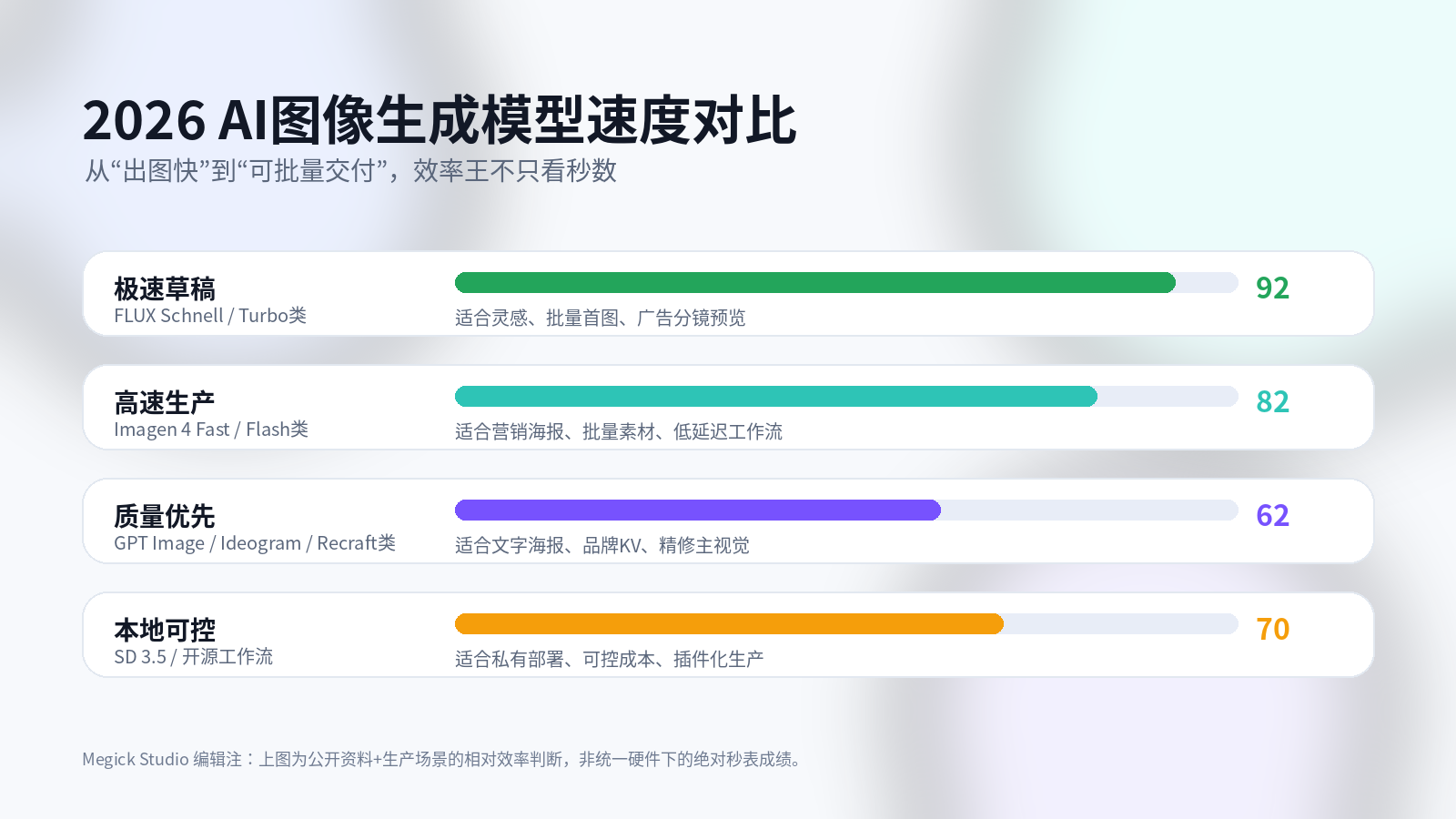
AI image models in 2026 can broadly be divided into four directions.
| Type | Representative Direction | Speed Characteristics | Best-Suited Scenarios |
|---|---|---|---|
| Ultra-fast draft models | FLUX Schnell, Turbo-style models | Few inference steps and rapid first-image feedback | Idea exploration, batch drafts, short-video storyboards |
| High-speed production models | Imagen 4 Fast, Flash-style models | Relatively balanced speed, cost, and stability | Marketing assets, feed ads, e-commerce lifestyle images |
| Quality-first models | GPT Image-style models, Ideogram, Recraft, and similar tools | Individual images may be slower, but usable-output rates are higher | Brand posters, text-heavy key visuals, refined ad images |
| Local and controllable models | Stable Diffusion 3.5, open-source workflows | Depends on GPU performance and workflow optimization | Private deployment, cost control, plugin-based production |
If your only goal is to see the first image as quickly as possible, ultra-fast draft models clearly have an advantage. For example, public documentation for FLUX.1 Schnell highlights its distilled generation process, which can create images in one to four steps and is naturally suited to rapid creative exploration.
But if the goal is publishable material, speed cannot be measured only by the first image.
You also need to consider:
- How many prompt revisions are required;
- Whether people, products, and text remain stable;
- Whether assets in the same batch can maintain a consistent style;
- Whether local edits are convenient;
- Whether the image can later be extended into video or advertising variations.
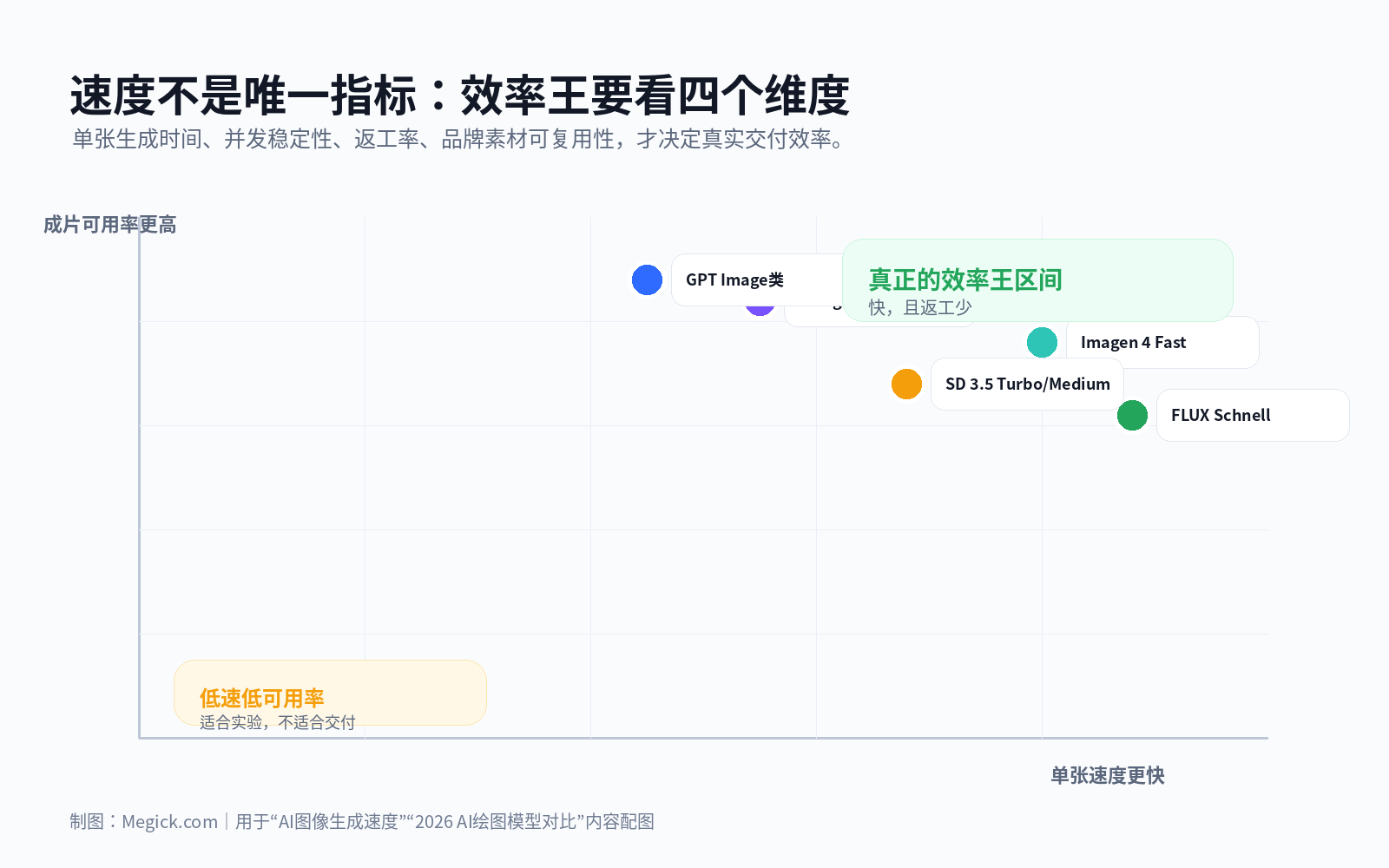
From this perspective, truly efficient tools are not necessarily the fastest in one metric. They are the tools that can deliver “fast enough generation, less rework, and continued production potential.”
That is also why Megick Studio emphasizes multi-model collaboration. Use fast models to open up creative directions, use higher-quality models for refinement, then extend the key visual into brand advertising video. This is far more practical than asking one model to handle the entire process from start to finish.
2. Why Has Image-Generation Speed Become So Important in 2026?
In the past, when people asked about AI image generation, their main concerns were whether an image looked good, whether it resembled the subject, and whether the hands were generated correctly.
By 2026, the questions have changed.
A brand may create more than one feed advertisement every day. A cross-border e-commerce SKU may need dozens of main images, lifestyle visuals, and product-detail images. A short-video account may test dozens of covers in a single day.
AI image-generation speed is no longer just a user-experience issue. It has become a content-supply-chain issue.
Slow generation creates three direct costs.
First, there is the cost of creative experimentation.
Every time designers wait for an image, their train of thought is interrupted. Instead of testing ten visual directions in sequence, they may only manage three or four.
Second, there is the cost of batch production.
A few extra seconds per image may seem insignificant, but when the task grows to two hundred assets, the total delay becomes substantial.
Third, there is the cost of rework.
If a model fails to understand the brand tone, product angle, or poster text on the first attempt, even the fastest generation speed will be offset by later revisions.
So, to judge whether an AI image model is truly efficient, you need to evaluate at least four factors:
- First-image speed;
- First-pass usability;
- Batch consistency;
- Follow-up editing and extension capabilities.
3. The First Tier of Speed: Fast Models Are Best for Exploring Directions
Among publicly available tools, lightweight-step models such as FLUX Schnell are impossible to ignore in discussions about speed.
Their value is not that every image can be delivered immediately. Their value is that they can rapidly open up a wide range of creative possibilities.
These models are especially suitable for three types of tasks.
1. Advertising Creative Drafts
Generate twenty different compositions first and see which visual hook is strongest.
For the same product, you can quickly test minimalist studio photography, lifestyle settings, holiday atmospheres, character-use scenarios, and high-contrast visual directions. First determine which direction feels promising, then refine it later.
2. Short-Video Storyboard Previews
Generate shot sketches first, then decide whether it is worth moving into video generation.
For people creating AI video, this step matters. Whether an image can become a usable shot depends on whether the subject is clear, whether the composition leaves enough space, and whether the scene provides room for motion.
3. E-Commerce Scene Exploration
Rapidly test different environments such as kitchens, outdoor settings, office desks, travel scenes, and holiday promotions.
These models can quickly help you find the setting where a product looks most appealing, but they may not be ideal for final hero images.
The limitations of fast models are also obvious.
When you need complex text, consistent characters, accurate product structures, fixed brand colors, and high-quality layout control, ultra-fast models often require more selection and post-processing.
That is why their best position is not final delivery. It is early creative exploration.
In Megick Studio, these models can be treated as creative accelerators: generate directions in batches first, then send the strongest options into more reliable quality-focused models for refinement. This preserves speed without making the final delivery dependent on randomness.
4. High-Speed Production Models: The Practical Middle Ground Marketing Teams Need
Models such as Imagen 4 Fast represent another direction.
They do not sacrifice image quality as aggressively in exchange for speed. Instead, they aim to find a balance between speed, pricing, and stability that better fits commercial production.
Google DeepMind’s public introduction to Imagen 4 mentions a fast mode that can reach up to ten times the speed of the previous generation, while supporting image generation at resolutions up to 2K. For marketing teams, this positioning matters because it is not designed only for technical demos. It is built for high-frequency production tasks.
High-speed production models are generally suitable for:
- Feed-ad key visuals;
- Xiaohongshu, TikTok, and Reels covers;
- E-commerce campaign assets;
- Holiday promotion posters;
- Brand social-media images;
- Batch marketing visual variations.
Their strength is scalability.
If a team needs to produce a large volume of marketing assets every day, this kind of model is often more suitable as a primary engine than a purely quality-first model.
But it is not a universal solution.
When dealing with brand fonts, complex Chinese typography, strict product structure, or consistent layouts, you still need stronger prompts, reference images, local editing, and human review.
This is why Megick.com’s workflow should not focus on just one model. A more practical marketing process is to generate static images in batches first, then turn them into brand advertising videos so one key visual can become multiple campaign-ready video assets.
Tutorials are available here:
5. Quality-First Models: Slower Generation Can Still Save Time
Many people misjudge quality-focused models.
They see that a single image takes longer to generate and assume the model is unsuitable for production.
But in real advertising projects, a slightly slower model may actually complete delivery faster.
The key is usability.
One model may generate an image in ten seconds, but only one out of ten images is usable. Another may take thirty seconds per image, but three out of five images are usable. In commercial delivery, the second model may be far more efficient.
Quality-first models are better suited for:
- Brand key visuals;
- Posters that require clear text;
- Advertising images where product structure cannot be wrong;
- Series images where people, pets, or products need to remain consistent;
- Core visuals that will later connect to video generation.
OpenAI’s public introduction to 4o image generation emphasizes text rendering, prompt adherence, and contextual understanding. Ideogram 3.0’s official introduction places readable text, photorealistic images, and style control at the center of its capabilities.
These strengths may not make a single image the fastest, but they can significantly reduce rework.
That is why quality-focused models are better positioned in the second half of a workflow. Once the direction is confirmed, use them for final visuals, refined text, and stronger brand consistency.
6. Local and Controllable Models: Not Always the Fastest, but Better for Long-Term Cost Reduction
Stable Diffusion 3.5 represents another kind of efficiency: local deployment and controllable workflows.
When Stability AI released Stable Diffusion 3.5, it highlighted efficient performance on consumer hardware, particularly through directions such as Medium and Large Turbo.
The advantage of this category is not that it is the fastest out of the box. Its strength is that it can be optimized through engineering.
For businesses and technical teams, local and controllable models offer three practical benefits.
First, costs are easier to control.
For high-frequency generation, local or private deployment can reduce long-term API costs. This becomes especially meaningful when teams need large numbers of asset variations or ongoing batch-generation tasks.
Second, data is easier to control.
Unreleased products, client visual assets, and internal materials may not be suitable for direct upload to external platforms. Local models can reduce these concerns.
Third, workflows are more flexible.
ControlNet, LoRA, inpainting, reference images, and batch-processing scripts can all be assembled into a production workflow that fits the team’s needs.
Of course, this route also has a higher barrier to entry.
GPU hardware, deployment, parameter tuning, node maintenance, and workflow optimization all require time. For marketing teams that simply want to create advertising assets quickly, integrated platforms such as Megick Studio are usually more convenient.
7. Stop Asking “Which Model Is Fastest?” Ask “Which Production Chain Is Fastest?”
A mature AI image-production workflow is not one model doing everything from beginning to end. It is a complete chain.
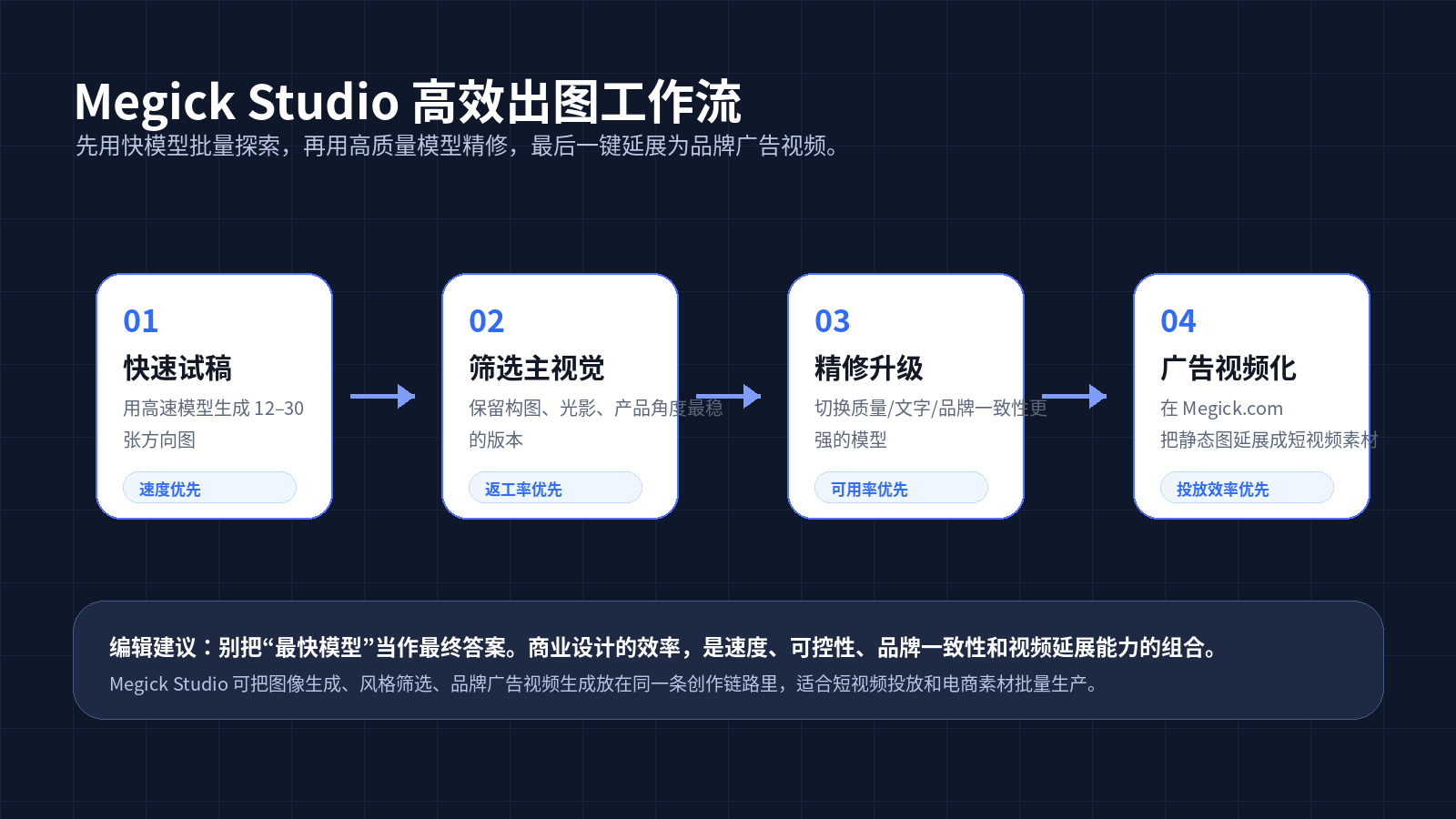
A practical high-efficiency workflow for 2026 can follow this sequence.
Step One: Use Fast Models for Batch Draft Exploration
Do not chase the final result yet.
Focus on composition, angles, scenes, character states, and emotional direction. Generate multiple versions at once to open up the creative space.
Step Two: Select the Images with the Strongest Commercial Potential
Do not choose only the image that looks the most beautiful.
Also consider:
- Does it create enough visual impact to earn a click?
- Is the product prominent enough?
- Is the main subject clear?
- Can it be cropped easily?
- Does it have potential for video extension?
- Does it fit the brand tone?
Step Three: Switch to Quality Models for Refinement
Strengthen the text, brand colors, product details, character consistency, and poster structure.
The goal at this stage is not to continue experimenting randomly. It is to turn a promising direction into a deliverable asset.
Step Four: Continue into Brand Advertising Video
Static images are only the beginning of the asset lifecycle.
Real marketing efficiency means turning one image into short videos, covers, feed ads, and multi-platform content.
This is also where Megick Studio is especially useful: instead of switching endlessly between separate tools, teams can keep AI image generation, AI video generation, and brand-ad asset production within one creative workflow.
8. How Should Different Users Choose?
1. Designers: Prioritize “Fast Models + Refinement Models”
Designers should not spend most of their time waiting for the first batch of rough concepts.
Use high-speed models to explore directions first, then use stronger models to create the final visual quality. This usually matches real design workflows more closely.
A practical allocation looks like this:
- Draft stage: prioritize speed;
- Proposal stage: prioritize composition and visual style;
- Delivery stage: prioritize brand consistency and detail quality.
2. E-Commerce Teams: Prioritize Batch Consistency
The biggest risk in e-commerce creative is not slow generation. It is product distortion, color shifts, and inconsistent materials.
Single-image speed is not the most important metric. Batch consistency is.
A practical workflow is:
- Lock in a product reference image;
- Test environments in batches;
- Select the versions best suited for hero images, product-detail pages, and ad creatives.
If product visuals are unstable from the beginning, creating videos, A+ pages, and advertising assets later becomes increasingly difficult.
3. Short-Video Teams: Prioritize Image-to-Video Continuity
Short-video teams should not generate attractive static images only.
They also need to consider whether an image can become a shot, support camera movement, or serve as the first frame of an advertising video.
On Megick.com, teams can generate a brand key visual first and then continue into brand advertising video. This is more suitable for performance-marketing scenarios than generating static images alone.
4. Developers: Prioritize API Latency, Concurrency, and Cost
Developers should not rely only on model marketing pages.
When launching a product, they also need to evaluate:
- API latency;
- Failure rates;
- Concurrency limits;
- Pricing;
- Queue times;
- Output consistency;
- Stability during traffic peaks.
At minimum, run three test groups:
- First-image generation speed at 512 or 1024 resolution;
- Average generation time for batches of twenty to one hundred images;
- Usable-output rate across repeated generations using the same prompt.
These numbers are far closer to real business performance than a general statement such as “this model generates images in a few seconds.”
9. A Practical Testing Method for Your Own Model Comparison
If you are preparing a “2026 AI image model comparison,” do not test every model with only one prompt.
A better approach is to design five categories of tasks.
| Test Item | What It Tests | Why It Matters |
|---|---|---|
| Single-subject product image | Product structure and materials | Essential for e-commerce hero images |
| Multi-person scene | Character consistency and composition | Common in advertising visuals |
| Chinese poster | Text readability | Critical for Chinese-language markets |
| Brand-color scene | Style control | Important for consistent brand visuals |
| Image-to-video first frame | Follow-up extension capability | Essential for short-video campaigns |
Generate at least twenty images per model, then record:
- Average generation time;
- First-pass usability;
- Number of revision rounds;
- Whether manual retouching is required;
- Whether the result can be extended into video;
- Stability under batch tasks.
The result will be much closer to real production needs than simply asking, “Which model is the fastest?”
10. Final Conclusion: Who Is the Real Efficiency Champion?
The answer becomes clearer when viewed through different dimensions.
| Evaluation Dimension | Direction Most Likely to Lead | Editorial Assessment |
|---|---|---|
| First-image speed | FLUX Schnell, Turbo-style models | Best for rapid exploration, not always suitable for final output |
| Batch marketing production | Imagen 4 Fast, Flash-style models | Better balance of speed, cost, and quality |
| Text-heavy posters | Ideogram, GPT Image-style models | May be slower per image, but require less rework |
| Private deployment | Stable Diffusion 3.5, open-source workflows | Better for long-term cost reduction in technical teams |
| Commercial delivery efficiency | Multi-model workflows | Closest to the real production answer |
So, if there must be one conclusion:
The real AI image-generation efficiency champion in 2026 is not one specific model. It is a complete workflow of “fast draft exploration + high-quality refinement + video extension.”
Single-model speed only solves the problem of “seeing an image faster.”
Megick Studio aims to solve a broader problem: producing brand assets faster that can be launched, reused, and extended into advertising videos.
That is the real shift in AI image generation after it enters commercial production in 2026.
Conclusion: Speed Is Only the Beginning. Deliverability Is the Goal.
AI image generation will continue to get faster, but brand-content production will not automatically become easier.
The more models there are, the more complex selection becomes. The faster generation gets, the easier it becomes for experimentation to spiral out of control. Experienced teams treat different models as different workstations within a production line:
Some are responsible for speed, some for accuracy, some for fine details, and some for video extension.
If you only want to experiment with images, choosing the fastest model may be enough.
But if you are creating brand advertising, e-commerce assets, short-video campaigns, and growth content, a better question is:
Can this image become an ad, a set of posters, and a video asset package after it is generated?
This is where Megick.com is better suited to commercial creators. It does not focus only on generating one image. It places AI image generation, AI video generation, and brand advertising-asset production into a more complete workflow.
From 2026 onward, AI image-generation efficiency is no longer a stopwatch competition. It is a competition in content-production pipelines.
References
- Black Forest Labs / Hugging Face: FLUX.1 Schnell model documentation, noting its rapid generation capability in one to four steps.
- Google DeepMind: Imagen 4 model introduction, mentioning fast mode and support for resolutions up to 2K.
- Google Developers Blog: Imagen 4 Fast materials describing rapid generation and high-frequency task use cases.
- Stability AI: Stable Diffusion 3.5 release materials, highlighting consumer-hardware efficiency and customizable workflows.
- OpenAI: 4o image-generation introduction, emphasizing text rendering, prompt adherence, and contextual understanding.
- Ideogram: Ideogram 3.0 official introduction, emphasizing readable text, photorealistic images, and style control.
- Artificial Analysis: Image Model Comparisons, providing entry points for comparing image-model quality, generation time, and pricing.