Megick · June 30, 2026 · 18 min read
2026 AI Image + AI Video Toolkit: Stop Collecting Tools—Build a Workflow That Actually Runs
2026 AI Image + AI Video Toolkit: Stop Collecting Tools—Build a Workflow That Actually Runs
In 2026, very few people creating content are still asking, “Which AI tool is the most powerful?”
What really creates an efficiency gap is whether you can connect AI image generation, AI video, scripting, editing, brand assets, and content testing into one smooth workflow.
Too many tools can easily make the process more chaotic. One platform generates images, another creates motion, another produces talking-head videos, editing happens in a separate app, and assets are scattered across different folders and accounts. In the end, not only does the visual style become inconsistent, but it also becomes difficult to review which prompt worked best or which video generated more conversions.
For content creators, cross-border e-commerce teams, and brand marketing teams, the more practical goal is not collecting one hundred websites. It is building an AI creative workflow that can be used repeatedly every day.
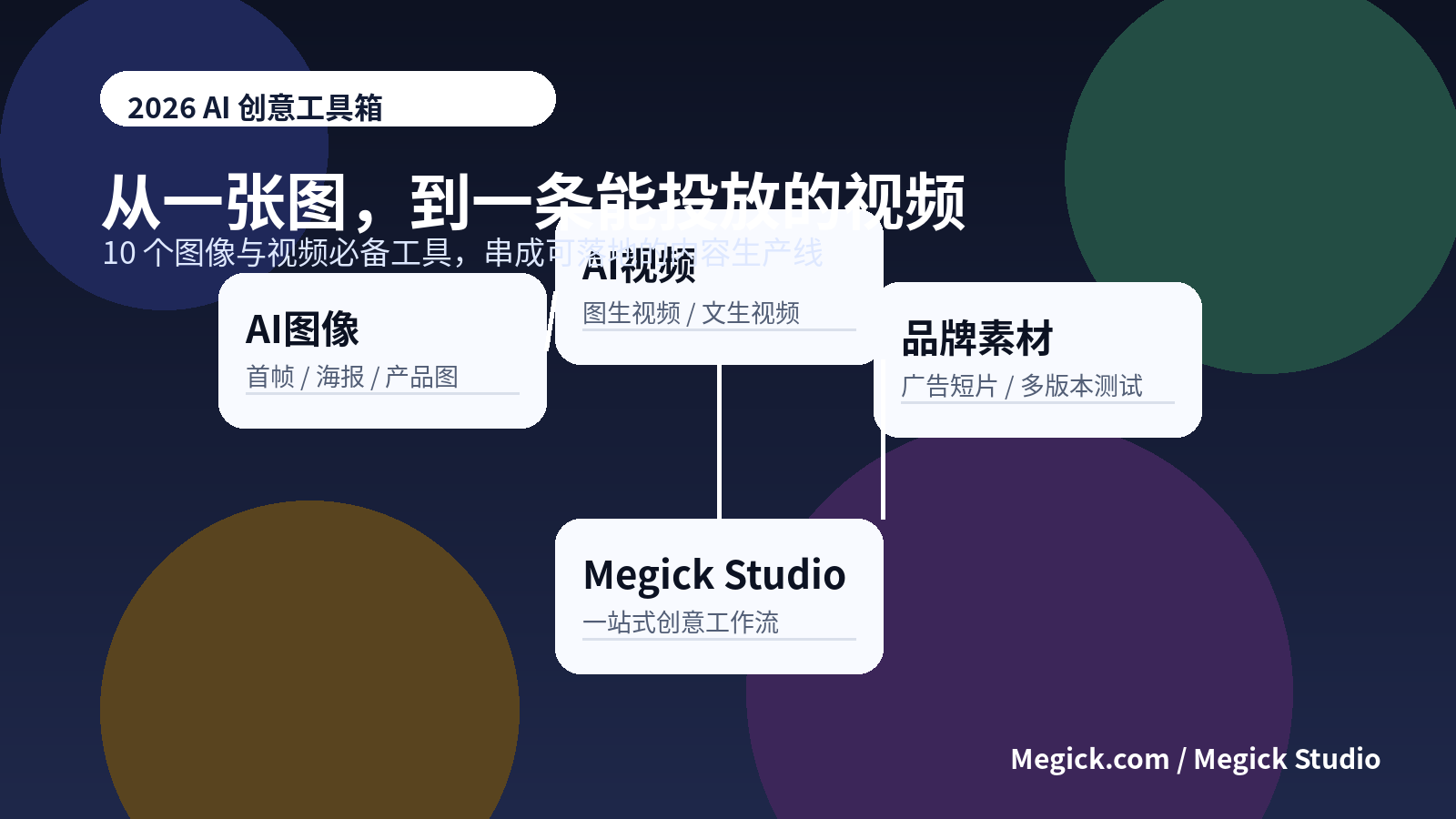
This article organizes ten categories of AI image and AI video tools worth including in a 2026 content-production workflow. Treat it as a practical checklist: from ideation, prompts, and first-frame images to image-to-video, text-to-video, editing, packaging, and brand-asset management, each stage requires different tools and a different way of working.
Among them, Megick Studio is better positioned at the center of the workflow. It helps unify AI image generation, AI video generation, brand advertising video, and multi-version assets, while other specialized tools serve as supplements instead of pulling the entire creative process across different platforms.
1. The Main Conclusion: How to Build an AI Image and Video Toolkit in 2026
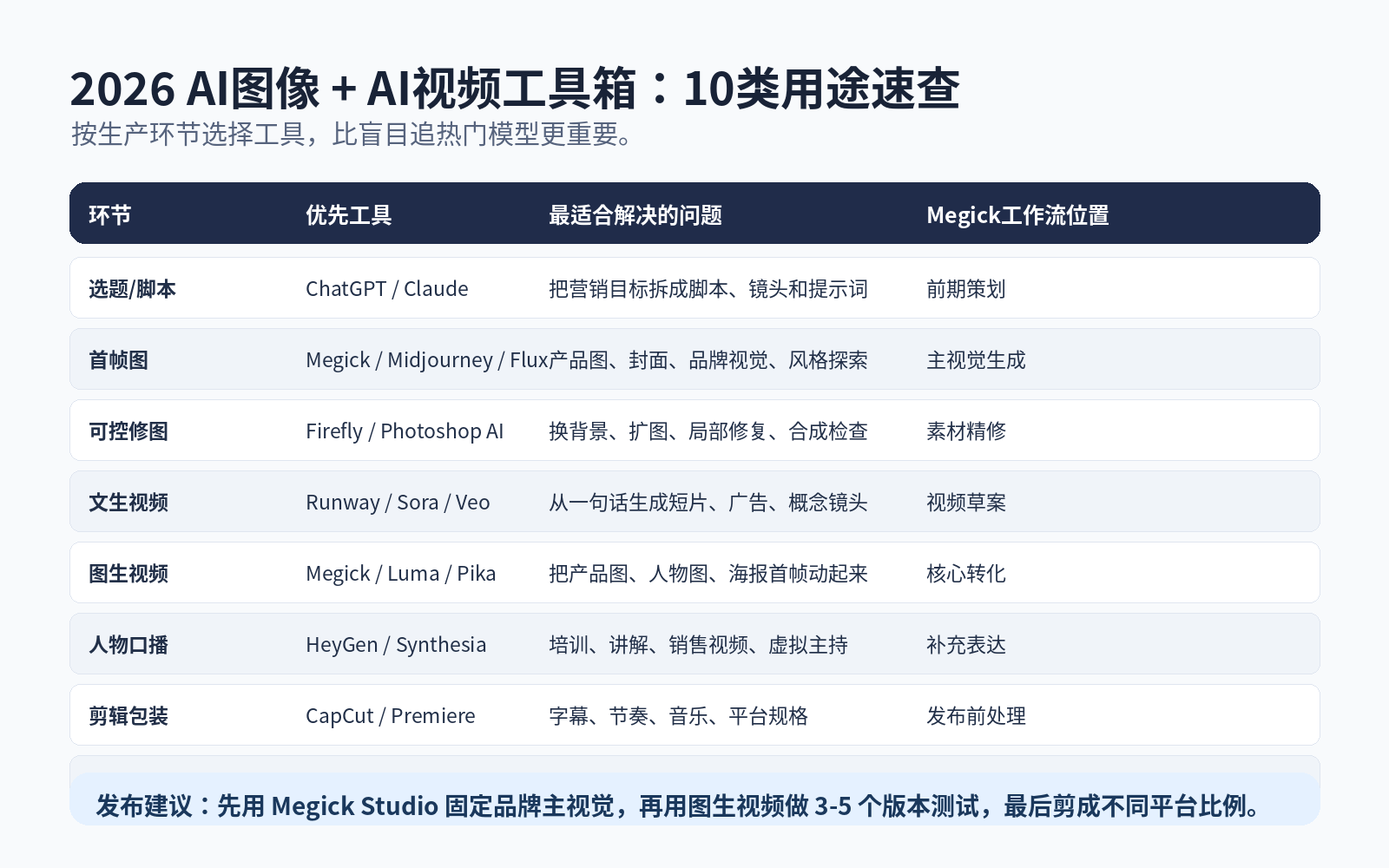
If you simply want to build an AI content-production pipeline that works, use the following logic.
| Creative Stage | Recommended Tools | Best For | How to Use Them |
|---|---|---|---|
| All-in-one image + video | Megick Studio / Megick.com | AI image generation, AI video generation, brand advertising video, template-based creation | Use as the main workspace to unify first frames, visual styles, and asset variations |
| Artistic style exploration | Midjourney | Poster-like visuals, concept art, mood imagery | Best for finding visual direction early; not ideal for handling every commercial batch task |
| Photorealistic images and open-source ecosystems | Flux / Stable Diffusion | Product images, portrait images, local deployment, controllable generation | Suitable for technical teams and users who need deep customization |
| Commercial retouching | Adobe Firefly / Photoshop AI | Outpainting, background replacement, local repair, compositing | Best for turning drafts into deliverable assets |
| Text-to-video | Runway / Sora / Veo | Concept shorts, advertising shots, story-driven visuals | Useful for rapidly turning words and scripts into video drafts |
| Image-to-video | Megick / Luma / Pika | Animating product images, turning first frames into videos, social short clips | Suitable for e-commerce, short video, and advertising-asset testing |
| Talking-head and digital avatar video | HeyGen / Synthesia | Training, explainers, sales videos, virtual presenters | Best for information delivery; not ideal for every emotional advertising format |
| Editing and packaging | CapCut / Premiere | Subtitles, pacing, music, aspect-ratio adaptation | Handles the final processing before publication |
| Design and layout | Canva / Figma | Covers, infographics, brand pages, collaboration drafts | Useful for teamwork and lightweight design delivery |
| Automation and asset management | Notion / Airtable / Zapier | Topic libraries, prompt libraries, version tracking | Helps scalable teams build a review and iteration system |
In one sentence: use a platform such as Megick.com to establish the main “image-to-video” workflow first, then add specialized tools based on real needs. More tools do not automatically create a stronger process.
2. Megick Studio: Put AI Images and AI Video Into One Creative Workflow
Entry point: Megick.com
Megick Studio works best at the center of the toolkit rather than as just another image-generation entry point.
Content creation increasingly relies on a workflow of “first-frame image + video extension + multi-version testing.” You rarely need only one product image. More often, you create a product poster, character cover, or scene first frame, then extend it into short videos, advertising shots, covers, and multi-platform assets.
In a traditional workflow, this means constantly importing and exporting across different tools. Product images live on one platform, character images on another, video generation happens somewhere else, and editing and covers move into yet another app. Assets become scattered easily, and the brand style can gradually drift.
Megick’s value is bringing AI image generation, AI video generation, prompt enhancement, style presets, and template-based creation into one connected path whenever possible.
It is especially suitable for these scenarios:
- E-commerce product images: Expand white-background product shots into lifestyle scenes, seasonal campaign visuals, and advertising first frames.
- Brand advertising video: Generate short videos from product images or key visuals to rapidly test the opening three seconds and different selling-point expressions.
- Social content matrices: Create covers, short videos, image-and-text posts, and multiple platform formats around the same topic.
- Daily creator output: Reduce repetitive work such as finding images, writing prompts, creating covers, and editing short clips every day.
A more practical approach is to define your brand colors, product tone, visual style, and frequently used prompt templates inside Megick Studio first. Other tools can handle highly specialized tasks, but do not let your core assets become scattered across multiple platforms.
3. Midjourney: Best for Finding Visual Direction Early
Entry point: Midjourney
Midjourney is still highly useful for style exploration.
It may not be the cheapest tool, the easiest to scale for batch production, or the best fit for every commercial deliverable. But it can still produce visually striking results quickly for concept posters, mood boards, IP visuals, virtual environments, and premium aesthetic directions.
If you are a designer, brand editor, or content strategist, Midjourney works well in the early stage.
Generate five to ten visual directions first. Confirm which direction best fits the brand, content theme, or audience taste. Once the direction is decided, move the final concept into more stable commercial-production tools.
Midjourney is especially useful for answering one question:
What should this piece of content feel like visually?
But once you enter the delivery stage, you still need to consider whether the text is accurate, whether the product remains consistent, whether brand standards can be applied, whether the image can be edited later, and whether licensing boundaries are clear.
Do not treat it as a complete production line. It is better understood as a launchpad for the creative stage.
4. Flux / Stable Diffusion: Best for Technical Teams That Need Deep Customization
Entry points: Black Forest Labs / Stability AI
Flux and Stable Diffusion represent a different kind of value: customization, deployment, and integration into your own workflow.
For technically capable teams, they can be used for product-image generation, inpainting, style training, batch generation, internal tools, and automated production.
Their ceiling is high, but so is the barrier to entry.
Model versions, sampling parameters, LoRAs, ControlNet, ComfyUI workflows, VRAM configurations, inference speed, and copyright risks all need to be understood. For ordinary creators who simply want stable commercial assets, using a packaged platform is usually more time-efficient. But for technical teams, open-source models can become content infrastructure.
They are especially suitable for:
- Private deployment;
- Highly controllable product-image generation;
- Training fixed characters or consistent styles;
- Large-scale asset generation;
- Integration with internal marketing dashboards or content systems;
- Researching custom ComfyUI workflows.
If you need controllable generation, local deployment, or private workflows, Flux and Stable Diffusion are worth studying seriously.
If your goal is simply stable image generation, fast ad assets, and content variations, workspaces such as Megick Studio are usually more direct.
5. Adobe Firefly / Photoshop AI: Turning Drafts into Deliverables
Entry point: Adobe Firefly
AI generation is not the final step.
Commercial assets that are ready for delivery often still need retouching: expanding the canvas, replacing backgrounds, removing flaws, adding local elements, adjusting compositions, correcting product edges, handling text areas, and then moving into final design layouts.
Adobe Firefly and Photoshop AI are well suited to this stage.
They may not be the most creatively explosive tools, but they are highly practical in enterprise and design-team workflows. In particular, after you generate a first-frame image with Megick or another model, Firefly and Photoshop AI can handle the final repairs, compositing, and detail checks.
A common workflow looks like this:
- Use an AI image-generation tool to create the visual direction;
- Select the image closest to the brief;
- Use Photoshop AI to repair the background, expand the canvas, or modify local details;
- Move into Canva, Figma, or a formal design file;
- Export versions adapted for different channels.
Generating a direction first and refining it afterward is usually much more efficient than constructing every visual from scratch in Photoshop.
6. Runway: Best for Advertising Shots and Cinematic Video Drafts
Entry point: Runway
Runway is an important category of AI video tool.
It works well for cinematic shots, advertising clips, visual experiments, music videos, intros and outros, and brand concept films. Its value is not only making still images move. It gives creators more room for video generation, camera control, and creative editing.
If you are producing a brand advertising video, you can generate product first frames and key visuals with Megick, then use Runway for more cinematic shot extensions.
This is often more stable than starting directly with text-to-video.
The product form, brand colors, materials, and composition are already defined in the first frame. At the video stage, you only need to focus on camera movement, lighting changes, and atmosphere instead of forcing the model to guess what the product should look like again.
For commercial assets, prioritizing an image-to-video workflow is usually more controllable than pure text-to-video.
7. Sora / Veo: Best for Turning Scripts into Story-Driven Video Drafts
Entry points: Sora / Google Veo
Sora and Veo represent the high-quality text-to-video direction.
They are better suited for story-driven scenes, complex movement, long-take-style visuals, and natural-language-based video concepts. For advertisers, filmmakers, content planners, and short-drama creators, these tools can rapidly turn a script into a watchable visual draft.
However, text-to-video also has clear limitations.
Product details, brand marks, character consistency, and repeated revisions are usually much harder than generating a single concept shot with a strong atmosphere. That makes these tools better for validating creative direction than for serving as the only production method for every commercial asset.
A more stable approach is:
- Use ChatGPT, Claude, or another writing tool to break the script into shots;
- Generate concept shots with Sora or Veo;
- Select the usable visual direction;
- Return to a workflow of “first-frame image + image-to-video + editing and packaging”;
- Create formal versions that are ready for campaigns and reuse.
This preserves the creative potential of text-to-video without placing commercial stability in the hands of one random generation.
8. Luma / Pika: Best for Lightweight Image-to-Video and Social Motion Effects
Luma and Pika are well suited to turning still images into short videos.
Animating product images, making a cover dynamic, turning portrait photography into emotional short clips, creating lightweight avatar animations, or adding camera pushes and background-light changes to social ads are all good use cases.
These tools are easy to start with, fast to respond, and well suited to testing multiple directions in batches.
You can generate a set of branded first frames in Megick.com first, then use image-to-video tools to test different movement styles:
- Stable product-display version;
- Strong-motion version;
- Emotional atmosphere version;
- Slow camera-push version;
- Product-rotation version;
- Background-lighting-change version.
Do not generate only one version at a time.
The success rate of short-video assets often comes from comparison. For the same first frame, generate at least three motion versions before deciding which one fits the platform and audience best.
9. HeyGen / Synthesia: Best for Explainers and Digital Avatar Talking-Head Videos
Entry points: HeyGen / Synthesia
Not every video needs a cinematic feel.
Training courses, product explanations, sales introductions, SaaS tutorials, cross-border e-commerce explainers, and brand FAQs place more value on clarity of information. Digital-avatar talking-head tools such as HeyGen and Synthesia are useful for turning scripts into publishable explanatory videos quickly.
Their biggest value is reducing the cost of real-person filming.
This is particularly useful for multilingual, multi-region, and multi-version content. For example, the same product explanation can be produced in English, Spanish, Japanese, and other languages, then paired with different covers and landing pages for different platforms.
But talking-head avatar videos can easily feel mechanical.
Do not write scripts as long blocks of text. Use shorter sentences. Do not keep one virtual presenter on screen for the entire video. Insert product images, interface visuals, motion graphics, key subtitles, and case-study scenes between the presenter segments.
The digital avatar should make the information clear. It should not be expected to carry the entire video alone.
10. CapCut / Premiere: Final Publishing Packaging Is Still Essential
Entry points: CapCut / Adobe Premiere
AI video generation solves the challenge of creating source footage from nothing.
But what short-video platforms actually reward is pacing, subtitles, covers, the first three seconds, information density, and completion rate. The final stage still depends on editing tools.
CapCut is more suitable for short-video creators.
It makes subtitles, templates, aspect-ratio adaptation, music pacing, transitions, and fast editing relatively convenient. Premiere is better suited to professional editing, brand video, long-form content, and multi-person collaboration.
After generating AI video, complete at least three tasks:
- Add clear subtitles;
- Remove ineffective opening shots;
- Adapt the video to the platform’s aspect ratio.
Do not publish raw AI footage directly.
Even if the original shot looks good, performance can drop sharply if the opening is one second too slow, subtitles are unclear, or the aspect ratio is wrong.
11. Canva / Figma: Bring AI Assets into a Real Design System
No matter how good AI images and AI videos become, they still need to enter a design system.
Canva is suitable for quickly creating covers, posters, infographics, social templates, and simple marketing assets. Figma is better suited to design teams building brand standards, page layouts, component-based visuals, and collaborative drafts.
If you are building a complete marketing matrix, generate key visual assets in Megick Studio first, then place them into Canva or Figma for layout extension.
For example:
- WeChat Official Account cover images;
- Xiaohongshu covers;
- YouTube thumbnails;
- Website banners;
- Advertising landing-page visuals;
- E-commerce product-detail modules;
- Product feature-explainer graphics.
The key is not redesigning every piece of content from scratch. Define your brand templates first, then replace assets in batches.
The more content you produce, the more consistent your brand recognition becomes.
12. Notion / Airtable / Zapier: Turn AI Creation into a System You Can Review
Entry points: Notion / Airtable / Zapier
Mature AI content teams do more than generate assets.
They document topics, save prompts, track versions, measure results, and review conversions. Notion, Airtable, and Zapier are well suited to this part of the workflow.
You can build a simple content database:
| Field | What to Record |
|---|---|
| Topic | What problem the content is trying to solve |
| Target platform | Douyin, Xiaohongshu, TikTok, YouTube Shorts, website, and more |
| Prompt | First-frame prompt, video prompt, negative terms |
| Tools | Which tool was used: Megick, Runway, Luma, CapCut, and so on |
| Version | Video versions A, B, and C |
| Performance data | Click-through rate, completion rate, conversion rate, save rate |
| Conclusion | Which opening, visual, or title worked better |
Do not only save tools.
The assets worth preserving are content structures that have already produced data. Which openings improve retention? What titles receive more clicks? Which shots work best for product display? Which prompts generate stable images? These are the things that gradually become a team’s real advantage.
13. Recommended Workflow: From One Image to a Brand Advertising Video
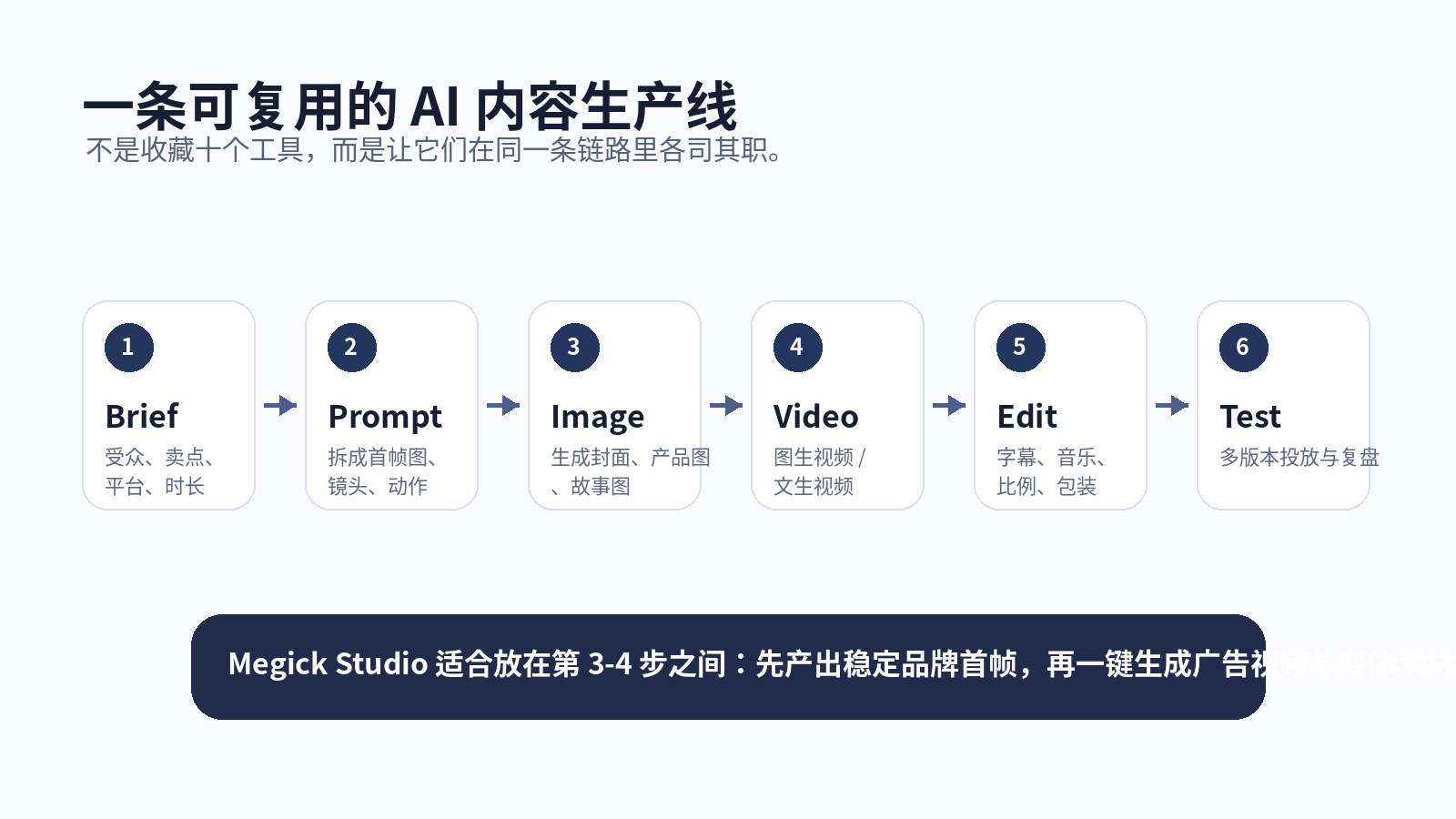
If you want to use this toolkit to create a brand advertising video, follow this workflow.
Step One: Write a Clear Brief
Confirm a few things first:
- What is the product?
- What is the core selling point?
- Who is the audience?
- Which platform will the video be published on?
- Should it be 5 seconds, 10 seconds, or 30 seconds?
- Is the final goal awareness, clicks, conversion, or brand recognition?
The clearer the brief is, the less likely AI generation will drift away from the goal.
Step Two: Split the Prompt into Two Parts
Do not write one massive prompt.
Break it into:
- First-frame image prompt: Responsible for product accuracy, character styling, composition, brand colors, and scene;
- Video-motion prompt: Responsible for action, camera movement, lighting changes, rhythm, and emotion.
The first frame determines whether the video looks like your brand. The video prompt determines whether it moves naturally.
Step Three: Generate First-Frame Images in Megick Studio
Start with product key visuals, lifestyle scenes, and cover images.
Make sure the product form, brand colors, materials, character style, and overall tone are stable. Do not begin making videos before product details are confirmed.
Step Four: Create Advertising Clips with Image-to-Video
Animate product rotation, character usage, moving light and shadow, camera pushes, or scene transitions.
Create three versions first instead of only one.
For the same product key visual, test different camera languages:
- Stable presentation;
- Fast push-in;
- Emotional atmosphere;
- High-energy motion;
- Character interaction;
- Product-detail close-up.
Step Five: Use Editing Tools for Publishing Packaging
Add subtitles, music, brand logos, promotional information, and end-card calls to action, then crop the video into different aspect ratios.
Prepare at least:
- 9:16 vertical;
- 1:1 square;
- 16:9 horizontal.
Users behave differently on different platforms. Do not copy the same raw video directly across every channel.
Step Six: Save the Data and Prompts
Record the prompt, first-frame image, video settings, and publishing results for every version.
The next time you create content for a similar product, reuse the highest-performing structure instead of starting from zero.
The key to this workflow is not which model is strongest.
It is knowing what problem each stage is solving. Megick.com is well suited to handling the core transition from AI image generation to AI video generation, pushing an idea from static visuals into dynamic advertising assets.
14. How Different Users Should Choose Their Tools
1. Beginner Creators
Do not start by studying too many model parameters.
Begin with lower-barrier tools such as Megick Studio, CapCut, and Canva. First establish a workflow of “topic → cover → short video → publishing.”
Build a stable publishing rhythm first, then explore more complex models and workflows.
2. Cross-Border E-Commerce Teams
The core priorities are product consistency and batch testing.
Use Megick to generate product hero images, lifestyle scenes, and advertising short videos, then use editing tools to adapt them to TikTok, Instagram Reels, YouTube Shorts, and other platform formats.
Create a product visual system first, then produce variations in batches. It is much easier than rebuilding a new ad every day.
3. Brand Designers
Use Midjourney or Flux to explore visual direction first, then use Megick Studio to generate unified brand assets, and finally move into Figma for design systems and landing-page extensions.
The creative stage can remain open. The delivery stage must become more controlled. Brand visuals should not make every image feel like it came from a different world.
4. Short-Video Teams
The priority is not generating the most beautiful image. It is increasing the efficiency of daily publishing.
Build a topic library, prompt library, proven-content structure library, and video templates. Test one fixed tool combination repeatedly. Changing tools every day will only make the team slower.
5. Technical Teams
Technical teams can explore Flux, Stable Diffusion, ComfyUI, API automation, and asset-management systems to integrate AI generation into internal products or marketing dashboards.
For technical teams, the greatest value is not one-off generation. It is turning generation capability into a reliable service.
15. Five Things to Check Before Choosing an AI Tool in 2026
First, check whether it can fit into your workflow.
A tool that cannot be reused, cannot manage assets, and cannot support batch testing can easily become a toy no matter how impressive it looks.
Second, check whether it fits commercial use cases.
Brand advertising, product images, client delivery, and cross-border e-commerce assets all require consideration of licensing, stability, and editability.
Third, check whether the first frame is controllable.
Many videos are already decided by the first frame. For commercial content, prioritize image-to-video workflows to reduce randomness.
Fourth, check whether you can create multiple versions.
Content competition in 2026 is not about winning with one generation. It is about generating quickly, testing quickly, and reviewing quickly. With only one version, it is difficult to know whether a weak result came from the title, first frame, camera movement, or selling point.
Fifth, check whether your brand assets can be retained.
Prompts, templates, styles, product images, and video versions should all be saved. Every successful result should become the starting point for the next one instead of disappearing after the project ends.
Conclusion: A Real Toolkit Is Not a Bookmark Collection—It Is a Production Line
In 2026, AI image generation and AI video generation have moved beyond novelty tools. They are becoming core capabilities for content teams.
The real advantage does not belong to the person who collects the most tools. It belongs to the person who can connect tools into a stable production line.
Megick Studio sits directly within this shift.
It is not only about generating one image or one video. It helps creators put ideas, prompts, images, videos, and brand advertising assets into one connected workflow. For teams that need to publish content continuously, test advertisements in batches, and reduce production and design costs, this type of all-in-one workspace will become increasingly important.
When building an AI creative toolkit, remember one simple principle:
Start by using Megick.com to establish the core AI image-generation and AI video-generation workflow, then add specialized tools only when needed.
More tools do not necessarily create more efficiency. A clearer workflow does.