01
Upload the white-background product image
Start with one clean product image that shows the full item. This becomes the identity anchor for the whole suite.

Turn one white-background product image into a complete ecommerce visual suite.
Create editable visual plans first, then generate main images, feature images, lifestyle scenes, and detail-page suites.
Starts from one white-background image
Review and regenerate individual images
For galleries, PDPs, and campaign suites
1
white-background product image to start
3
steps: upload, review plans, generate suite
The suite studio turns the product image, product name, selling points, and language settings into reviewable plans before producing the finished suite.
Start with one clean product image that shows the full item. This becomes the identity anchor for the whole suite.
Add the product name, selling points, audience, materials, language, and whether you need Amazon, Shopify, TikTok Shop, PDP, promo, or category-specific visuals.
Generate editable visual plans first, refine the plan direction when needed, then create the final image suite and download the finished assets.
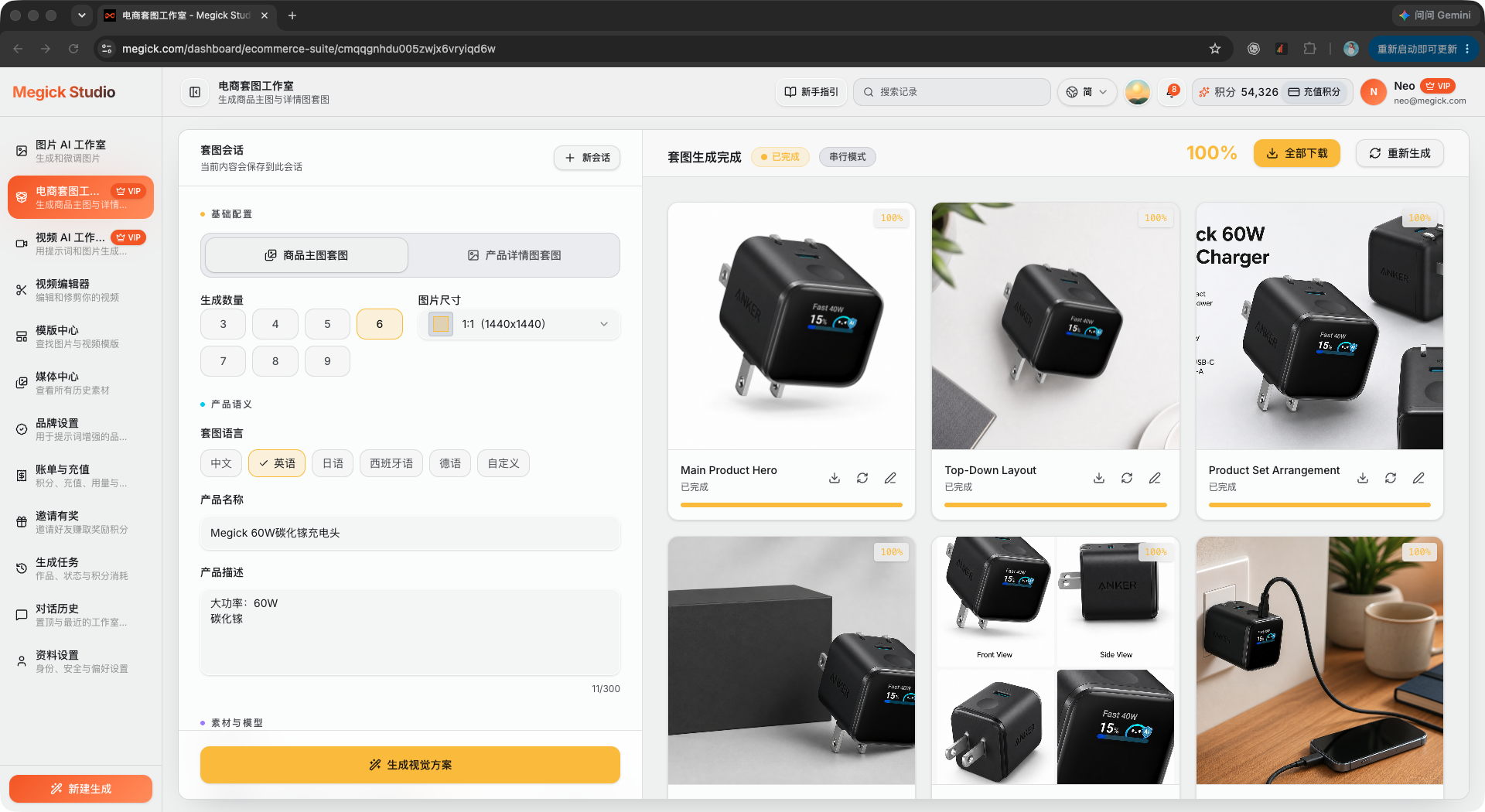
The example shows the real workflow: configure the suite, create visual plans, then generate a full set of product visuals that can be reviewed and regenerated image by image.
Before generation
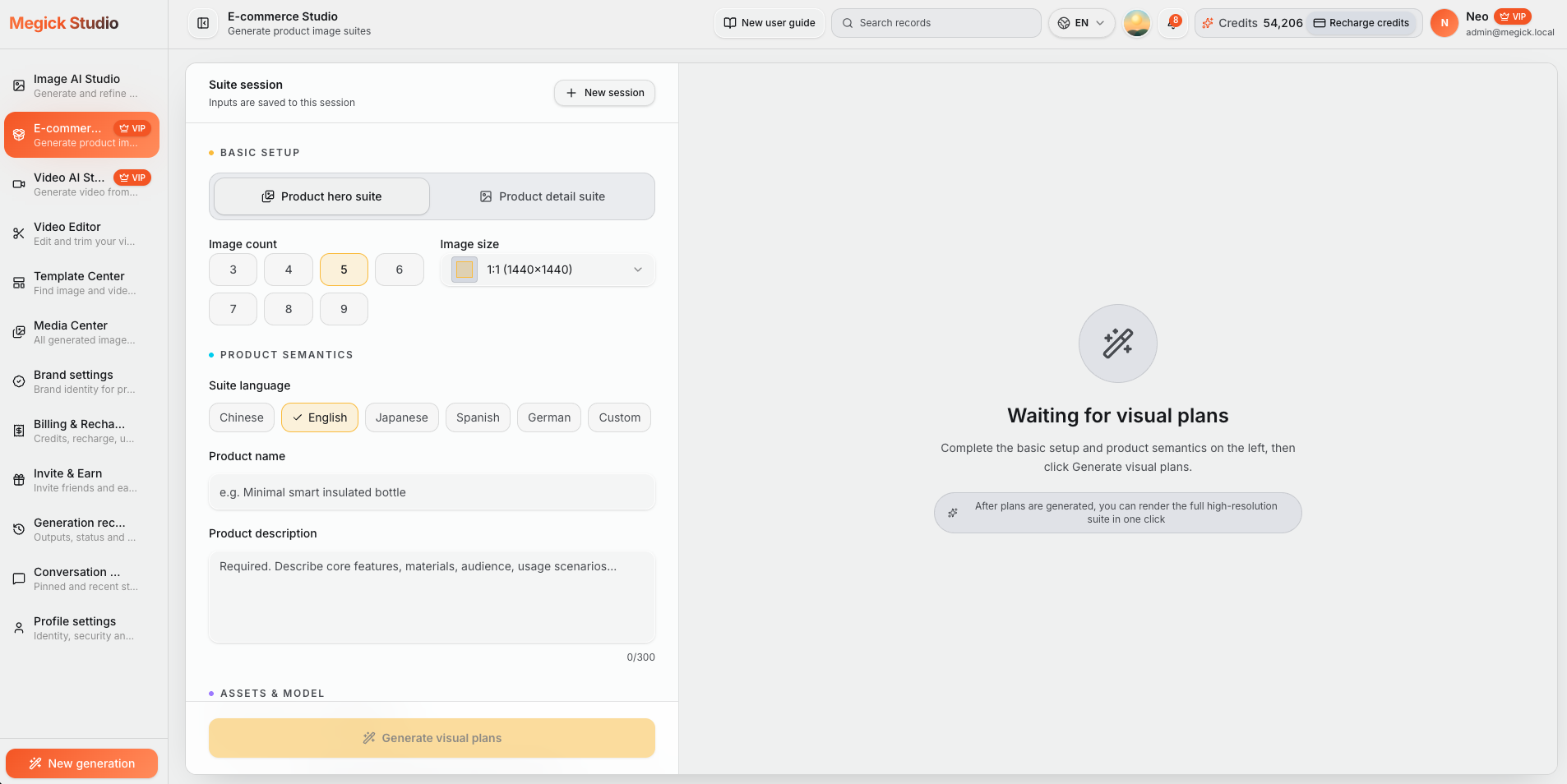
The setup screen shows the default English workflow: choose Product hero suite, set count and 1:1 size, select language, then add product name and description.
After generation
The result can include hero, feature, size, lifestyle, promo, and short-video first-frame images for review and download.
The recording shows the flow from setup and visual planning to final suite generation.
Instead of stuffing channel names into copy, Megick turns Amazon, Shopify, TikTok Shop, category features, and promotions into image tasks that share one product identity.
Plan hero, feature, scale, lifestyle, comparison, accessory, and trust visuals, then extend the same story into A+ modules.
Break selling points into PDP visuals, 3C feature graphics, beauty details, accessory size charts, and home comparison layouts.
Generate social commerce covers, pet product scenes, multilingual promo images, holiday suites, and product short-video first frames.
Use the same white-background product image to prepare the visuals buyers expect across marketplace galleries, brand story modules, product detail pages, social commerce feeds, and seasonal campaigns.
Turn the product into a coherent Amazon 7 image set: hero, feature, scale, usage, comparison, accessory, and trust visuals. Extend the same direction into Amazon A+ brand story modules.
Create Shopify PDP graphics, 3C product feature images, beauty product detail images, accessory size charts, and home product comparison layouts without rebuilding the product identity each time.
Generate TikTok Shop product seeding covers, pet product lifestyle scenes, home usage scenes, and product short-video first frames that still look connected to the main gallery.
Prepare multilingual promo images and holiday marketing suites from the same product story, so a listing, ad, and seasonal campaign do not look like separate shoots.
E-commerce image suite design helps sellers turn one white-background product image and a few selling points into editable visual plans, then use those plans to generate a connected suite of product images for listings, PDPs, social commerce, ads, catalogs, and seasonal campaigns.
Choose by selling context
Explore dedicated workflows, deliverable plans, and pre-publish QA for Amazon, Shopify, TikTok Shop, beauty, and electronics.
It is the process of turning one white-background product image into a coordinated set of listing, PDP, social commerce, promo, and campaign visuals. Megick creates editable plans first, then generates the final images.
It can cover Amazon 7 image suites, Amazon A+ brand stories, Shopify PDP selling-point images, TikTok Shop product covers, 3C feature images, beauty details, pet lifestyle scenes, home comparison visuals, accessory size charts, product short-video first frames, multilingual promos, and holiday campaign suites.
Yes. You can plan and generate Amazon-style hero, feature, scale, comparison, lifestyle, accessory, and brand story images from the same product source.
Yes. Use the same workflow to create Shopify product page benefit visuals and TikTok Shop product seeding covers while keeping the product identity consistent.
Yes. The suite language selector supports Chinese and English, with English selected by default. It also supports Japanese, Spanish, German, and custom language settings.
No. The core workflow starts from one clean white-background product image. Megick creates editable visual plans first, then generates the final product image suite from those plans.
Open the e-commerce suite studio, upload one clean white-background product image, enter product information, generate editable visual plans, create the suite, and download the finished images.
Upload the product image, add the name and selling points, review the visual plans, then generate the listing-ready suite.